이미지 생성
프롬프트에서 정지 이미지를 생성합니다. 편집 또는 비디오 샷의 시작점으로 사용하세요.
시작하기 전에
먼저 프로젝트의 비주얼 스타일과 화면 비율을 선택하세요. 비주얼 스타일을 참조하세요. 선택한 모델의 출력 설정을 확인하고 결과를 검토하세요. 각 생성에는 크레딧이 사용됩니다. 일괄 실행 전에 모델 크레딧 비용을 확인하세요.
단계
먼저 + 버튼을 클릭한 다음 이미지 생성을 클릭합니다:
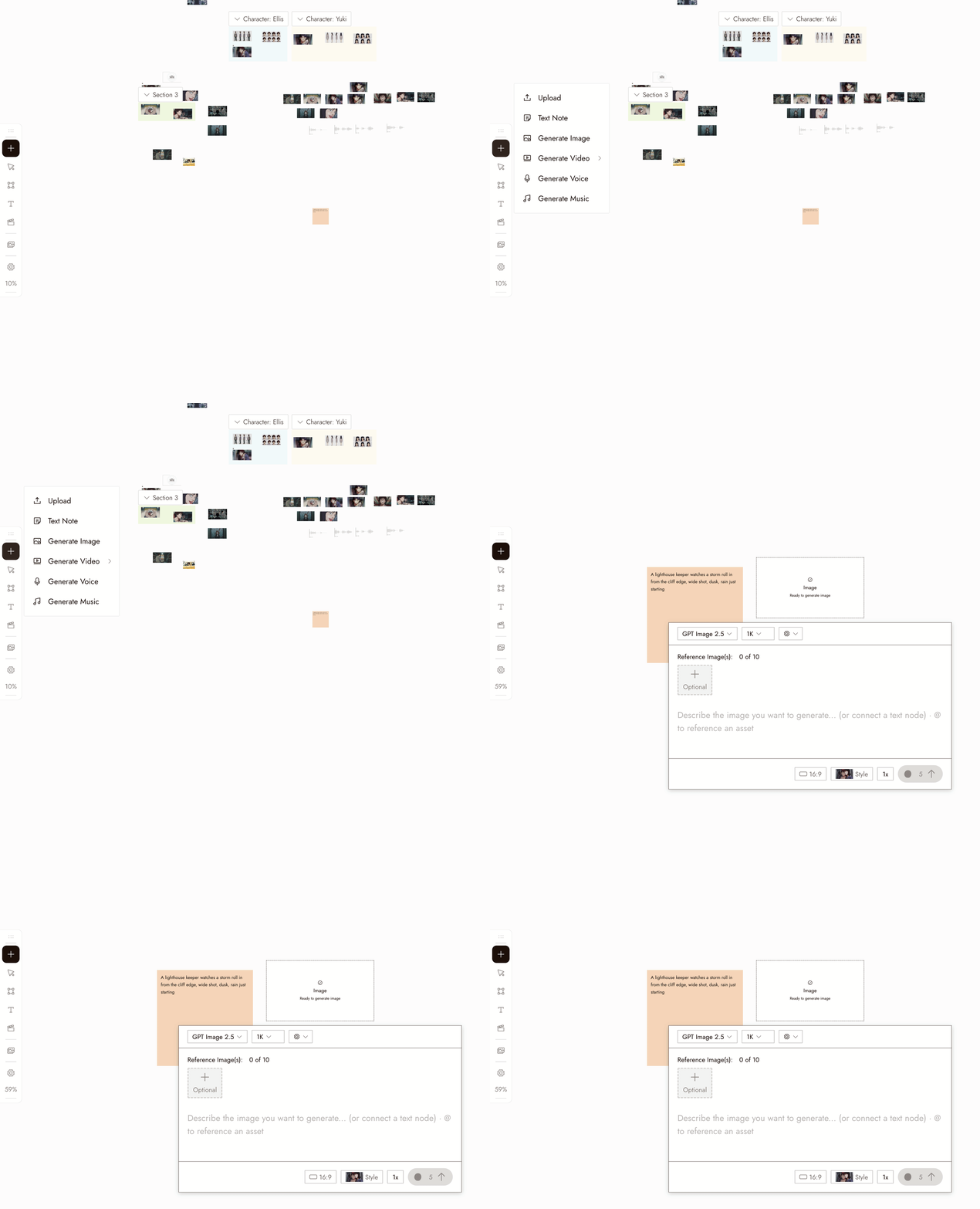
- Select the new image node. Its settings panel opens under it.
- Pick a model in the Model dropdown. Good starting picks for image generation are Nano Banana Pro and GPT Image 2.5. Midjourney is temporarily unavailable and shows greyed out. Models your plan does not include show a lock.
- Write your prompt in the panel. Type @ to reference another asset on the canvas.
- Choose how many images to generate at once with the 1x control if you want several candidates to compare.
- Check the credit cost shown on the Run button, then click it. The image appears as a new node connected to the placeholder.
오른쪽 하단의 채팅 상자에 이미지를 설명하면 에이전트가 자동으로 생성해줍니다.
설정
모델. 선택기에는 플랜에서 사용 가능한 이미지 모델이 나열됩니다. 각각 고유한 장점이 있습니다. 모델을 비교할 때는 동일한 프롬프트를 유지하고 샷에 필요한 것을 기준으로 결과를 판단하세요.
Batch count. Choose how many images to generate. Use batches to compare options for a specific shot.
Style and aspect ratio. The project's style is set at the top of the chat panel, and new generations use the aspect ratio you last chose. Check the selected model's settings; some workflows follow the source image's aspect ratio.
모범 사례
주제를 먼저, 그다음 설정, 마지막으로 구도를 작성하세요. 이미지당 하나의 명확한 주제를 사용하세요.
약함: "많은 일이 벌어지는 멋진 영화 같은 장면."
더 나은 예: "비 온 뒤 텅 빈 역 플랫폼에서 기다리는 겨자색 레인코트를 입은 여성, 와이드 샷, 부드러운 자연광."
충돌하는 스타일 지시는 피하세요. 고정된 스타일을 사용해 외형을 안내하고 프롬프트로 내용을 설명하세요.
약한 예: 스타일이 고정되어 있는데 "…유화, 애니메이션, 사실적" 같은 표현 사용.
더 나은 예: 프롬프트는 내용에 집중하고 프로젝트에 스타일을 한 번만 선택하세요.
먼저 작은 배치를 비교하세요. 명확한 프롬프트를 선택하고 테스트할 내용을 결정하세요.
덜 유용한 예: 모호한 프롬프트로 10개의 이미지 생성.
더 유용한 예: 명확한 프롬프트로 작은 배치를 생성한 뒤, 집중된 변경 하나를 적용.
결과 검토하기
- The subject is clear and there is one of it.
- The framing is the framing you asked for.
- The look matches the project's visual style, not a style the prompt drifted into.
- Check for extra limbs, incorrect object counts, or unreadable text before moving on.
- It would cut next to the other shots in the sequence.
문제가 있어 보인다면
주제가 누락되었거나 잘못되었습니다. 프롬프트에 묻혀 있을 가능성이 높습니다. 첫 단어로 이동하세요.
The look is off. Check the style at the top of the chat panel, then remove any style words from the prompt.
모든 시도가 똑같이 나옵니다. 전체 프롬프트가 아닌 프레이밍이나 조명 같은 한 가지만 변경하세요.
생성 결과가 나타나지 않았습니다. 다시 실행하기 전에 캔버스에서 노드의 상태를 확인하세요. 여전히 작업 중이거나 화면 밖에 있을 수 있습니다.
요청이 차단되었습니다. 메시지를 읽고 프롬프트나 레퍼런스를 수정하세요. 동일한 요청을 계속 제출하지 마세요.
다음 단계
- Edit Image로 마음에 드는 이미지의 한 가지를 변경할 수 있습니다.
- Visual Styles로 전체 프로젝트의 외형을 한 번에 설정할 수 있습니다.
- 세 개의 샷에서 캐릭터 일관성 유지는 동일한 인물이 여러 이미지에 등장해야 할 때 사용합니다.
- AI 캐릭터 일관성: 5가지 방법 비교에서 관련 레퍼런스 기법을 확인하세요.