How credits work
Generating images, video, voice and music uses credits. This page covers what uses them, how failed generations are refunded, and every way to get more.
What uses credits
The cost depends on the model and its settings, such as length and resolution.
- See the cost before you run. The Run button shows the credit cost for your current settings. Check it again after you change the batch size or video settings.
- Compare models in Model Credit Costs.
- See where your credits went. Click your credit balance at the top of the page to open Usage details.
If a generation fails
Credits are held when a generation starts. If it doesn't finish, they're refunded automatically, whatever the reason: an error, a time-out, or a prompt flagged by moderation.
A generation that finishes is charged, even if the result isn't what you wanted.
This is about credits. For refunds of a purchase, see Refund Policy.
Free credits
Every account gets these, on any plan, including Free.
| Credits | Amount | When | Expire |
|---|---|---|---|
| Signup bonus | 100 | Once, when you create your account | Never |
| Weekly credits | 100 | Every Monday, 00:01 UTC | The next Monday, 00:00 UTC |
| Discord reward | 200 | Once, when you claim it | Never |
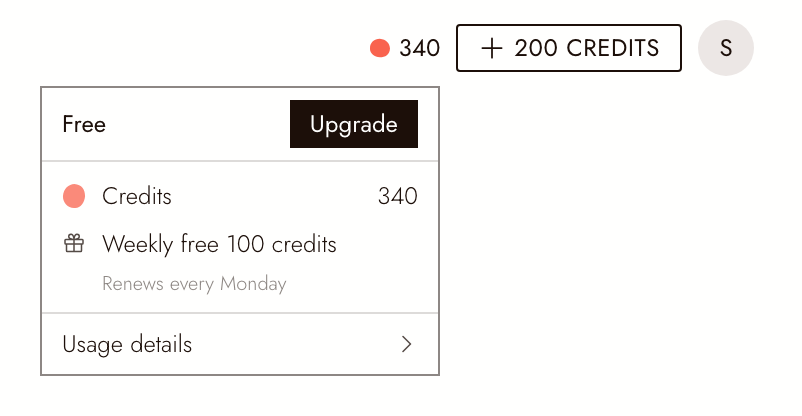
Weekly credits are added for you; there's nothing to claim. They don't carry over, so they never pile up. Hover over your credit balance at the top of the page to see Weekly free 100 credits and Renews every Monday.
Claim 200 credits for joining Discord
- Join the Flick Discord server at discord.gg/SPYgXej78k, or click your profile picture and choose Join Discord. If Discord asks you to agree to the server rules, finish that step: you don't count as a member until you do.
- Open flick.art/claim-discord. The same link is pinned in the #claim-credits channel.
- Click Verify with Discord and approve the request. Log in to Flick first if asked.
- You'll see You got 200 credits!
Each Flick account can claim once, and each Discord account can claim once. Verifying asks Discord for your username and whether you're in the Flick server; Flick can't see your messages or your other servers.
If the claim doesn't work, the message tells you why:
- Not a member yet. Your Discord account isn't in the server, or hasn't finished joining. Join, agree to the rules if asked, then click Try Again.
- Already claimed. This Flick account already got the Discord reward.
- Already claimed on another account. This Discord account was used to claim on a different Flick account.
- Log in to claim. Log in to Flick, then open flick.art/claim-discord again.
Plan credits and top-ups
- Monthly plans add credits at the start of each billing period. Plan credits don't roll over: unused ones expire when the period ends, and the next period's credits replace them.
- Annual plans add credits once a month through the year, on the same rule.
- Top-ups are one-time credit packs for Standard, Pro and Studio subscribers. Click your profile picture, choose Manage plan, then One-time. Top-up credits expire 90 days after purchase. Top-ups aren't available on Free or Casual, so on those plans, upgrading is how you get more credits.
- Credits tipped to you as a creator never expire.
Which credits are used first
Flick spends the credits that expire soonest first. Credits that never expire (signup, Discord, tips) are spent last.
For example, if your weekly credits expire on Monday and your plan credits expire the week after, your weekly credits are spent first.
FAQ
Where can I see what I was charged for? Click your credit balance at the top of the page to open Usage details, which lists each generation and its cost. A failed generation is refunded automatically, so it won't stay on your balance.
Do unused plan credits roll over? No. Plan credits expire at the end of each billing period and the next period's credits replace them. Signup, Discord and tipped credits never expire.
Are my starting credits daily or one-time? The signup bonus is one-time, and it never expires. The credits that refill are the weekly 100, added every Monday.
Can I buy credits without changing my plan? On Standard, Pro or Studio, yes: click your profile picture, choose Manage plan, then One-time. Top-ups aren't available on Free or Casual, so on those plans you'd need to upgrade.
My weekly credits didn't arrive. What should I do? They're added on Mondays at 00:01 UTC. If they're still missing later that day, email contact@flick.art.
다음 단계
- Model Credit Costs: what each model and setting costs.
- Refund Policy: refunds for purchases.