Générer une image
Générez une image fixe à partir d'un prompt. Utilisez-la comme point de départ pour un montage ou une prise vidéo.
Avant de commencer
Choisissez d'abord le style visuel et le format du projet ; voir Styles visuels. Vérifiez les paramètres de sortie du modèle sélectionné et examinez le résultat. Chaque génération utilise des crédits ; consultez Coûts en crédits des modèles avant de lancer un lot.
Étapes
Tout d'abord, cliquez sur le bouton +, puis sur Générer une image :
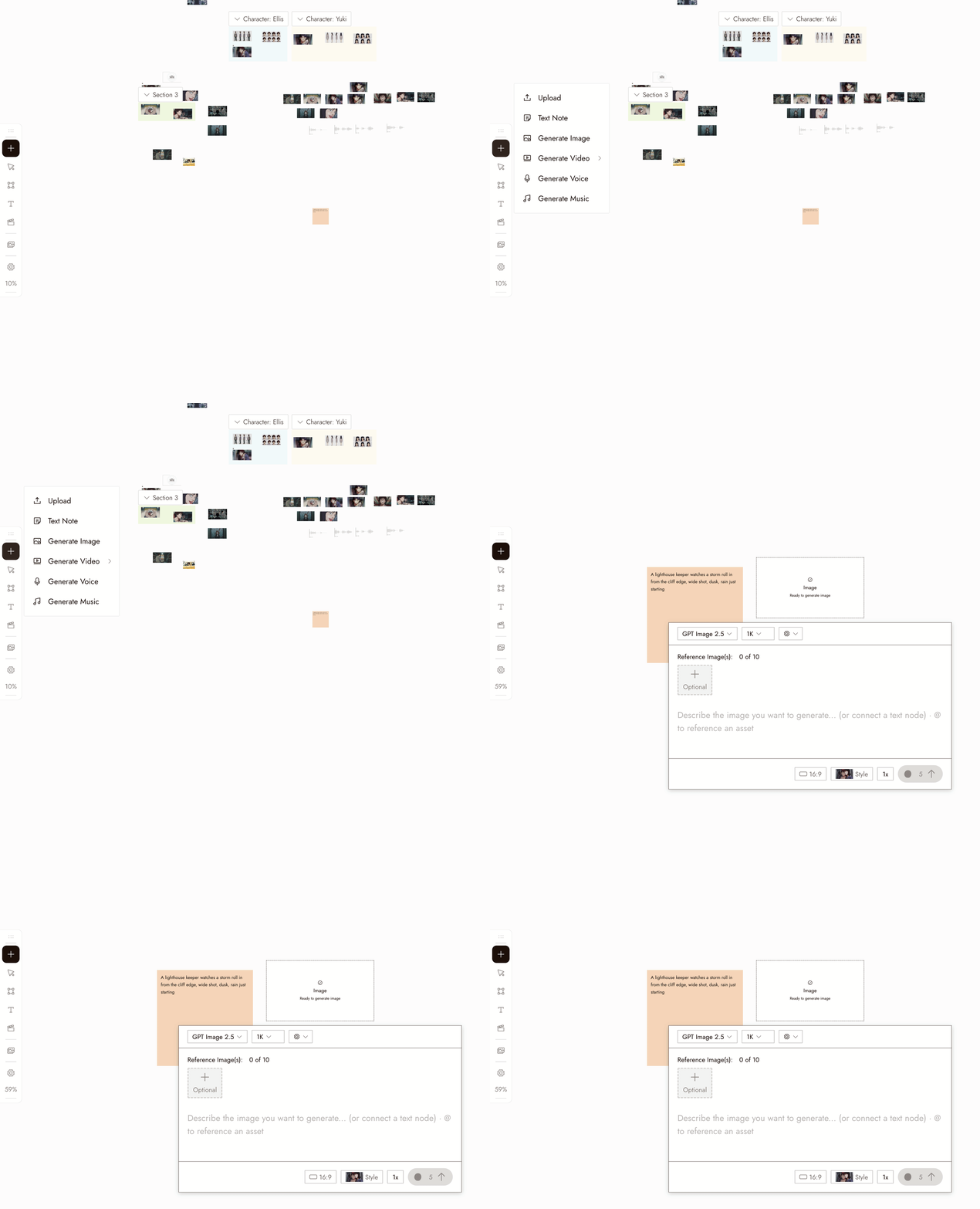
- Select the new image node. Its settings panel opens under it.
- Pick a model in the Model dropdown. Good starting picks for image generation are Nano Banana Pro and GPT Image 2.5. Midjourney is temporarily unavailable and shows greyed out. Models your plan does not include show a lock.
- Write your prompt in the panel. Type @ to reference another asset on the canvas.
- Choose how many images to generate at once with the 1x control if you want several candidates to compare.
- Check the credit cost shown on the Run button, then click it. The image appears as a new node connected to the placeholder.
Vous pouvez également décrire l'image dans la zone de chat en bas à droite et laisser l'agent la générer pour vous.
Paramètres
Modèle. Le sélecteur liste les modèles d'image disponibles dans votre forfait. Chacun a ses propres forces. Lorsque vous comparez des modèles, gardez le même prompt et jugez les résultats selon les besoins de votre prise.
Batch count. Choose how many images to generate. Use batches to compare options for a specific shot.
Style and aspect ratio. The project's style is set at the top of the chat panel, and new generations use the aspect ratio you last chose. Check the selected model's settings; some workflows follow the source image's aspect ratio.
Bonnes pratiques
Placez le sujet en premier, puis le décor, puis le cadrage. Un sujet clair par image.
Faible : « scène cinématographique cool avec beaucoup de choses. »
Mieux : « une femme en imperméable moutarde attendant sur un quai de gare vide après la pluie, plan large, lumière du jour douce. »
Évitez les instructions de style contradictoires. Utilisez le style épinglé pour guider l'apparence et le prompt pour décrire le contenu.
Faible : « …peinture à l'huile, anime, photoréaliste » alors qu'un style est épinglé.
Mieux : gardez le prompt axé sur le contenu et choisissez le style une fois pour le projet.
Comparez d'abord un petit lot. Choisissez un prompt clair et décidez ce que vous voulez tester.
Moins utile : dix images à partir d'un prompt vague.
Plus utile : un petit lot à partir d'un prompt clair, suivi d'un seul changement ciblé.
Examinez le résultat
- The subject is clear and there is one of it.
- The framing is the framing you asked for.
- The look matches the project's visual style, not a style the prompt drifted into.
- Check for extra limbs, incorrect object counts, or unreadable text before moving on.
- It would cut next to the other shots in the sequence.
Si quelque chose ne va pas
Le sujet est manquant ou incorrect. Il était probablement enfoui dans le prompt. Déplacez-le au début.
The look is off. Check the style at the top of the chat panel, then remove any style words from the prompt.
Chaque tentative se ressemble. Changez une seule chose, comme le cadrage ou l'éclairage, pas tout le prompt.
La génération n'est pas apparue. Vérifiez l'état du nœud sur le canvas avant de le relancer ; il peut encore être en cours ou avoir atterri hors écran.
La requête a été signalée. Lisez le message et révisez le prompt ou la référence pour y remédier. Ne continuez pas à soumettre la même requête.
Suivant
- Edit Image pour modifier un élément d'une image qui vous plaît.
- Visual Styles pour définir l'apparence une fois pour tout le projet.
- Garder un personnage cohérent sur trois plans lorsque la même personne doit apparaître dans plusieurs images.
- Cohérence des personnages IA : 5 méthodes comparées pour les techniques de référence derrière.