Direct one clear action
Start a short clip with one main action and one camera instruction. State what should stay unchanged. This lesson uses the station scene to practise that approach.
What you will learn
- The difference between subject motion and camera motion, and why a model needs them stated separately.
- A three-sentence structure for clear motion prompts.
- How to choose duration, and when an end frame is worth setting.
- When to stop describing a camera move and show it with a reference instead.
Before you start
Start with a still whose face and framing already work. For this exercise, use the traveler looking up from her watch toward the red umbrella. See Generate Video for the controls.
Give the shot one story purpose: the traveler notices the umbrella.
Step 1: Separate the subject from the camera
Every moving image has two kinds of motion, and audiences read them differently.
- Subject motion is what the people and things in the frame do: she turns her head, the train enters, the umbrella rolls. It carries the story beat.
- Camera motion directs attention. A pan turns left or right; a tilt turns up or down. A push in moves closer; a pull out moves away. A track follows alongside the subject. A static camera stays still.
Write the two on separate lines before you write a prompt. For the turn shot:
- Subject: she looks up from her watch and turns her head toward the umbrella, slowly.
- Camera: static.
If the subject's action is unclear, revisit the scene. If the camera needs several moves, test them separately before combining them.
Step 2: Write the prompt in three sentences
Write three sentences: the subject's action, the camera's action, and what should stay unchanged.
- The subject and the action, with a pace word. "She looks up from her watch and slowly turns her head toward the red umbrella on the bench."
- The camera, as one instruction. "Static camera, locked framing." Or, if the shot needs it, one move: "slow push in toward her face."
- What must not change. "The platform, the lighting, and the framing stay the same."
Use visible instructions instead of mood labels alone. For a staged action, state the order: "First she looks up, then she turns."
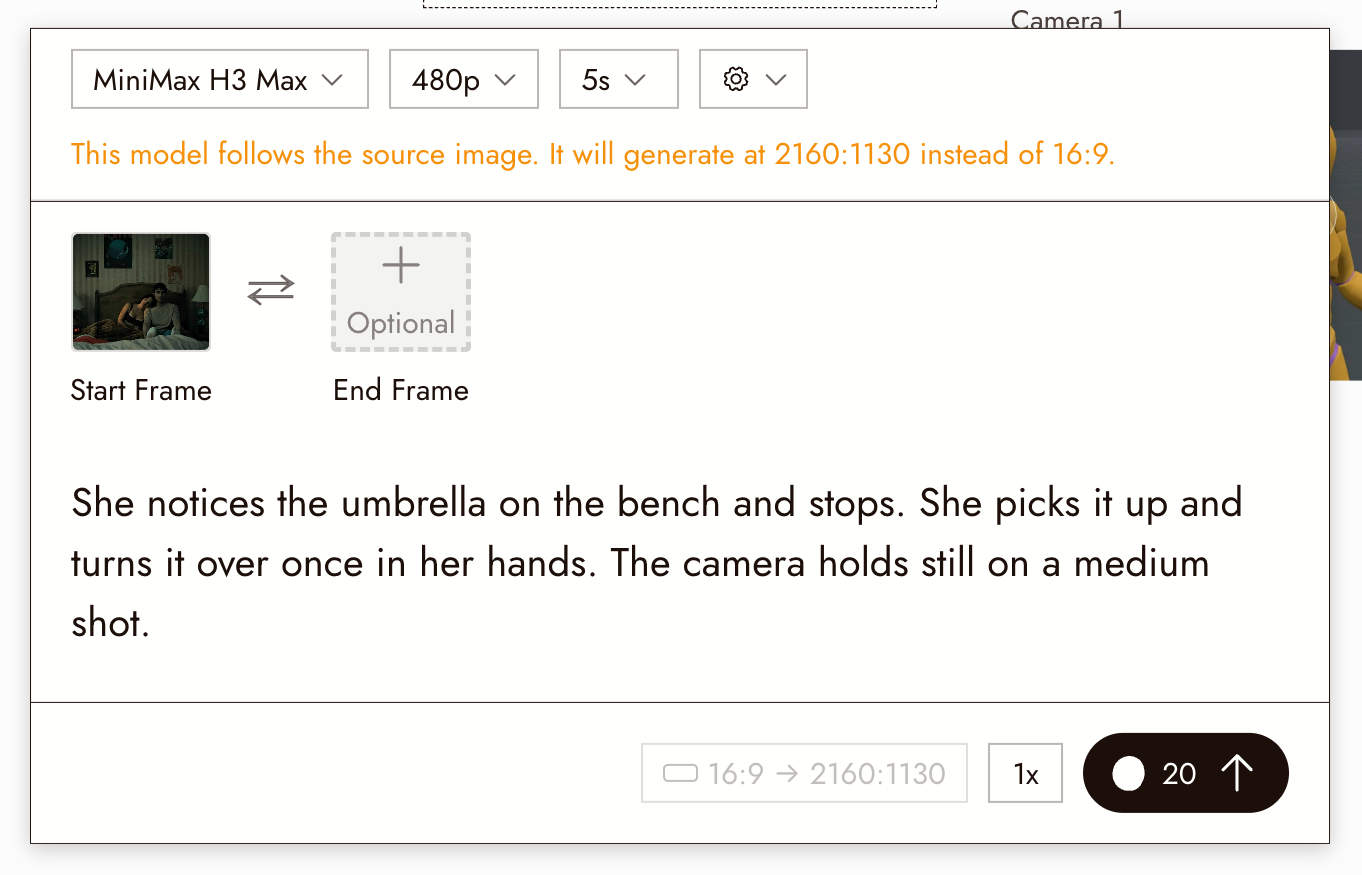
Paste the three sentences into the prompt field of the panel under the Image to Video node.
Step 3: Choose the shortest duration that holds the action
Choose the shortest available duration that fits the action. Extra time can introduce unwanted movement. Trim spare time later; see Trim and split.
If the model supports End Frame, attach a still showing the intended ending, such as her gaze resting on the umbrella. It guides the endpoint but does not guarantee the exact action between frames.
Check the cost on Run before generating. Test at a modest resolution. If you generate a higher-resolution take, review it again; it may differ from the draft.
Step 4: Run the three-take exercise once
Compare three takes using the same still, duration, and model. Check the cost of all three before starting:
- Take A, subject only. The action from Step 2 with "static camera."
- Take B, camera only. "She holds still, looking at the umbrella. Slow push in toward her face. Nothing else changes."
- Take C, both. The action and the push in together.
Watch A for the subject's action, B for the camera move, and C for how well they work together. Combined motion can introduce drift, but it may work. Keep the take that tells the story clearly.
The clips below are three takes from one start frame in the Flick residency film Xenogenesis, generated during that production. The prompts were not recorded, so read them for what the exercise teaches: the same still, the same 15 seconds, three different answers.
Step 5: When words are not enough, show the move
If text is not enough, supply a video showing the intended move. Select the still, choose Video, then Motion Reference, or use Omni Reference with supported image and video inputs. A 3D Stage recording can provide the camera reference. See Omni Reference and 3D stage export.
Two things that look like camera moves are not, and have their own tools:
- A different angle on the same setup, for a reverse or a reaction shot, is a still: Image, then Change Angle, with the Rotation, Tilt, and Forward sliders; see Camera Control.
- Continuing an action past the end of a clip is a new clip: take the last frame with Extract Frame (Last frame) and use it as the next start frame; see Extract Frame.
Where AI gets it wrong, and why this helps
A vague prompt leaves important choices open. Separate instructions make it easier to see whether the subject, camera, or background caused a problem. Review the result rather than assuming the prompt will be followed exactly.
Review the result
Watch the full clip, including the last second, then check:
- The subject did the one action, at the pace you asked for, and nothing else.
- The camera did what the second sentence said, and only that.
- The things in the third sentence did not change: framing, lighting, the face.
- The action starts and ends inside the clip, with a little air on both sides for the cut.
If something looks wrong
The camera moved when I said static. Put the camera sentence second, on its own, and say it twice in different words: "static camera, locked framing." Shorten the clip.
The action is over in the first second. Add a pace word and a sequencing word, and shorten the duration to the action.
The face changed during the move. Try a smaller head turn or less camera movement. Test each separately to find the cause.
The model invented a new background. A big camera move asks for what the still does not contain. Make the move smaller, or build the move in the 3D Stage and reference it.
Two takes have different motion with the same prompt. Results vary. Compare them against the intended action. If you choose to batch more takes, check the count and total cost first.
More symptoms are in The motion is not what I asked for.
Next
- Tell a small story in three shots to direct the other two shots the same way.
- Generate Video for the panel, the models, and the settings.
- Seedance Performance Guide for directing performance in more detail.
- Keep a character consistent across three shots for the identity side of the same problem.