Agent memory
Agent memory is what the agent knows without you repeating it: your film's look, its characters, the things it should never do. Say it once, and the agent reads it at the start of every turn, in every chat of the project.
There are two kinds:
- Project memory: true for this film only. It lives in a card at the top of your Story, where you can read and edit every line.
- Agent memory for all projects: how you like the agent to work, in everything you make.
Nothing is hidden. What the agent remembers is the text you can see in these two places.
Open Agent memory
Click Agent memory in the chat box, right of @. Once the project has a memory card, the button shows how many.
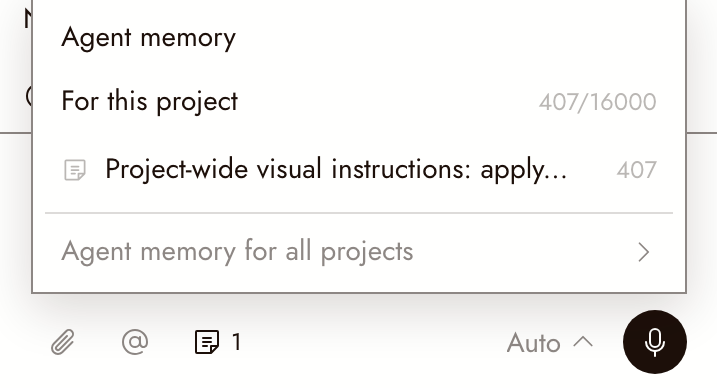
- For this project: with no memory yet, click Add a memory. A card opens at the top of your Story with the caret inside it. Once there is a card, the panel lists it by its first line; click it to jump to the card. The number beside the heading is how many characters you have used of 16,000.
- Agent memory for all projects: opens Preferences > Agent preferences, where you write your workflow rules and click Save. Turn Use these rules off to keep them without the agent reading them.
Ask the agent to remember
You do not have to write the card yourself. Tell the agent in chat:
Remember this for the whole project, so every chat uses it without me pasting it again: Style: 35mm film still, Kodak Portra 400 colour, soft halation around lights, fine grain. Never: text, logos, watermarks.
It writes the lines into the project's memory card and replies with a link to it, so you can check exactly what it saved.
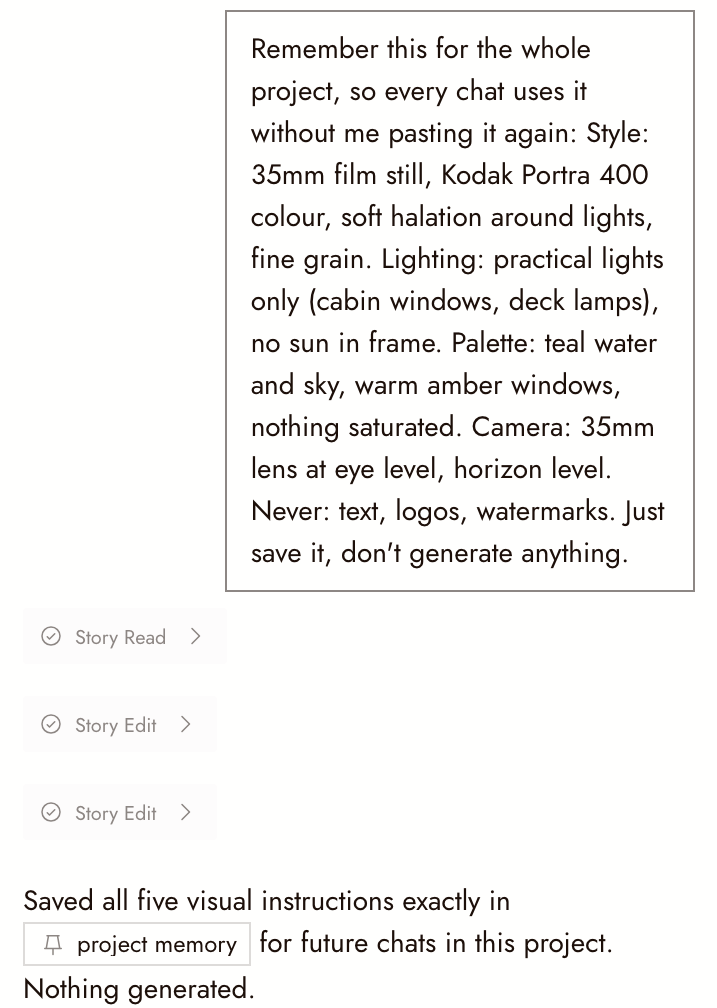
To check what it knows at any time, ask "What is in this project's memory?" It reads the card back.
Write the card yourself
The card is ordinary text in your Story. Click into it and type, or add one with / > Project memory. Inside a card you can use paragraphs, headings and bulleted or numbered lists.
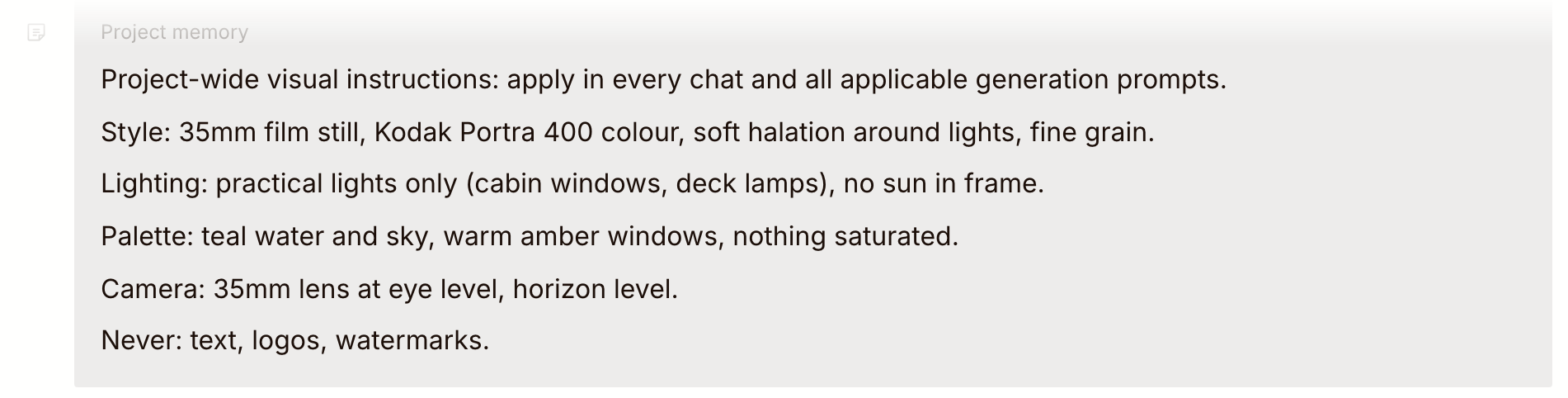
To delete a card, click its chip in the left margin and choose Delete memory.
What to put in it
Write what stays true for the whole film, one fact per line, in the words you would use in a prompt.
- The look: medium, film stock or texture, light, palette, lens. "Practical lights only, no sun in frame" is something the agent can act on; "cinematic" is not.
- Characters: who they are and what does not change. "Mara: late 30s, cropped grey hair, always in the green field jacket." Name the node that holds each character's reference sheet.
- Format: aspect ratio, shot length, the model you want for video.
- Never: what must not appear. "No text, no logos, no music."
Leave out:
- Asking before spending. Use the approval mode next to the microphone instead; see Talking to the agent. Memory can add a check, but the mode is what makes the agent wait.
- Anything for one shot only. Say it in that message.
- How you like the agent to work in every project, such as "keep replies short". That belongs in Agent memory for all projects.
Check the prompt before you spend
The agent writes each generation prompt itself, so read the draft before you run it, as you would any prompt. A selected reference image carries a look of its own and can pull the result away from what your memory says. If a line from memory is missing, point to it: "Use the style in project memory."
The 16,000 character limit
Project memory holds up to 16,000 characters. Past that, the agent stops reading: the lines beyond the limit turn grey in the card under Memory limit reached, so the agent stops reading here, and the panel says how many lines are not reaching the agent. Put what matters most at the top of the card.
下一步
- Talking to the agent for giving it context and choosing when it asks first.
- Story basics for the document the memory card lives in.