07. Fix the shot
Bring: Selected takes, a problem clip, and your shot plan. Make: One justified repair or replacement, checked in the sequence.
The umbrella bends near the end of an otherwise useful clip. Before generating again, find out whether the scene needs the damaged part at all.
Diagnose the problem before choosing a tool
Watch the shot between its neighbors and name what the audience must learn. For S05, the traveler leaves one umbrella hanging on the hook for its owner.
| Problem | First option to consider | Check after the change |
|---|---|---|
| A defect is already in the starting image | Image edit or a new still before animation | The pose, prop, and space allow the action |
| Identity or a prop state is ambiguous | A clearer reference or description | The right person and object state appear |
| Only the ending fails | Trim to the useful span | The required action still completes and the next cut works |
| The action keeps breaking | Simpler blocking or different coverage | The same story information survives |
| The images work but the choice is unclear | Revise the scene or show the missing reaction | A viewer understands why the action happens |
Write a specific diagnosis, such as "a second umbrella appears after the hand release," instead of "the model is bad."
Keep the original and change one main thing
Record the prompt, references, model, and settings. Note what must stay: the traveler's identity, one closed red umbrella, the hook position, and the established light.
For a small still-image defect, consider an image edit or Inpaint. A mask guides the edit but does not guarantee that everything outside it stays unchanged. Inspect the whole result before animating; see Edit Image.
For a damaged ending, use Trim and split. Edit Video is different: it generates a transformed clip. Check its inputs and cost in Generate Video, then inspect the whole result, including sound.

Compare the first three sampled frames with the last: a shirt and phone appear. Locate the actual defect in the moving clip before trimming. These stills do not establish an exact safe cut point.
Change the coverage when the action will not work
If the pickup-to-hook movement repeatedly fails, show the reach in one shot and the umbrella hanging in another. The audience can infer the transfer when identity, direction, and object states agree.
Another option is to change the angle or what the shot emphasizes. In a two-character scene, try cutting to the other character's reaction during a difficult movement, then show the result. Keep enough information for the audience to follow the action; check eyelines, timing, and object states across the cut. This is a different shot plan, not a repair to the original clip. For the station exercise, use the reach/result pair above rather than adding another character.

One attempt moves attention from the person to a mechanical handoff and then toward a screen. Several competing actions may make the intended beat harder to isolate.
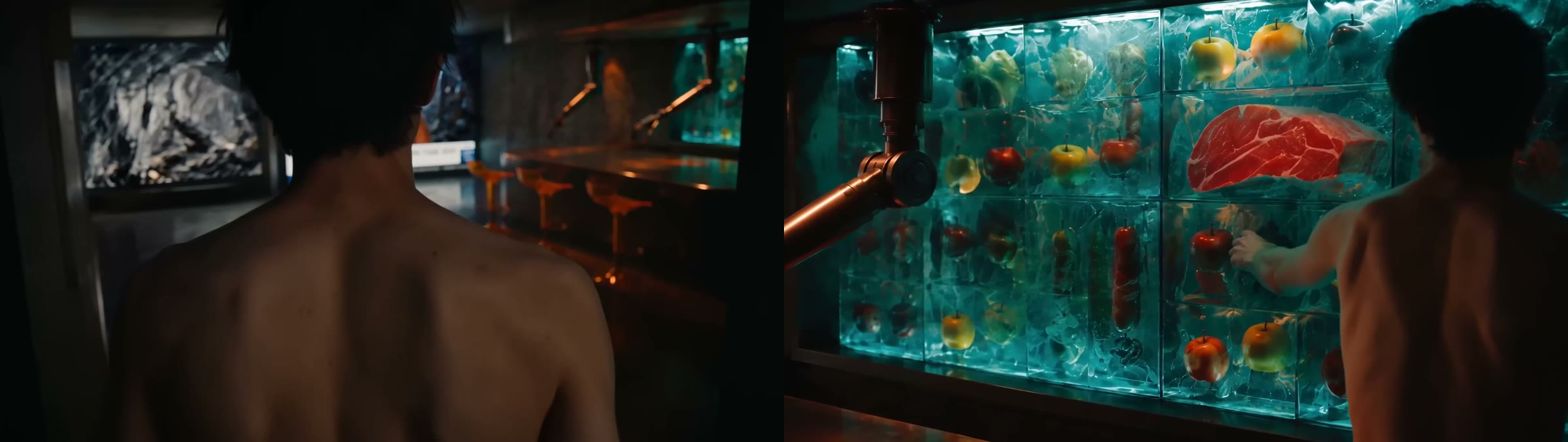
A wider setup paired with a closer view of the hand and object offers another way to present the action. Test the timing in the edit; a pair of stills does not prove the cut works.
If one action looks stitched across several clips, decide whether it must be continuous. Use deliberate cuts when they tell the story. If uninterrupted movement is essential, compare with one supported take of suitable duration. Longer is not automatically better.
For an essential camera path that words cannot communicate, consider a supported video reference or a 3D Stage recording. This supplies guidance, not guaranteed choreography. A simpler angle may still be the better choice.
Stop repeating the same failure
Set a checkpoint in time, attempts, or credits. At that point, review the diagnosis before extending the budget. Check another eligible model's inputs and cost in Choosing a model if the current workflow does not suit the task. Recheck continuity after switching.
For a flagged request, follow Why a generation was flagged. Model switching is not a moderation workaround.
Test the repair in the film
Compare the original and revised versions in the same sequence. Can a fresh viewer tell that the umbrella was left behind? Did the fix create a new identity, timing, or sound problem?
Keep the clearer version and record why. If neither works, revise the shot plan rather than calling the newest attempt finished. If no clip needs repair, use this diagnosis on a rejected candidate without generating another one.
Before you continue
- I identified the problem and chose an intervention that addresses it.
- I preserved the original and respected my retry checkpoint.
- I tested the revised shot in context and checked for new problems.
Next: 08. Edit for story.