
How to make an anime with AI in 8 steps, from story to voice, with one real trailer
To make an anime with AI, write a short story, pick one look, design your characters, make each shot as a still, then animate, voice and edit it. One person can make an anime trailer or short this way in a single tool today; an episode is many of those shots held together by the same look and characters. Below, each step is taught on a real 35-second anime trailer made in Flick, with the prompts behind it.
Hannah L. walks through the trailer, from style references to captions (Flick on YouTube)
Featured film and tutorial: OBSESSION x Perfect Blue by Hannah L. (Flick team), a remake of OBSESSION as an anime trailer.
Make your first anime short in Flick
Start a canvas, pick your look and build your first character.
How to make an anime with AI in 8 steps
The 8 steps run in this order: story, look, characters, shots, color grade, motion, voice, then edit and sound. Every prompt below is quoted from the trailer's public workflow in Hannah's own words. Prompts that copy frames from the original films are left out.
1. Write a one-line story, then the moments it needs
What it is
Story beat: A beat is one moment the audience has to see. In a trailer, each beat is usually one shot.
Why first: The beats tell you which characters, places and props to make. Without them you generate images that have no place in the film.
How to get it (our guidance: the video starts after this step)
Write the premise in one line: who wants what, and what goes wrong. Hannah's: a young man uses a one-wish toy to win his crush, and gets more than he asked for.
List the beats in order: the setup, the turn, then a hint of what follows. A trailer stops before the ending.
Move the story into the anime's world: Hannah turned the original film's wish toy into a gachapon, a Japanese capsule toy machine. Her note to the Flick agent (Flick's chat, which drafts prompts for you):
Model: Flick agent · Note: Her note on the canvas
in obsession, he breaks a "one wish willow" toy to make the wish. In my version, he's getting a "one wish gachapon." i want to recreate this in my Perfect Blue style.Go further: Flick's Academy course Make your first AI short film builds one short film from the first idea to a finished file.
2. Pick one look and write it as a style line
What it is
Style line: One sentence that names the drawing style, palette and texture. You paste it into every image prompt so every frame matches. 30 of the 33 image prompts on Hannah's canvas carry a version of hers.
More looks: Animation styles for AI has 15 looks with real prompts, including this one.
How to get it
Study references first: Hannah asked the agent to "pull film references of iconic shots" from the film she was imitating, and kept the few that set the look. Use references to study a look. Don't publish another film's frames.
Words that do the work: "flat anime cel shading" (flat colors with hard-edged shadows) sets the drawing; "muted red cream and teal palette" fixes the colors; "grainy vintage late 90s film texture" dates it; "uneasy naturalistic framing" sets the mood of the camera.
Model: Nano Banana 2 · Note: Hannah's style line for shots; it names the film she was imitating
Satoshi Kon Perfect Blue anime cel shading style, muted red cream and teal palette, grainy vintage late 90s film texture, uneasy naturalistic framing.Watch for: Rewording the line from shot to shot. Copy it; don't retype it.
3. How to make anime characters: describe them once, then make sheets
What it is
Character prompt: Age, face, hair, clothes, posture and one line of personality, followed by the style line.
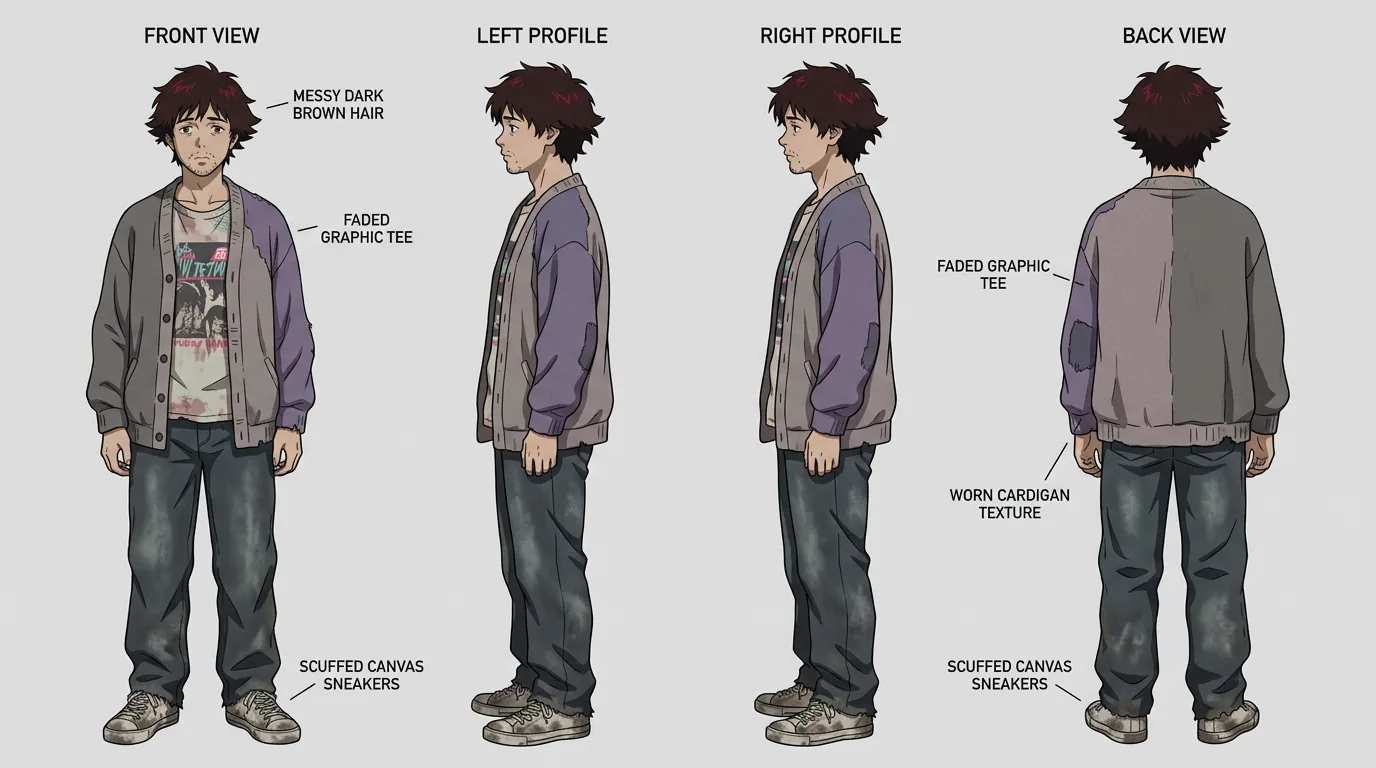
Character sheet: A turnaround sheet shows one character from the front, sides and back. An expression sheet shows the same face in several moods. Every later shot uses the sheets as references (images the model follows), which is how a character keeps the same face from shot to shot.
How to get it
Brief the agent: Tell it the project, the cast and the look. Hannah asked for "a boy and a girl both about 23 years old" and to "keep the visual style" in both.
Describe each lead: Cover face, hair, clothes and posture, then say who they are. Hannah's Ellis prompt ends: "A hopeless romantic in over his head."
Model: Nano Banana 2 · Note: Text to image
# Ellis (The Wisher)

Awkward, sweet everyman in his early twenties. A relatable dweeb, easy to root for. Soft, slightly nervous face, gentle eyes, a bit of stubble he cannot quite grow. Messy brown hair, oversized thrift store cardigan over a faded band tee, scuffed sneakers. Perpetually hunched, apologetic posture. A hopeless romantic in over his head.

Rendered in Satoshi Kon Perfect Blue style: flat anime cel shading, muted pink and teal palette, grainy late 90s film texture, uneasy naturalistic framing.
Turn the image into a sheet: Give the character image back as a reference and ask for set views on a plain background. "Identical facial features … in every panel" holds the face; "Show ONLY this character" keeps out scenery.
Model: Nano Banana 2 · Note: Edit, with the character image as the reference
Create a professional character turnaround reference sheet of this young man, Ellis (the character in the image). Show the SAME character in several full body views in one image: front view, left profile, right profile, and back view, all in a neutral A-pose. Identical facial features, messy dark brown hair, light stubble, oversized cardigan over a faded band tee, scuffed sneakers, in every panel. Plain seamless light gray background, even flat lighting, orthographic framing, full body visible. Satoshi Kon Perfect Blue anime cel shading style, muted palette, grainy late 90s film texture. Show ONLY this character, no scene, no props, no other people.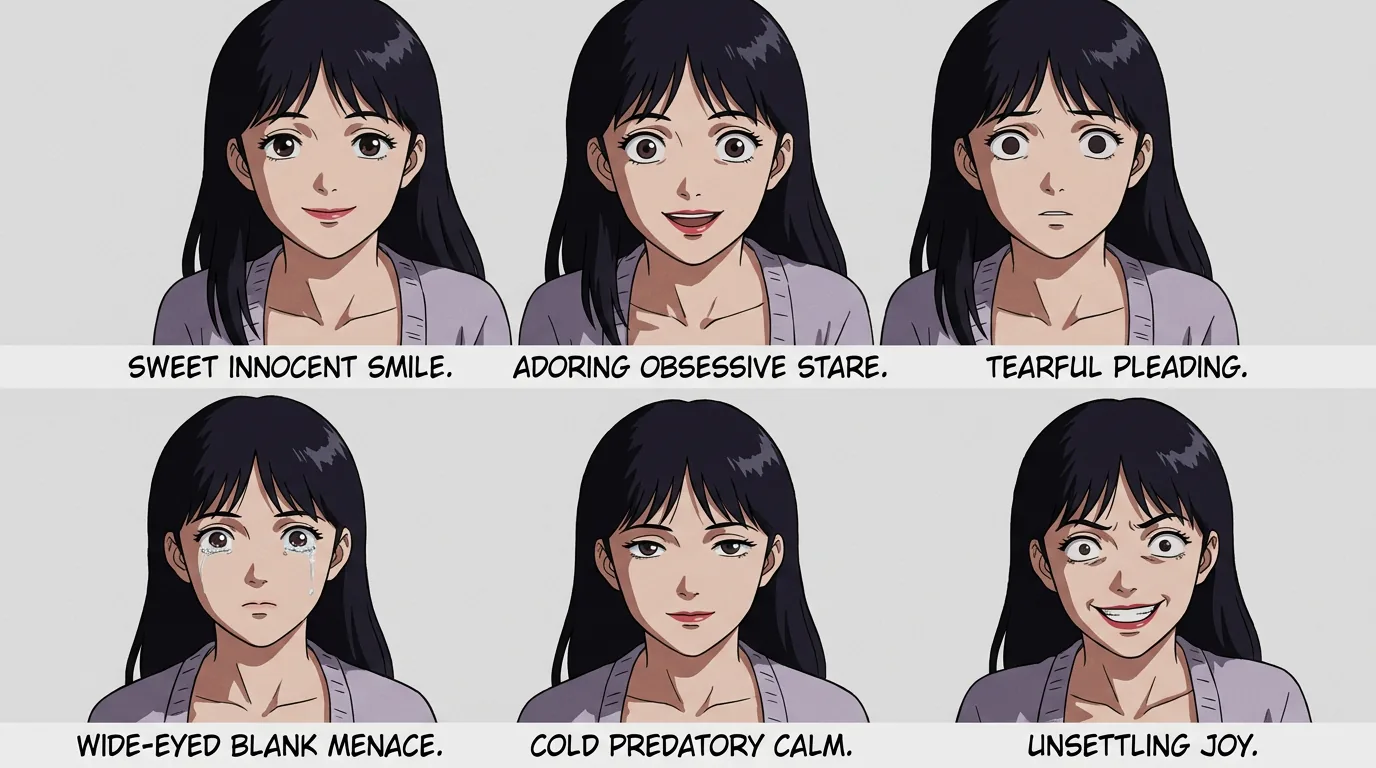
Name the moods you'll need: Poppy's expression sheet asks for "sweet innocent smile, adoring obsessive stare, wide-eyed blank menace" and more: the faces her shots call for. (In the finished trailer she is renamed Yuki.)
4. Make each shot as a still, from scratch or from an image you love
What it is
Shot: One camera setup: what the camera sees from one position. Make each shot as a finished still first, then animate it.
Why a still first: In this project a still cost about 20 credits and a 5-second Seedance 2.0 take (one generated try) about 141 (Flick data, July 2026). The still is the cheap place to get the frame right.
Two ways to start: Hannah's recap: "both using the Flick agent to draft the prompt from scratch, but then also having the chat help me draft a prompt around an image that I'm inspired by."
How to get it
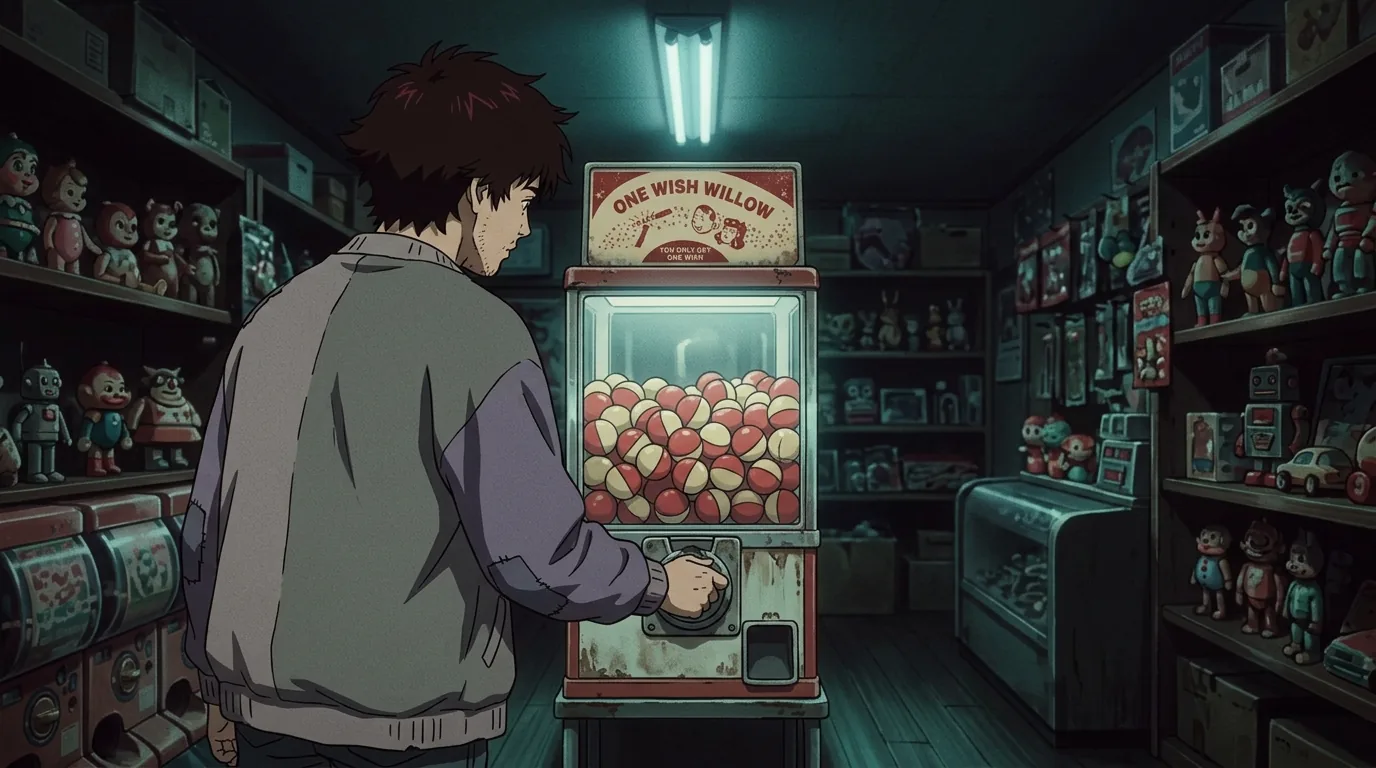
From scratch: Describe the beat to the agent and let it write the prompt, with the character sheets attached. Number your references and say which image is who: "Ellis (shown in reference images 1 and 2)". Then repeat the details that must not change.
Model: Nano Banana 2 · Note: Edit with 3 references: two of Ellis, one of a vending machine
Recreate the scene of image 3 (a person at a vending machine) but as a gachapon capsule machine, starring this young man Ellis (shown in reference images 1 and 2). Ellis stands before a glowing gachapon vending machine in a dim toy shop at night, seen from behind over his shoulder, his hand turning the metal crank. The machine is filled with red and cream plastic capsules. A vintage red and cream sign reads "ONE WISH WILLOW" with smaller text "YOU ONLY GET ONE WISH" and a small retro illustration of a boy and girl. Rows of kitschy toys and trinkets line the shelves, lit by a warm fluorescent tube overhead. Ominous stillness. Keep Ellis's exact face, messy dark brown hair, stubble, and oversized cardigan. Satoshi Kon Perfect Blue anime cel shading style, muted red cream and teal palette, grainy late 90s film texture, uneasy naturalistic framing.From an image you love: Write the composition out in words: who stands where, what the camera sees, what the mood is. For her subway shot, Hannah put Ellis by a train window with Poppy's face reflected behind him:
Model: Nano Banana 2 and Nano Banana Pro (one take each) · Note: Edit with 5 references (the characters and the inspiration image); trimmed
… Compose it: Ellis stands next to a subway train window at night, seen in profile close up, staring blankly off into the distance with a tired faraway expression. In the dark glass of the window, Poppy's face is reflected close behind his shoulder, smiling a wide unsettling scary smile as she watches him. Her reflection is semi transparent, layered over passing city lights and the dim train interior visible through the glass. Claustrophobic, intimate, ominous. …Watch for: Copying the frame you were inspired by. Borrow the idea, describe it in your own words, and keep the source image out of anything you publish. (Our guidance.)
5. Grade the still until it matches the look
What it is
Color grade: Changing the contrast, warmth and tint of a frame after it exists, instead of generating it again.
How to get it
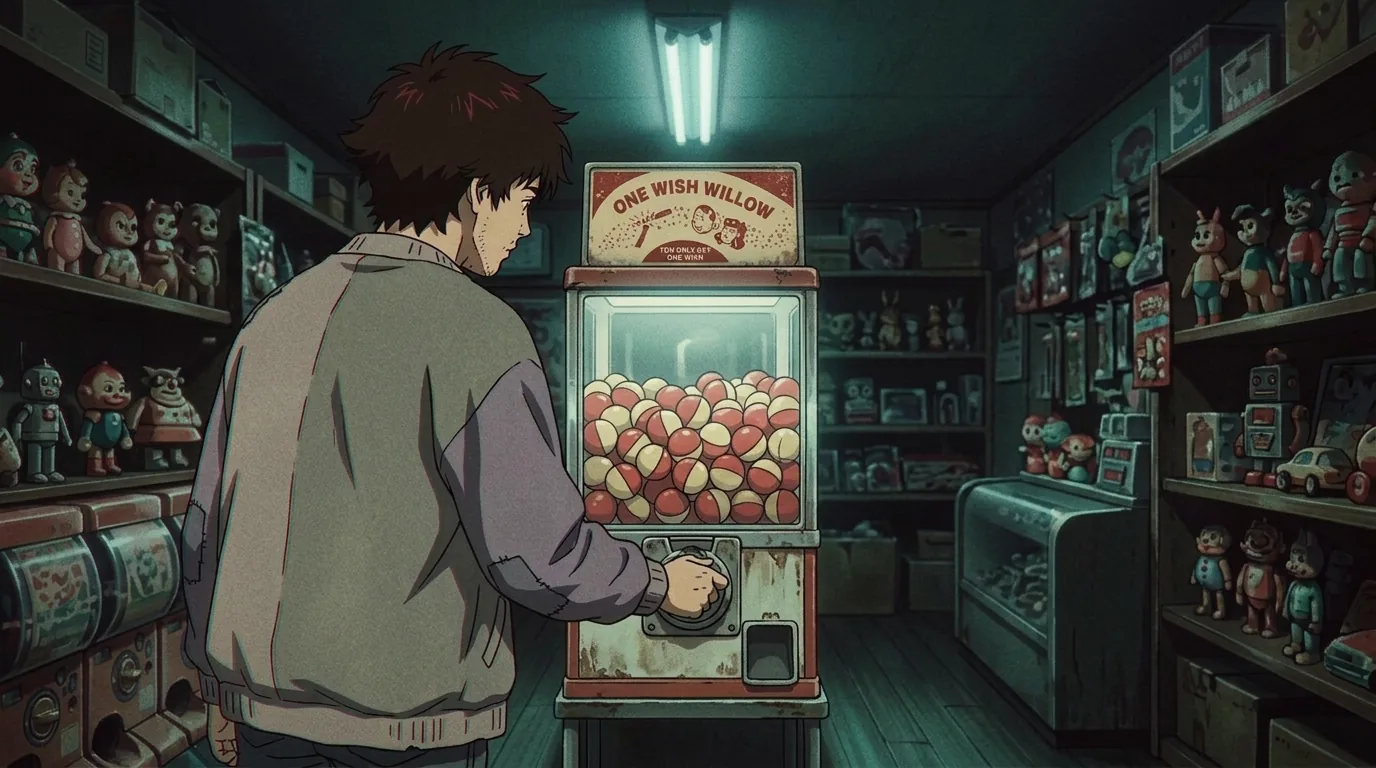
By hand: Her first gachapon frame was "a little too dark for my liking." In the video she opens Image, then "adjust color and light", lowers the contrast, cools the temperature and pushes the tint toward purple, checking the side-by-side view as she goes.
By prompt: When the frame looks too clean and modern, ask for a regrade that changes the finish and nothing else.
Model: Nano Banana 2 · Note: Edit, with the first gachapon still as the only reference
Regrade and restyle this image to look more like a vintage Satoshi Kon Perfect Blue anime frame. Keep the exact same composition, character, gachapon machine, ONE WISH WILLOW sign, and toy shop layout. Push toward: flatter hand-painted 90s cel animation with harder ink outlines, visible film grain and analog VHS softness, subtle chromatic aberration, slightly desaturated muted palette with cold teal fluorescent shadows and dull warm reds, lower contrast, a faint yellowed vintage cast. Less digital and clean, more grainy retro anime cel. Preserve all detail and the uneasy naturalistic framing.Words that do the work: "Keep the exact same composition" and a list of what stays protect the shot; "Less digital and clean, more grainy retro anime cel" names the direction.
Watch for: A regrade that brightens or tidies the frame. Another of her grades ends: "Do not brighten, do not clean up, do not make it cheerful."
6. Animate each still: lock the camera, move one thing
What it is
Image to video: Your still becomes the first frame and a video model animates it. All 12 video takes left on Hannah's canvas are 5 seconds long, and 11 of them were made with Seedance 2.0.
Locked camera: The camera stays put and only the subject moves. A 5-second take has room for one action.
How to get it
Prompt in this order: "camera locked." first, then the one action, then what must not move. 9 of the 12 video prompts on her canvas contain "camera locked."
Model: Seedance 2.0 · Note: Image to video, 5 s; the clip above
camera locked. winds gacha machine and ball falls outModel: Seedance 2.0 · Note: Image to video, 5 s, from the subway still
camera locked. the mans face stays unmoved. the woman in reflection slowly turns to him more and eyes get wide and crazy. she doesnt do anything but smileSay what stays still: Name the parts that tend to drift. Her shot of Ellis in front of a wall of photos adds:
Model: Seedance 2.0 · Note: Image to video, 5 s
camera locked. he looks up slowly at the pictures. the pictures should not move at allWrite plainly: None of her 12 video prompts repeats the style line. The start frame already carries the look.
7. Add voice lines in Japanese
What it is
Voice lines: Speech generated from text, one voice per character. In Flick, Generate voice in the toolbar lists the voices; Text to Voice in the docs covers it.
How to get it
Filter, then listen: Hannah filtered the voices to Japanese and a young male, which "just makes the search a little bit easier", then typed her line.
Cast by take: She generated the same male line in two voices, Akira and Minto, and kept Akira.
Model: ElevenLabs v3 · Note: Voice "Akira", one of the trailer's lines
願い事は一つしか叶えられません。Or let the video model speak: Hannah also asked Seedance for a line and its language in the video prompt itself:
Model: Seedance 2.0 · Note: Image to video, 5 s
looks to the ground, pauses, then says "I wish that Yuki Tanaka loved me more than anyone in the entire world" he says it very quickly and kind of scared. camera locked. he says it in japaneseWatch for: Lines your audience can't follow. Japanese dialogue needs captions (step 8).
8. Edit, then add music, sound effects and captions
How to get it
Lock the order first: In Flick's video editor, Hannah rearranged the clips until the order worked, then moved on to sound.
Then the sound: Add SFX opens Flick's sound library. Under its horror category she found both the music for the whole trailer and the effects for each clip, and swapped them until they fit. She calls this "my favorite part, adding the audio, which is really going to bring this to life."
Last, captions: She added English captions for the Japanese lines.
Go further: Flick's Academy lesson Build the sound covers ambience, effects, voice, music and silence.
Make your first shots with Flick's AI anime video generator, or start from the 90s anime look.
What one AI anime trailer took: 35 seconds, 3,500 credits
The 35-second trailer took 83 generations (images, video takes and voice lines) and 3,500 Flick credits, counting takes Hannah later threw away.
| Step | Models (generations) | Generations | Credits |
|---|---|---|---|
| Characters, sheets, shots and grades | Nano Banana 2 (47), Nano Banana Pro (5), Auto (3) | 55 | 1,096 |
| Image to video | Seedance 2.0 (14), Kling O3 Standard (3) | 17 | 2,316 |
| Voice | ElevenLabs v3 | 11 | 88 |
| Total | 83 | 3,500 |
Flick data, all successful generations in the film's project, July 28 to 29, 2026 (queried October 2026). Uploads, library sound effects and editing are not counted. Runtime from Flick's video sitemap.
- Video was two thirds of the 3,500 credits. 17 video takes used 2,316 credits; 55 images used 1,096. Settle every frame as a still before you animate it.
- About two takes set aside for every one kept. 30 of the 45 images and videos she prompted on her canvas are archived.
- About 75 minutes of generating. In the Flick data, every image and video in the project was generated within about 75 minutes on one evening, and the last voice takes the next morning. Planning and editing time is not in that count.
From one trailer to an anime series
To grow a trailer into an anime series, build each episode shot by shot on the same style line, character sheets and voices. The tutorial stops at a trailer. This is our guidance for going further.
- Keep the look and the cast fixed. An episode is many shorts that share one style line and one set of character sheets. Save them before you start: Hannah put each character's sheets in their own asset group (a named set in the canvas's left panel).
- Build shot by shot. Plan each episode as a list of beats, then work through steps 4 to 8 for each one.
- Check faces across shots. Flick's guide to keeping a character consistent across three shots shows how to spot and fix drift.
- Keep one voice per character. Use the same voice name for a character in every episode.
- Start with a trailer. It tests the look, the characters and the voices before you commit to episodes. This one used 3,500 credits.
Start your anime in Flick
Sign up, open a canvas and start with a style line and your two leads.
Every account gets 100 free credits when you sign up, and 100 more every Monday.
Create your free Flick account →
More anime looks and tools
- Animation styles for AI 15 looks, each with the real prompt from a film made in Flick, including 90s anime and painted anime.
- AI anime video generator
- 90s anime style AI generator
- AI anime opening generator Describe your show and get anime-style shots stitched into a sequence.
- How to make a character reference sheet
- How to make AI movies Data from 9 films made in Flick, and how to block scenes in 3D (place the actors and camera before you generate).
About the author
Bilguun Bayarkhuu is a growth engineer at Flick. This guide is built from Hannah L.'s tutorial on Flick's YouTube channel, the public workflow of her trailer, and Flick's generation data for that project.
Frequently Asked Questions
Can I use AI to make an anime?
Yes. One person can make an anime trailer or short with AI today. Hannah L. of the Flick team made a 35-second anime trailer in one Flick project in July 2026, with 55 image generations, 17 video takes and 11 voice takes. You write the story and direct each shot; AI draws the frames, animates them and voices the lines.
Can AI make a whole anime?
AI can make an anime episode today only shot by shot. Flick's AI anime video generator page says a full episode can't be made "in one go yet". Each 5-second take starts from a still, and the same style sentence and character sheets in every prompt hold the episode together.
Which AI is best for making anime?
It depends on the step. In a 35-second anime trailer made in Flick, Nano Banana 2 made the characters, character sheets and shots (47 of 55 image generations), Seedance 2.0 animated them (14 of 17 video takes) and ElevenLabs v3 voiced the Japanese lines (Flick data, July 2026).
How can I create my own anime character?
Describe the character in one prompt: age, face, hair, clothes, posture and one line of personality, then one sentence that names the art style. Generate the image, give it back as a reference and ask for a turnaround sheet (front, sides and back) and an expression sheet (one face in several moods). Use both sheets as references in every shot.
Can I make my own anime series?
Yes, if you treat each episode as a set of shorts. Fix the look, character sheets and voices first, then make each story moment as a still, a video take and a voice line. Make a trailer first to test the look and the cast.
How is anime made step by step?
Studios write a script, design characters on model sheets (reference drawings of each character), draw storyboards, animate key frames and the frames between them, paint backgrounds, then add voices, sound and the edit. With AI, one person follows the same order: story, look, character sheets, a still for each shot, image to video, voice, then edit and sound.
How much does it cost to make an anime with AI?
A 35-second anime trailer made in Flick in July 2026 used 3,500 Flick credits, and two thirds of that was video. A still cost about 20 credits and a 5-second Seedance 2.0 take about 141. A new Flick account gets 100 free credits once and 100 more every week, and the monthly plans include 500 (Casual), 2,500 (Standard), 8,000 (Pro) or 24,000 (Studio) credits.