How to Use Nano Banana 2.1 in 2026: vs Nano Banana 2 and Pro
Oct 2026
Nano Banana 2.1 is Google's newest Nano Banana image model, generally available since October 6, 2026. Google calls it "the primary high-efficiency workhorse model for image generation and conversational editing", and on the same day it deprecated Nano Banana 2. On Flick it runs in Text to Image, Edit Image, Character Reference and style transfer, and it is included on the Free plan.
Three Nano Banana models now sit next to each other in Flick's picker. This guide explains what each one is for, what each costs, and what happened when we ran the same prompts through Nano Banana 2.1, Nano Banana Pro and GPT Image 2.5.
Quick answer: which Nano Banana should you use?
Use Nano Banana 2.1 by default, and reach for Pro when the frame is complex or has to match a reference exactly. Then:
- Explore on Nano Banana 2.1 at 1K. 8 credits an image, about half of Nano Banana 2's price.
- Switch to Nano Banana Pro for the hard frames. Dense scenes, exact geometry, or a 3D blockout to match. 2K costs the same as 1K on Pro.
- Keep Nano Banana 2 only to match old work. Google has deprecated it and recommends 2.1 for new projects.
| Nano Banana 2.1 | Nano Banana 2 | Nano Banana Pro | |
|---|---|---|---|
| Google model | gemini-nano-banana-2.1 | Gemini 3.1 Flash Image | Gemini 3 Pro Image |
| Status | GA, October 6, 2026 | Deprecated October 6, 2026; no shutdown date | GA, May 28, 2026 |
| Google's positioning | High-efficiency workhorse | Superseded by 2.1 | Premium choice for the most complex tasks |
| New image, 1K / 2K / 4K | 8 / 12 / 28 credits | 15 / 23 / 30 credits | 30 / 30 / 60 credits |
| Edit, 1K / 2K / 4K | 10 / 15 / 35 credits | 20 / 30 / 40 credits | 30 / 30 / 60 credits |
| Character Reference | 10 credits | 20 credits | 30 credits |
| Reference images (Google) | Up to 14: up to 10 objects, 4 to 5 characters | Up to 14: up to 10 objects, 5 characters | Up to 6 objects, plus 3 style references |
| Picker estimate | about 15 s | about 55 s | about 45 s |
| Plan | Free | Free | Free |
Make your next frame with Nano Banana 2.1
Explore fast on 2.1, render the hard frames on Pro.
What changed in Nano Banana 2.1
Google released Nano Banana 2.1 as an update to Nano Banana 2 with better visual quality, prompt adherence and text rendering (Gemini API release notes). The specific changes Google lists:
- Better visual quality and realism at 1K, 2K and 4K.
- A fix for tiling artifacts on wide and panoramic ratios (1:4, 4:1, 1:8, 8:1) at 2K and 4K.
- Better text rendering and infographic layout.
- Multi-image fusion of up to 14 references, up to 10 of them objects. Google's pages disagree on characters: the model page says up to 4, the image generation guide says up to 5.
- Configurable thinking levels.
For Flick users the headline is price. At 1K, Nano Banana 2.1 costs 8 credits against 15 for Nano Banana 2, and Character Reference drops from 20 to 10.
Version history
- Nano Banana (Gemini 2.5 Flash Image) was the original. It is still in Flick's picker.
- Nano Banana Pro (Gemini 3 Pro Image) arrived as a preview on November 20, 2025 and became generally available on May 28, 2026.
- Nano Banana 2 (Gemini 3.1 Flash Image) arrived as a preview on February 26, 2026, went GA on May 28, 2026, and was deprecated on October 6, 2026.
- Nano Banana 2.1 went GA on October 6, 2026. Google recommends it for all new projects.
- Nano Banana 2 Lite remains on Flick as the fastest tier: 1K only, about 4 seconds, 7 credits.
How to generate with Nano Banana 2.1 on Flick
- Add an image node. Generate an image walks through it, and the first project walkthrough shows it with screenshots.
- Choose Nano Banana 2.1 in the model picker.
- Set resolution. 1K for exploring. 2K costs 1.5 times as much, and 4K costs 3.5 times, so on 2.1 a 4K image is nearly the price of Nano Banana 2 at 4K.
- Connect references if you have them. A character sheet or product shot goes in as a reference image; the character consistency guide shows how to carry one face across three shots.
- Write the prompt. Shot size, angle, light, subject, action. Image generation prompts has patterns that work across models.
- Edit the keeper. Hover the image, open Image, and choose Edit & Merge. Name the one change and what must stay.
Test 1: one prompt, all three Nano Bananas and GPT
We ran one prompt through five models at 1K:
A cinematic low-angle wide shot inside a small, dimly lit office at midnight. A frustrated small business owner sits in an office chair, leaning backward with frustrated expression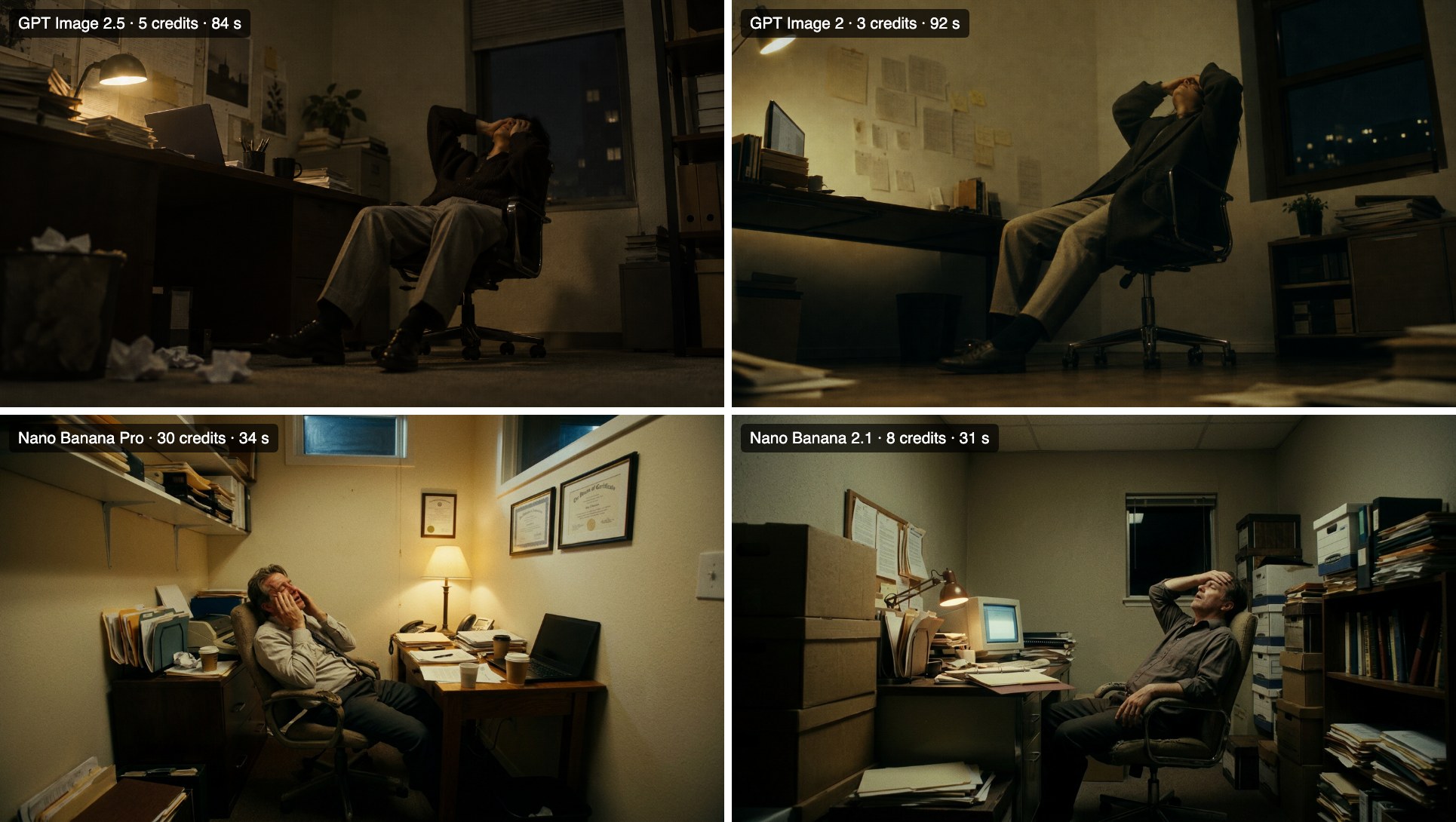
From one run each:
- Nano Banana Pro and Nano Banana 2.1 framed the room at eye level rather than low-angle, and both lit it more than "dimly lit at midnight" suggests. The two GPT Image models took the angle literally.
- Nano Banana Pro gave the most designed room: framed certificates, a shelf of binders, a warm lamp. Nano Banana 2.1 gave a plainer office with a monitor and stacked boxes, closer to a real small business.
- Price per frame: Nano Banana 2.1 cost 8 credits, Nano Banana Pro 30.
If the camera angle is the point of the shot, say it twice or use GPT Image 2.5. If you want a believable room fast, Nano Banana 2.1 did that for a quarter of Pro's price.
We then ran the same prompt on Nano Banana 2, with the same settings as the Nano Banana 2.1 run:
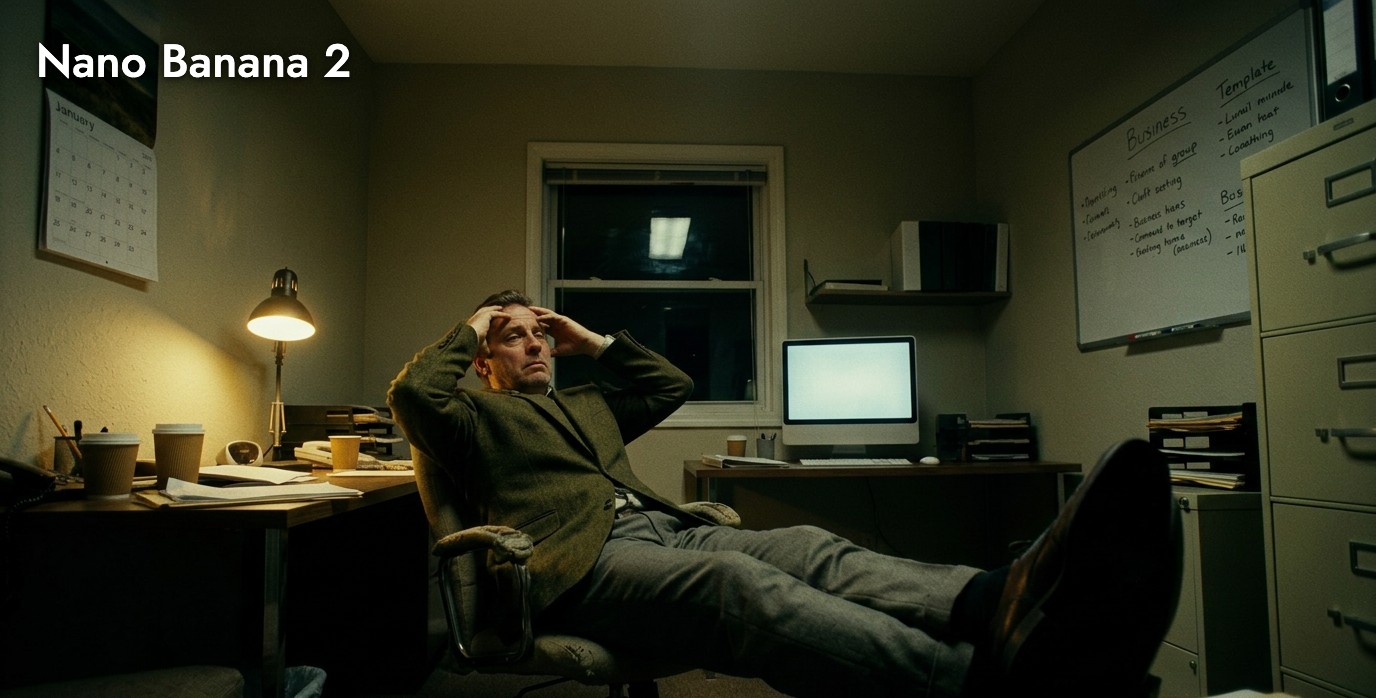
Nano Banana 2 got closer to the brief than 2.1 on this one: a genuinely low camera with the man's shoes toward the lens, and a room that stays dim. It also showed its weaker text, filling the whiteboard with words that do not quite exist, and it painted a fashion magazine's logo into the bottom corner that nobody asked for. We cropped that out. One run each, so this is a tendency, not a ranking, but it is a reminder that a newer model is not better on every prompt.
Test 2: the same prompt, six times
We ran a long top-down prompt six times on Nano Banana 2.1 and six times on GPT Image 2.5 to see how much each varies:
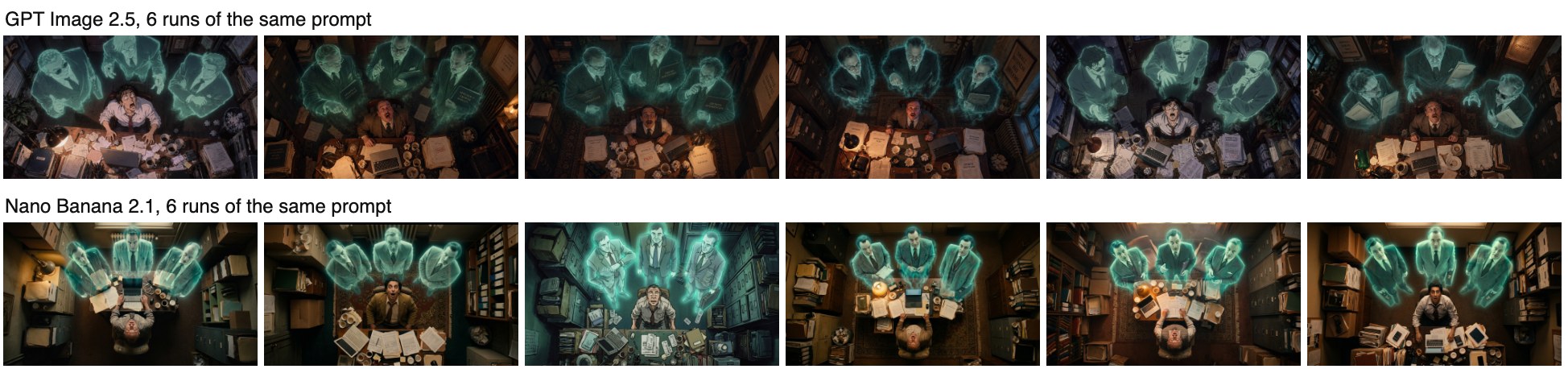
Nano Banana 2.1 varied more: where the desk sat, whether the man faced up or away, and in one run the whole rendering style moved toward illustration. It also read "strong geometric composition" more strictly, lining the three ghosts up in a neat row. GPT Image 2.5 returned six near-identical frames. Use Nano Banana 2.1 when you want options to choose from; use a fixed reference image when you need six frames to match.
Test 3: matching a 3D blockout
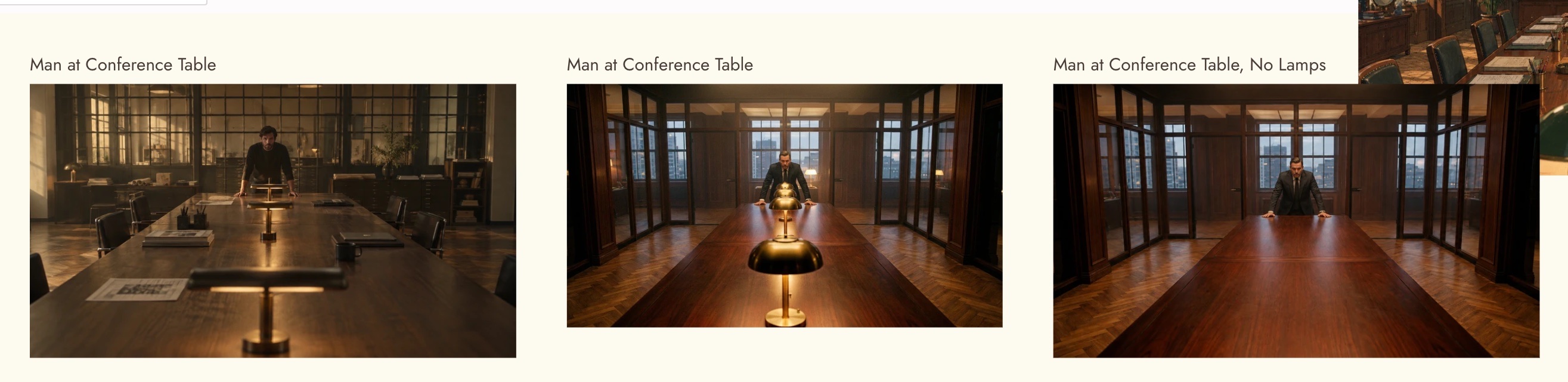
We blocked a shot in Flick's 3D Stage (a gray conference room and a yellow mannequin) and asked Nano Banana Pro and GPT Image 2.5 to turn it into a photographic frame while matching the angle, framing and table perspective.

Nano Banana Pro held the blockout's geometry more closely: the table fills the same part of the frame, the lamps line up down its centre, and the man stands where the mannequin stood. GPT Image 2.5 widened the room. This is where Pro earns its price: when a frame has to cut against previz, the closer match saves a round of edits.
Nano Banana 2.1 vs Nano Banana 2 vs Nano Banana Pro: pros and cons
Nano Banana 2.1
Pros:
- Cheapest of the three at 1K and 2K: 8 and 12 credits.
- Google's recommended default, with better text rendering and wide-ratio fixes.
- Most room for references: up to 14 images.
- Character Reference at 10 credits, half of Nano Banana 2.
Cons:
- 4K jumps to 28 credits, 3.5 times its 1K price.
- In our tests it varied more between runs and softened a requested low angle.
- Newest of the three, so there is the least shared experience with it yet.
Nano Banana 2
Pros:
- Matches images you already made with it, if a project needs to stay consistent with earlier frames.
- Took our low-angle prompt more literally than 2.1, in one run.
Cons:
- Deprecated by Google on October 6, 2026; Google recommends migrating to 2.1.
- Costs nearly twice as much as 2.1 at 1K and 2K.
- Slower in the picker's estimate (about 55 seconds against about 15), though our one run took 18 seconds.
- Weaker text: the whiteboard in our test came back as near-words, and it added an unrequested magazine logo.
Nano Banana Pro
Pros:
- Google's "premium choice for the most complex visual tasks", with the most world knowledge.
- Held a 3D blockout's geometry most closely in our test.
- 2K costs the same as 1K, 30 credits.
- Supports up to 3 style references alongside its object references.
Cons:
- The most expensive at 1K: almost four times Nano Banana 2.1.
- Fewer reference slots than 2.1: up to 6 objects.
- Like 2.1, it framed our low-angle prompt at eye level.
The pros and cons that cite Google come from its image generation guide; the ones about framing and variety are our assessment from the tests above.
How long it takes
The picker estimates about 15 seconds for Nano Banana 2.1. The runs in this guide took longer:
| Model | Runs | Range | Median |
|---|---|---|---|
| Nano Banana 2.1 | 8 | 30 to 95 s | 36 s |
| Nano Banana Pro | 2 | 34 s | 34 s |
| Nano Banana 2 | 1 | 18 s | 18 s |
| GPT Image 2.5 | 9 | 27 to 84 s | 31 s |
Times are from one canvas on one day at 1K, several of them running at once. Treat them as a snapshot, not a benchmark.
Prompting Nano Banana 2.1
- Repeat the camera if it matters. Our low-angle prompt came back at eye level. Put the angle first and restate it at the end.
- Use references instead of adjectives for identity. A character reference holds a face better than a paragraph describing it.
- Ask for text directly. Google's text rendering improvements make signs and labels a reasonable request; quote the exact words.
- Use wide ratios when the shot needs them. Panoramic ratios at 2K and 4K no longer tile.
- Batch, then choose. The run-to-run variety is a feature when you are exploring. Generate several at 1K and pick.
ベストプラクティス
- Default to Nano Banana 2.1; switch models for a reason, not by habit.
- Explore at 1K on 2.1, then re-render the keeper on Pro at 2K if it needs Pro's precision. Pro charges the same for 2K as 1K.
- Build characters once with Character Reference on 2.1 at 10 credits, then reuse them.
- Keep comparisons in a section so the choice is quick.
- Check model credit costs before a big batch; 4K changes the maths.
よくある間違い
- Starting new work on Nano Banana 2. It is deprecated and costs more than 2.1.
- Exploring on Pro. At 30 credits a frame, use 2.1 to find the composition first.
- Rendering 4K on 2.1 by default. 4K is 28 credits; most frames you will animate do not need it.
- Trusting one roll. 2.1 varies between runs. Generate a few before deciding.
- Expecting a low angle without asking twice. Nano Banana 2.1 and Pro both softened it in our test.
Sources
- Gemini API release notes, entries for October 6, 2026, May 28, 2026, February 26, 2026 and November 20, 2025
- Gemini Nano Banana 2.1 model page, updated October 6, 2026
- Gemini API image generation guide, checked October 20, 2026
- Tests, credit prices and timings from Flick on October 20, 2026
関連ガイド
- Generate an image
- Edit image
- Character reference
- Character consistency across three shots
- Model credit costs
- Choosing a model
- How to use GPT Image 2.5
- Keep characters consistent across AI generations
よくある質問
What is Nano Banana 2.1?
Google's newest Nano Banana image model, generally available since October 6, 2026, and Google's recommended default for image generation and editing.
What is the difference between Nano Banana 2.1 and Nano Banana 2?
2.1 is an update to Nano Banana 2 with better visual quality, text rendering and prompt adherence. On Flick it costs about half as much at 1K and 2K. Google deprecated Nano Banana 2 on the day 2.1 launched.
Is Nano Banana 2 being shut down?
Google has deprecated it but announced no shutdown date. It is still in Flick's picker today.
Is Nano Banana Pro better than Nano Banana 2.1?
For complex scenes and matching exact geometry, Pro did better in our test and Google positions it as the premium model. For most frames, 2.1 is the better value at 8 credits against 30.
How much does Nano Banana 2.1 cost on Flick?
8 credits at 1K, 12 at 2K and 28 at 4K for a new image; edits cost 10, 15 and 35.
Is Nano Banana 2.1 free on Flick?
It is included on the Free plan. Each image uses credits.
How many reference images can Nano Banana 2.1 use?
Google lists up to 14, with up to 10 objects. Its model page allows up to 4 characters and its image generation guide up to 5, so plan for 4.
Is Nano Banana 2.1 better than GPT Image 2.5?
They are good at different things. GPT Image 2.5 followed camera directions and stayed consistent across runs in our tests; Nano Banana 2.1 was cheaper and gave more variety. Our GPT Image 2.5 guide has the details.