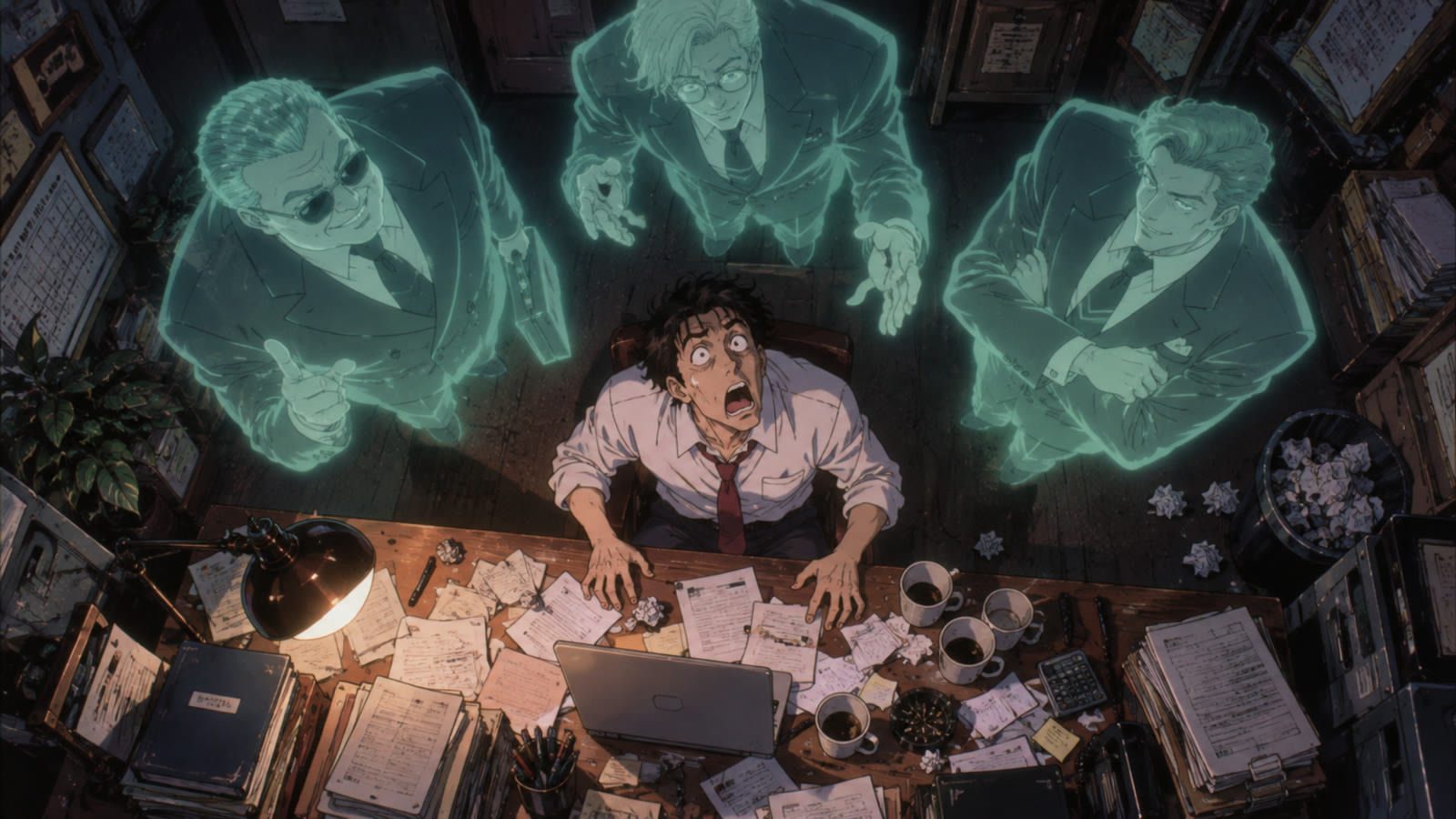
How to Use GPT Image 2.5 in 2026: The Complete Guide
Oct 2026
GPT Image 2.5 is OpenAI's newest image model, released on September 8, 2026 as the successor to GPT Image 2. OpenAI positions it for work where editing precision matters most. On Flick it runs in Text to Image and Edit Image, and it is included on the Free plan.
This guide covers what changed, what it costs, how to set it up, and what happened when we ran the same prompts through GPT Image 2.5, GPT Image 2, Nano Banana Pro and Nano Banana 2.1 on one canvas.
Quick answer: how do you use GPT Image 2.5?
Pick GPT Image 2.5 in the image model picker, write the shot the way a cinematographer would describe it, and generate. Then:
- Start at Medium and 1K. It costs 5 credits and is the setting every test below used.
- Name the camera. In our tests GPT Image 2.5 followed angle words such as "low-angle" more literally than the Nano Banana models did.
- Edit instead of re-rolling. Feed the result back in with a short change. Editing is what this version was built for.
| Spec | GPT Image 2.5 on Flick |
|---|---|
| Maker | OpenAI, released September 8, 2026 |
| Variant | Sunburst, the quality-focused version |
| Actions | Text to Image, Edit Image |
| Resolution | 1K (default), 2K, 4K |
| Prompt Weight | Low, Medium (default), High |
| Price | 2 to 28 credits; 5 credits at Medium 1K |
| Prompt length | Up to 32,000 characters |
| Plan | Included on Free |
| Measured time | 27 to 84 seconds, median 31, over 9 runs |
Make your next frame with GPT Image 2.5
Describe the shot like a cinematographer. Edit the keeper instead of re-rolling.
What GPT Image 2.5 is
OpenAI shipped two versions of GPT Image 2.5. Sunburst is described as "our most capable model for image generation and editing" and is aimed at workflows where "editing precision matters most". Flare is the faster everyday version (OpenAI API changelog). Flick runs Sunburst.
Compared with GPT Image 2, the pitch is control rather than a new look: edits that change only what you asked for, subjects that survive several rounds of changes, and prompts followed more literally. In our tests the look itself stayed close to GPT Image 2, which is why the two are easy to tell apart from Nano Banana and hard to tell apart from each other.
Version history
- GPT Image 2, released April 21, 2026. Strong text rendering and identity holding. Still in Flick's picker at a lower price.
- GPT Image 2.5 Sunburst and Flare, released September 8, 2026. OpenAI's API adds two higher quality levels, xhigh and max; Flick exposes Low, Medium and High.
How to generate with GPT Image 2.5 on Flick
- Add an image node. Generate an image walks through it, and the first project walkthrough shows the same step with screenshots.
- Choose GPT Image 2.5 in the model picker.
- Set Prompt Weight. Flick's name for OpenAI's quality setting. Low is for thumbnails and layout tests, Medium for most work, High when a detail has to be right.
- Set resolution. 1K for exploring, 2K or 4K for the frame you will animate or print.
- Write the prompt like a shot description. Shot size, angle, lens, light, then subject and action. The image prompts guide has more patterns.
- Edit the keeper. Hover the image, open Image, and choose Edit & Merge. Describe only the change and say what must stay the same. Edit image covers references and merges.
What it costs
Credits on Flick, for both generating and editing:
| Prompt Weight | 1K | 2K | 4K |
|---|---|---|---|
| Low | 2 | 3 | 5 |
| Medium | 5 | 9 | 14 |
| High | 10 | 18 | 28 |
Flick lists these as a launch price, half the model's list rate, so expect them to change. For comparison, GPT Image 2 is 3 credits at Medium 1K for a new image and 5 for an edit. Every model's current rate is on model credit costs.
Test 1: one prompt, four models
We ran one prompt through four models at 1K and Medium:
A cinematic low-angle wide shot inside a small, dimly lit office at midnight. A frustrated small business owner sits in an office chair, leaning backward with frustrated expression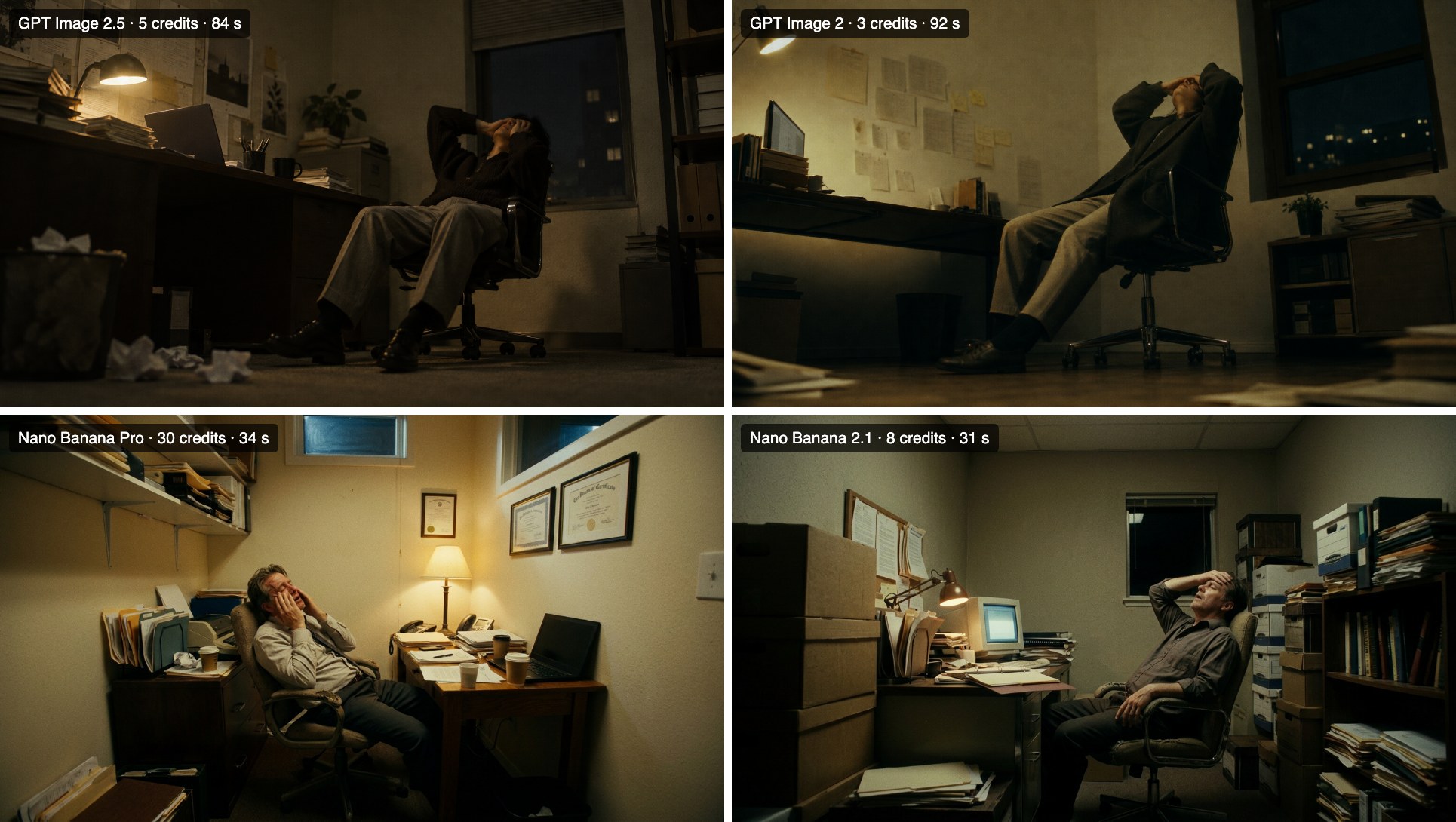
What we saw, from one run each, so read it as a tendency rather than a verdict:
- Both GPT Image models took "low-angle" literally. The camera sits near the floor and looks up at the chair. Both Nano Banana models framed the room closer to eye level.
- GPT Image 2.5 and 2 kept "dimly lit at midnight". The Nano Banana versions lit the room more, with a lamp or overhead light doing most of the work.
- The two GPT versions are close. At this prompt length, 2.5 is not a different look from 2. The difference shows up in editing and in time: 84 seconds against 92 here.
Test 2: the same prompt, six times
Consistency matters more than any single image when you are building a sequence. We ran a long top-down prompt six times on GPT Image 2.5 and six times on Nano Banana 2.1:
A cinematic, perfectly top-down overhead shot of a small business owner sitting alone in a cramped office, surrounded by three translucent ghosts hovering ominously above him. The man tilts his head back, staring directly up at the ghosts with an exaggerated expression of shock and disbelief, his eyes wide and mouth open. The ghosts are dressed in business suits, representing expensive consultants who took his money and disappeared. Scattered paperwork, an open laptop, and empty coffee cups cover his desk. Absurdist Halloween horror comedy, surreal atmosphere, eerie green-blue ghostly glow, dramatic shadows, strong geometric composition, dark cinematic humor, 35mm film aesthetic, highly detailed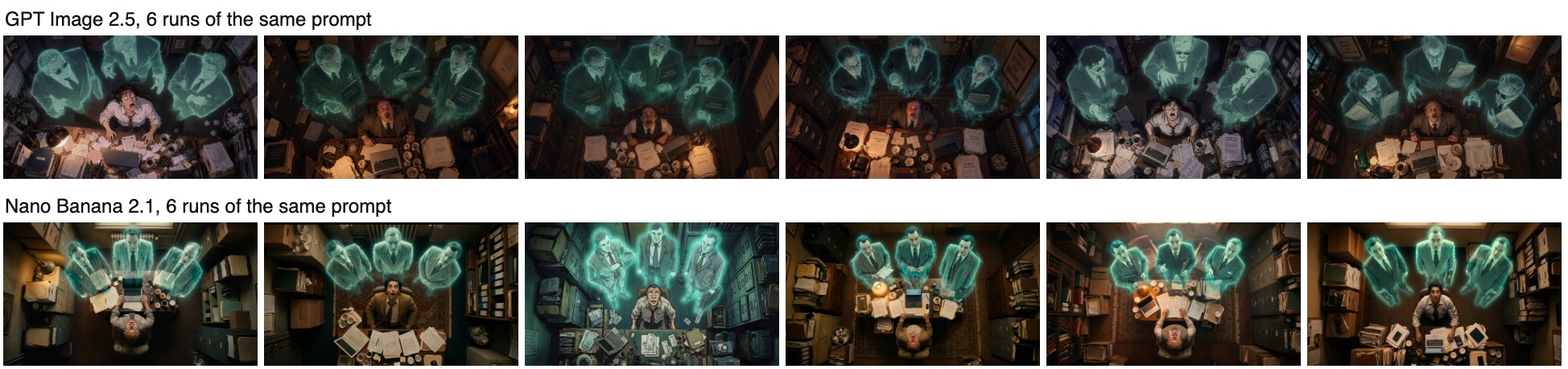
GPT Image 2.5 returned six near-identical compositions: man at the bottom, face turned up, three ghosts across the top, the same warm desk light and teal glow. Nano Banana 2.1 varied more from run to run, in where the desk sat, how the ghosts lined up, and in one case the whole rendering style. If you want a set of frames that already match, GPT Image 2.5 needs fewer rolls. If you want options to choose from, the variety is useful.
Test 3: from a 3D blockout to a finished frame
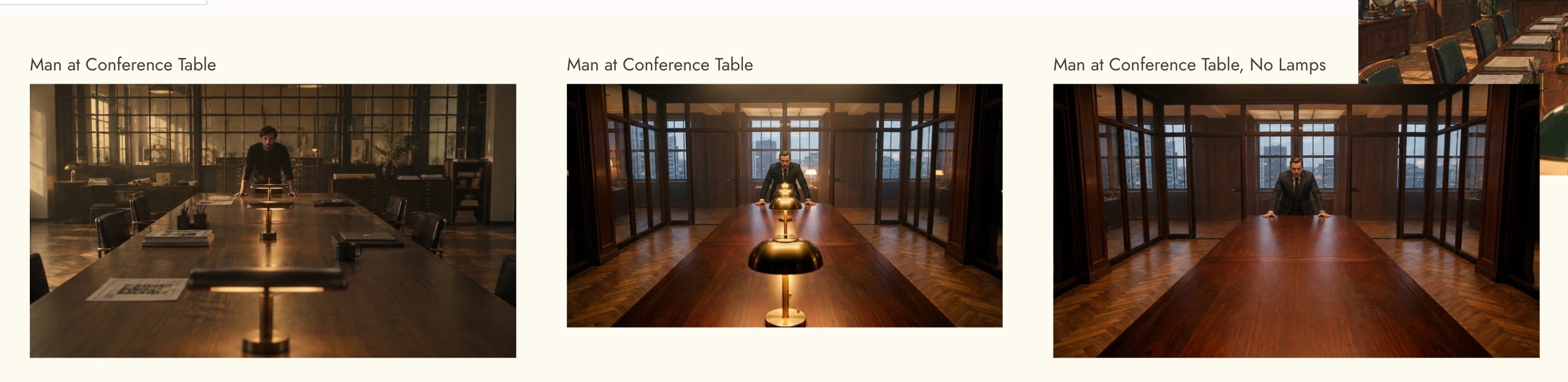
The most useful test for filmmakers. We blocked a shot in Flick's 3D Stage (a gray conference room and a yellow mannequin), then asked GPT Image 2.5 and Nano Banana Pro to turn the screenshot into a finished photographic frame while matching the camera angle, framing and table perspective.

Both kept the blockout's centred subject, eye-level camera and converging table. Nano Banana Pro stayed closer to the geometry: the table fills the same part of the frame and the lamps march down it as the prompt described. GPT Image 2.5 opened the room up, widening the walls and adding props, so the table reads shorter than in the blockout. For a frame that has to cut against a 3D previz, Nano Banana Pro was the tighter match here.
How long it takes
The picker estimates about 2 minutes for GPT Image 2.5. The runs in this guide finished faster:
| Model | Runs | Range | Median |
|---|---|---|---|
| GPT Image 2.5 | 9 | 27 to 84 s | 31 s |
| Nano Banana 2.1 | 8 | 30 to 95 s | 36 s |
| Nano Banana Pro | 2 | 34 s | 34 s |
| GPT Image 2 | 1 | 92 s | 92 s |
Times are from one canvas on one day at 1K, several of them running at once. Treat them as a snapshot, not a benchmark.
GPT Image 2.5 vs GPT Image 2 vs Nano Banana
| You want | Use | Why |
|---|---|---|
| A frame that follows camera directions literally | GPT Image 2.5 | Kept low-angle and night lighting where Nano Banana softened them |
| Several frames that already match | GPT Image 2.5 | Six runs, six near-identical layouts |
| Precise edits over several rounds | GPT Image 2.5 | OpenAI's stated focus for Sunburst |
| The cheapest GPT look | GPT Image 2 | 3 credits at Medium 1K against 5, with a very similar look |
| Matching a 3D blockout's geometry | Nano Banana Pro | Held the blockout's proportions more closely in our test |
| Options to choose from, quickly and cheaply | Nano Banana 2.1 | More variety per run at 8 credits |
The column "Why" is our assessment from the tests above, not a published benchmark. Our Nano Banana 2.1 guide runs the same tests from the other side.
Prompting GPT Image 2.5
- Lead with the camera. Shot size, angle and lens in the first sentence. GPT Image 2.5 weighs them heavily.
- Describe light as a time and a source. "Midnight, one desk lamp" works better than "moody".
- Keep the action to one beat. "Leaning back with a frustrated expression" is one beat. Add a second and one of them gets dropped.
- For edits, say what stays. "Change only the wall colour; keep the man, the chair and the framing exactly the same."
- Use the length when you need it. Prompts can run to 32,000 characters, enough to paste a full shot brief.
Bonnes pratiques
- Explore at Low or Medium 1K, then re-run the keeper at High or 2K.
- Lock one frame, then edit it into variations instead of rolling new ones.
- Use GPT Image 2.5 for frames that must follow the brief, and a Nano Banana model when you want alternatives.
- Build a character reference before generating a character across several shots.
- Keep comparisons side by side in a section so you can pick quickly.
Erreurs courantes
- Paying for High while exploring. High is twice Medium. Decide the composition first.
- Rewriting the whole prompt to fix one detail. Use an edit and name the one change.
- Expecting a new look over GPT Image 2. The gains are in control and editing; the style is similar.
- Leaving the camera unspecified. The model will pick one, and it may not be yours.
- Assuming the launch price is permanent. Flick marks the current rate as a launch price.
Sources
- OpenAI API changelog, entries for GPT Image 2 (April 21, 2026) and GPT Image 2.5 (September 8, 2026)
- OpenAI model list, checked October 20, 2026
- Tests, credit prices and timings from Flick on October 20, 2026
Guides associés
- Generate an image
- Edit image
- Image generation prompts
- Character reference
- Model credit costs
- Choosing a model
- GPT Image 2.0: the complete guide
- How to use Nano Banana 2.1
Questions fréquentes
What is GPT Image 2.5?
OpenAI's image generation and editing model, released September 8, 2026. Flick runs the Sunburst version, which OpenAI describes as its most capable image model.
What is the difference between GPT Image 2.5 and GPT Image 2?
GPT Image 2.5 is built for more precise editing and closer prompt following. The look is similar. On Flick, 2.5 costs 5 credits at Medium 1K against 3 for GPT Image 2.
Is GPT Image 2.5 free on Flick?
It is included on the Free plan. Each image uses credits, from 2 at Low 1K to 28 at High 4K.
What is Prompt Weight?
Flick's name for OpenAI's quality setting. Higher weight costs more and follows the prompt more closely.
How long does GPT Image 2.5 take?
The picker estimates about 2 minutes. Our 9 runs at 1K took 27 to 84 seconds, with a median of 31.
Is GPT Image 2.5 better than Nano Banana?
For following camera directions and producing consistent sets, it did better in our tests. For matching a 3D blockout's proportions, Nano Banana Pro did better. Pick by task.
Can GPT Image 2.5 edit my own images?
Yes. Connect the image to an Edit Image node, describe the change, and say what must stay the same.