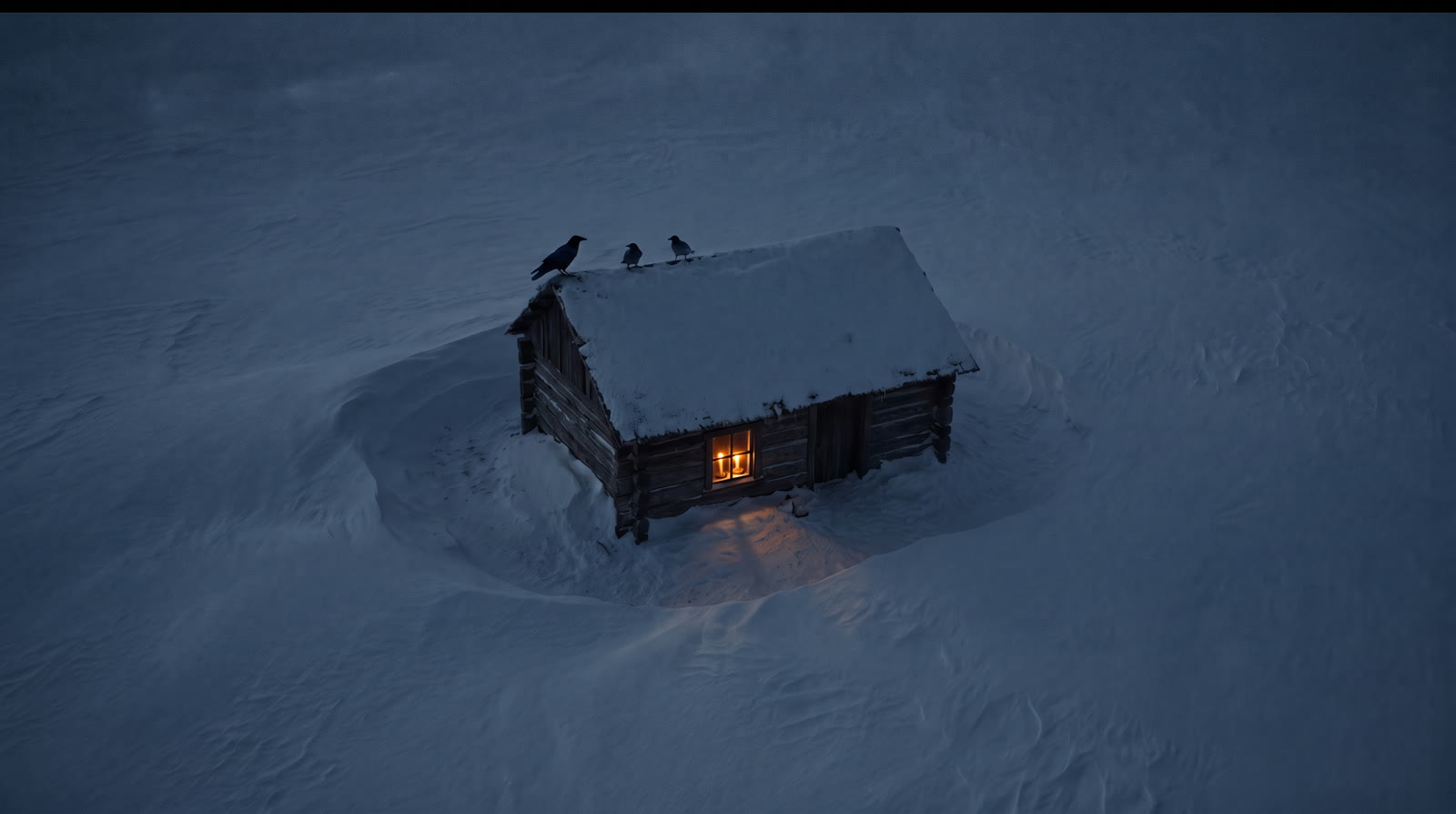
How to Use Nano Banana Pro in 2026: The Complete Guide
Oct 2026
Nano Banana Pro is Google's premium image model, Gemini 3 Pro Image, generally available since May 28, 2026. Google describes it as "the premium choice for the most complex visual tasks", with the most world knowledge of its image models. On Flick it is the model behind most character sheets and precise edits, and it is included on the Free plan.
This guide is built from more than 300 Nano Banana Pro images on our own canvases: what it does well, where it failed, what it costs, and how long it really takes.
Quick answer: how do you use Nano Banana Pro?
Pick Nano Banana Pro in the image model picker, connect any references, and describe the frame. Then:
- Render at 2K. On Flick, 2K costs the same 30 credits as 1K.
- Edit one thing at a time. Name the change and what must stay. Pro is precise when the request is small.
- Save 4K for the final. It doubles the price, and in our runs it took about five minutes rather than seconds.
| Spec | Nano Banana Pro on Flick |
|---|---|
| Google model | Gemini 3 Pro Image, GA May 28, 2026 |
| Actions | Text to Image, Image, Edit Image, Character Reference, style transfer |
| Resolution | 1K, 2K, 4K |
| Price | 30 credits at 1K or 2K, 60 at 4K; Character Reference 30; style transfer 12 |
| References (Google) | Up to 6 object images, plus up to 3 style references |
| Thinking | Always on; Google says it cannot be disabled |
| Measured time | 1K: median 34 s over 22 runs. 4K: median about 5.6 min over 8 runs |
| Plan | Included on Free |
Build your character sheet with Nano Banana Pro
One clean image in, a turnaround and expressions out, ready for every shot.
What Nano Banana Pro is good at
Google's model page lists "complex graphic design, high-fidelity product mockups, and factual data visualizations" as Pro's strengths, backed by accurate text rendering and grounding in Google Search (Gemini 3 Pro Image model page). Thinking is always on, so it reasons about the layout before drawing it.
For filmmakers that translates into three jobs, each tested below:
- Character sheets from a single image.
- Precise edits that change one thing and leave the rest of the frame alone.
- Frames that match a plan, whether that is a blockout from 3D Stage or a written shot description.
Version history
- Nano Banana Pro preview (gemini-3-pro-image-preview), November 20, 2025.
- Nano Banana Pro GA (gemini-3-pro-image), May 28, 2026. The preview was retired the following month.
- Its faster siblings are Nano Banana 2.1, Google's default since October 6, 2026, and the deprecated Nano Banana 2. Our Nano Banana 2.1 guide compares all three.
How to use Nano Banana Pro on Flick
- Add an image node and pick Nano Banana Pro. Generate an image covers the basics.
- Set resolution to 2K. Same price as 1K, twice the pixels to crop or animate from.
- Connect references. A character image, a product shot or a style frame. Google allows up to 6 object images and 3 style references.
- Write the prompt as a brief. Say what each reference is for: "Image 1 is the character, Image 2 is the room."
- Edit the keeper. Hover it, open Image, and choose Edit & Merge. Edit image explains merging several references.
- Build characters once. Use Character Reference or a turnaround prompt, then reuse the sheet in every shot.
Test 1: character sheets from one image
We asked Nano Banana Pro for a turnaround sheet and an expression sheet for two cartoon characters we designed, each from a single source image: Pip, a small glowing alien, and Milo, a teenage boy in a hoodie.
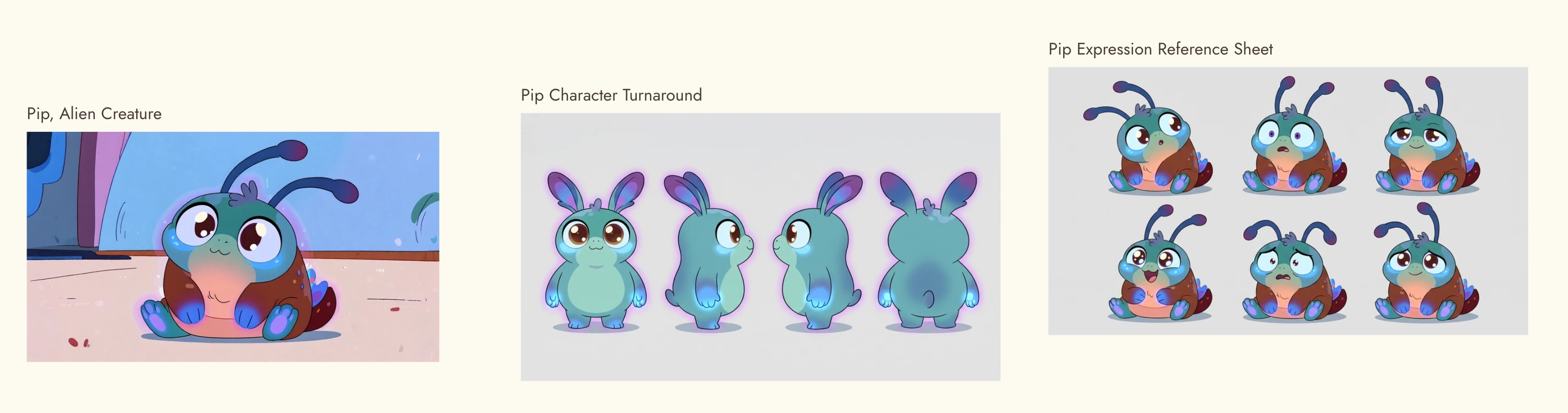
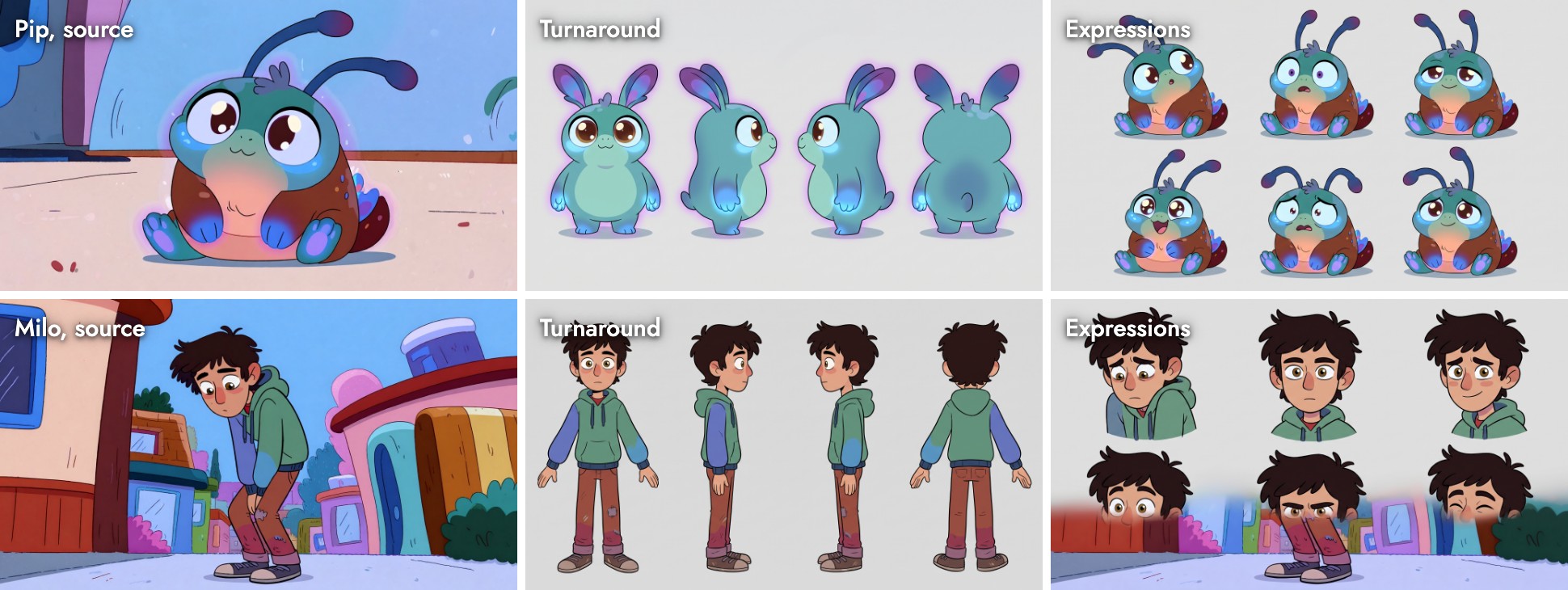
Two of the four sheets worked and two did not, and both failures have a clear cause:
- Pip's turnaround lost his antennae. The prompt described him with "big expressive ears/antennae". Given a choice, the turnaround picked ears and redrew him as a teal rabbit. The expression sheet, with the same wording, kept the antennae. Never offer the model a choice about a feature the reference already shows.
- Milo's expression sheet leaked the background. The top row is clean, but the bottom row blends in the street from the source image. Re-run sheets like this, or crop the source to the character first.
- Milo's turnaround and Pip's expressions held up: same face, outfit and proportions in every panel.
The turnaround prompt we used, verbatim:
Create a professional character turnaround reference sheet of this exact creature, Pip (referenced by the source image). Show the SAME creature in several full-body views in a row, front, left profile, right profile, and back, in a neutral standing pose. Keep its identity identical in every panel: same round soft body, oversized luminous eyes, stubby glowing paws, soft teal-blue bioluminescent skin, big expressive ears/antennae. Plain seamless light-gray background, even flat lighting, orthographic framing, full body visible in every view. Only the creature, no scene or props. Maintain the 60s cartoon style.The fix is one word: "antennae", not "ears/antennae". The character consistency guide shows how to carry a finished sheet through three shots.
Test 2: a precise edit
We generated a night aerial of a snowbound cabin, then asked for one change: "can we add two more small crow on the roof?"
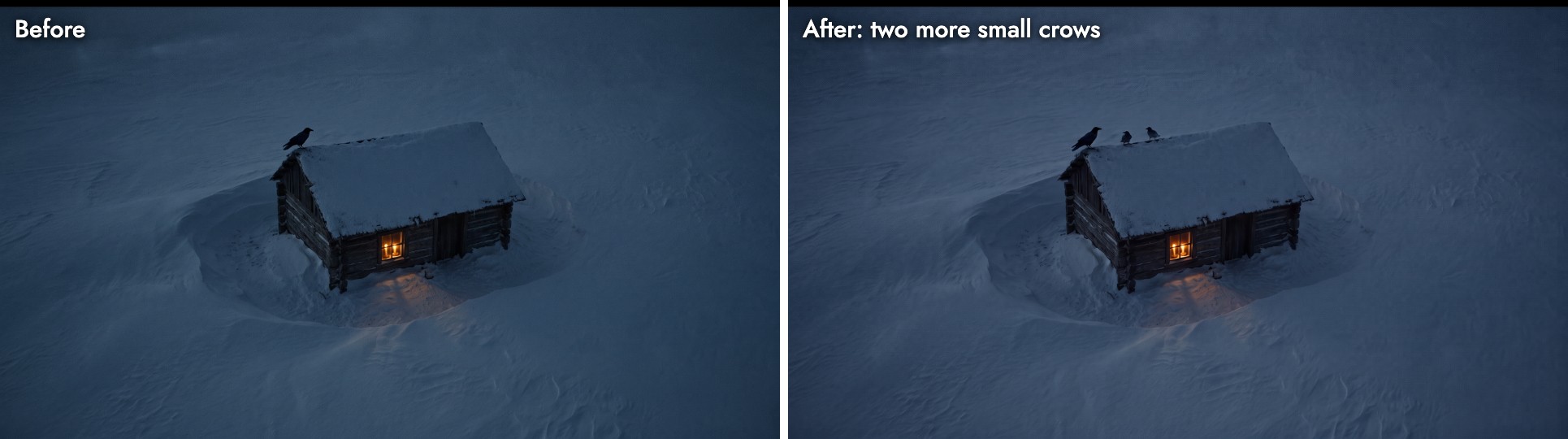
The cabin, the light in the window, the drifts and the framing stayed where they were; two smaller crows appeared on the ridge, as asked. The whole frame shifted slightly cooler, which is the usual cost of an edit and easy to grade back. This is the kind of request Pro handles best: small, specific, and clear about what stays.
Test 3: matching a 3D blockout
We blocked a shot in Flick's 3D Stage, a gray conference room with a yellow mannequin, and asked Nano Banana Pro and GPT Image 2.5 to turn the screenshot into a photographic frame while matching its angle, framing and table perspective.

Nano Banana Pro kept the blockout's geometry: the table fills the same part of the frame, the lamps run down its centre, and the man stands where the mannequin stood. GPT Image 2.5 widened the room. When a frame has to cut against previz, that difference saves a round of edits.
Test 4: one prompt, four models
The same prompt, "A cinematic low-angle wide shot inside a small, dimly lit office at midnight...", on four models at 1K:
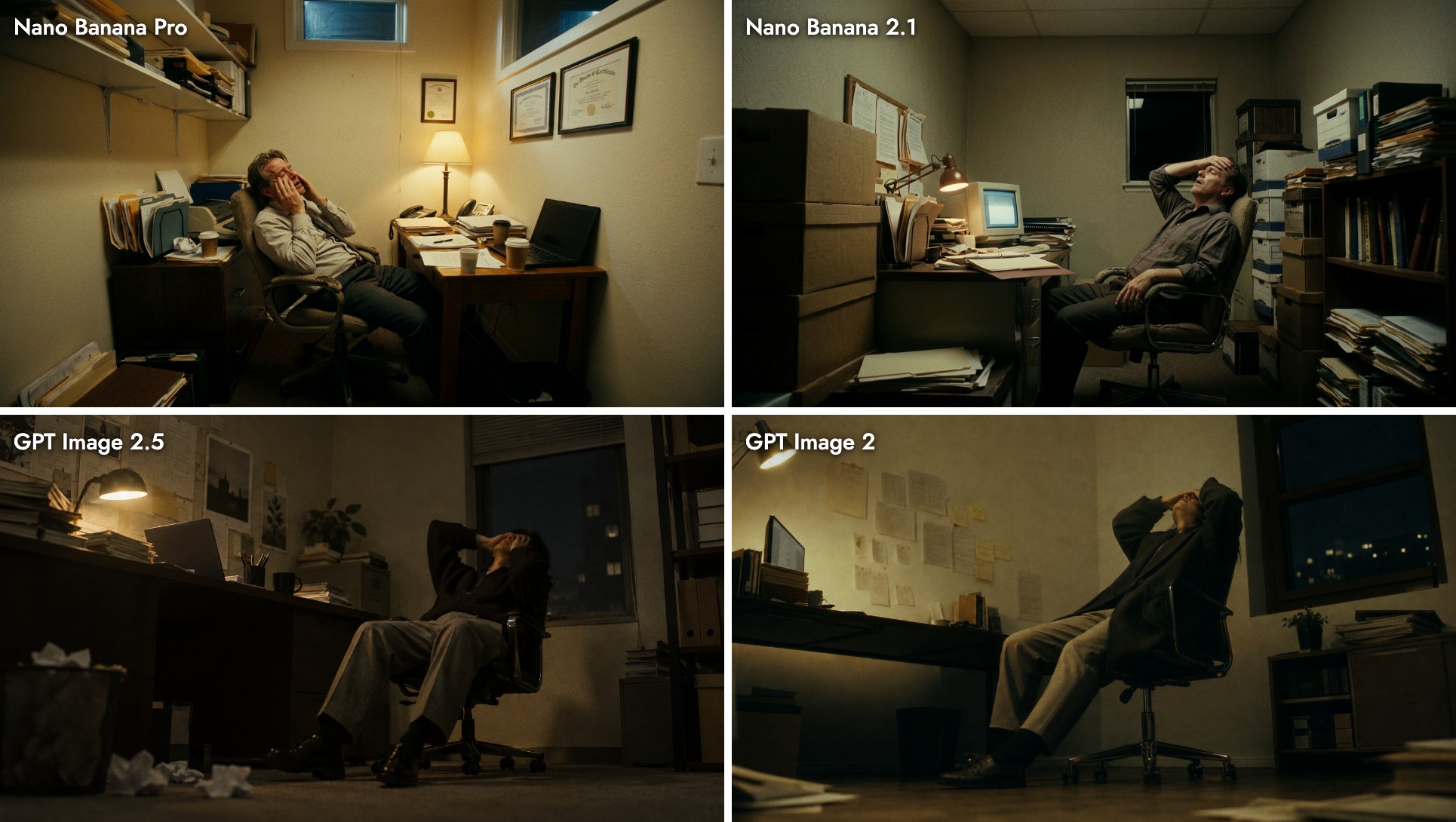
Nano Banana Pro gave the most designed room, with framed certificates, shelves of binders and a warm lamp, but it framed the shot at eye level and lit it brighter than "dimly lit at midnight". If the camera angle is the point, put it first and repeat it, or use GPT Image 2.5, which took it literally.
4K: what you get and what it costs
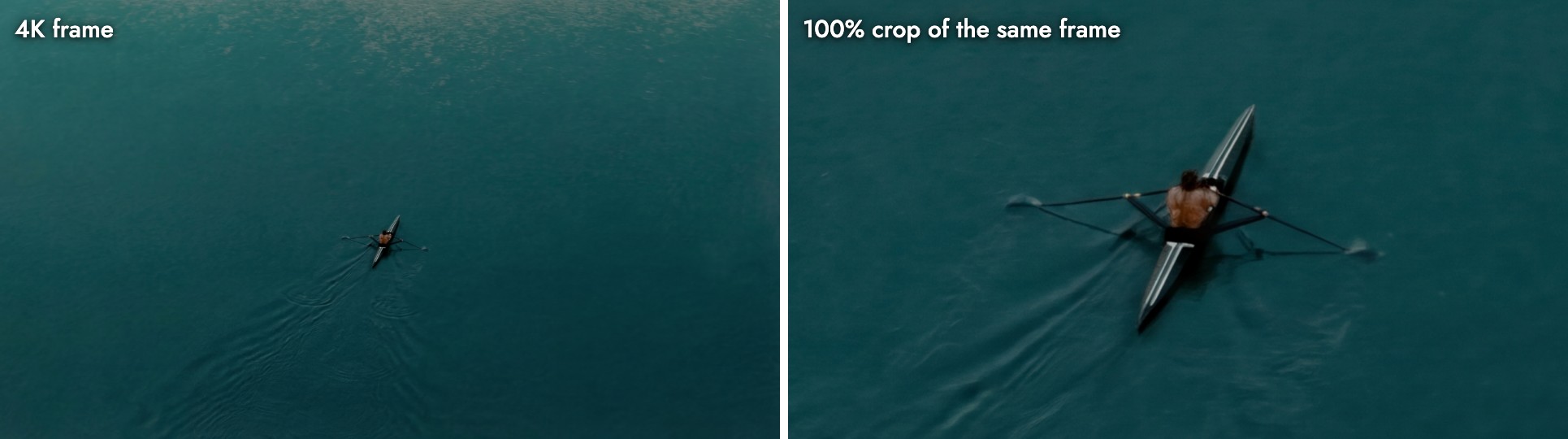
At 4K (5504 × 3072) there is enough detail to crop a usable close-up out of a wide. Two things to know first:
- It takes minutes, not seconds. The picker estimates about 45 seconds. Across 8 of our 4K runs the median was about 5.6 minutes and the longest 11.5. At 1K the median was 34 seconds over 22 runs.
- It still misreads nouns. The prompt asked for "a lone kayaker paddling". The result is a rower in a racing scull, with oars, not a paddle. Read the 4K result before you build on it.
What it costs
| Task | 1K | 2K | 4K |
|---|---|---|---|
| New image | 30 | 30 | 60 |
| Edit | 30 | 30 | 60 |
Character Reference is a flat 30 credits and style transfer a flat 12.
Credits on Flick. For comparison, Nano Banana 2.1 is 8 credits at 1K and GPT Image 2.5 is 5 at Medium 1K. Current rates for every model are on model credit costs.
When to use Nano Banana Pro, and when not to
| You want | Use | Why |
|---|---|---|
| A character or expression sheet | Nano Banana Pro | Held identity in two of four sheets, with clear fixes for the other two |
| One precise change to a finished frame | Nano Banana Pro | Changed only what was asked in our edit test |
| A frame that matches a 3D blockout | Nano Banana Pro | Closest to the blockout's geometry in our test |
| Many quick options to choose from | Nano Banana 2.1 | About a quarter of the price at 1K |
| A camera angle taken literally | GPT Image 2.5 | Kept low-angle where Pro framed at eye level |
The column "Why" is our assessment from the tests in this guide, not a published benchmark.
Prompting Nano Banana Pro
- Assign every reference a job. "Image 1 is the character, Image 2 is the room, Image 3 is the light."
- Describe only what the reference does not show. Repeating features invites the model to redraw them, as Pip's ears showed.
- Remove choices. "Ears/antennae", "hat or cap", "red or orange" all let the model pick.
- Ask for clean backgrounds on sheets. "Plain seamless light-gray background, no scene" reduced bleed, but not always; check the whole sheet.
- Put the camera first. Angle and lens lead the prompt; Pro otherwise drifts to eye level.
最佳實踐
- Default to 2K; it is free compared with 1K.
- Make a turnaround and an expression sheet for every recurring character before shooting.
- Keep sheets, edits and finals together in a section.
- Use visual styles or a style reference instead of describing a look in words.
- Batch 4K renders at the end of a session; they take minutes each.
常見錯誤
- Paying for 1K. 2K is the same price.
- Rendering 4K while exploring. Twice the credits and minutes per frame.
- Offering alternatives in the prompt. "Ears/antennae" produced a different character.
- Trusting a sheet without checking every panel. Background bleed hid in the bottom row of Milo's sheet.
- Asking for several edits at once. One change per edit keeps the rest of the frame stable.
Sources
- Gemini 3 Pro Image model page, checked October 20, 2026
- Gemini API image generation guide, checked October 20, 2026
- Gemini API release notes, entries for November 20, 2025 and May 28, 2026
- Tests, credit prices and timings from Flick canvases, October 2026
相關指南
- Character reference
- Character consistency across three shots
- Edit image
- Generate an image
- 3D Stage basics
- Model credit costs
- Nano Banana 2.1 vs 2 vs Pro
- How to use GPT Image 2.5
常見問題
What is Nano Banana Pro?
Google's premium image generation and editing model, Gemini 3 Pro Image, generally available since May 28, 2026.
How much does Nano Banana Pro cost on Flick?
30 credits for a 1K or 2K image or edit, 60 at 4K, 30 for Character Reference and 12 for style transfer. It is included on the Free plan.
Is Nano Banana Pro better than Nano Banana 2.1?
For complex frames, precise edits and matching a plan, yes in our tests. For quick options, 2.1 is about a quarter of the price.
How long does Nano Banana Pro take?
In our runs, a median of 34 seconds at 1K and about 5.6 minutes at 4K.
Can Nano Banana Pro make character sheets?
Yes. Give it one clean image of the character and describe the sheet. Check every panel, and avoid ambiguous wording about features the image already shows.
How many reference images can Nano Banana Pro use?
Google lists up to 6 object images plus up to 3 style references.
Why did my edit change more than I asked?
Usually because the request named several changes or did not say what must stay. Ask for one change and list what to keep.