
How to make realistic AI videos that don't look like AI slop: 5 fixes from a real film
To make a realistic AI video, direct what a real camera would record. Base every set on a real place, build each still from a locked layout with the light, materials and focus written as things you can check, then write the camera, the acting and the action as physical behavior. Below are the 5 fixes Jaime Yao used on In ’twixt Vows, a 16-minute photoreal film made in Flick, each with the real prompt behind it, plus what the film cost to make.
Prompts, stills and numbers from In ’twixt Vows by Jaime Yao (Flick Residency). Jaime tells the story of the film in his own behind-the-scenes post.
Try this method on your own shot with Sketch to Video: your sketch sets the layout, Nano Banana Pro draws the photoreal frame, and a video model animates it.
Make your next shot look filmed
Start from a sketch or a still, lock the layout, and turn it into a photoreal frame and a moving shot.
What makes a realistic AI video: the giveaways and the fix for each
"AI slop" is the glossy, generic look you get when the model fills each gap in your prompt with its most average guess.
| What gives it away | The fix |
|---|---|
| Sets and costumes that could be anywhere | Fix 1: base them on a real place, era and material |
| Plastic skin, clean new surfaces | Fix 2: say what each material has been through |
| Flat "cinematic" light, everything evenly lit | Fix 2: name the light source, what it hits and what stays dark |
| Everything razor sharp and too clean | Fix 2: name the focal subject, then add grain and lens softness last |
| A camera that glides with no weight | Fix 3: write the operator's steps, drift and corrections |
| Big, generic acting and wide mouth shapes | Fix 4: direct behavior and timing, not the emotion |
| Floaty fights with no weight behind a hit | Fix 5: contact, force and reaction, inside a time window |
Seven giveaways of an AI video, and which of the 5 fixes solves each.
Fix 1: Base every set, costume and prop on something real
What it is
Why it works: Ask for a "fantasy village" and the model gives you the average one it has seen most. A real place gives you details you can name and check.
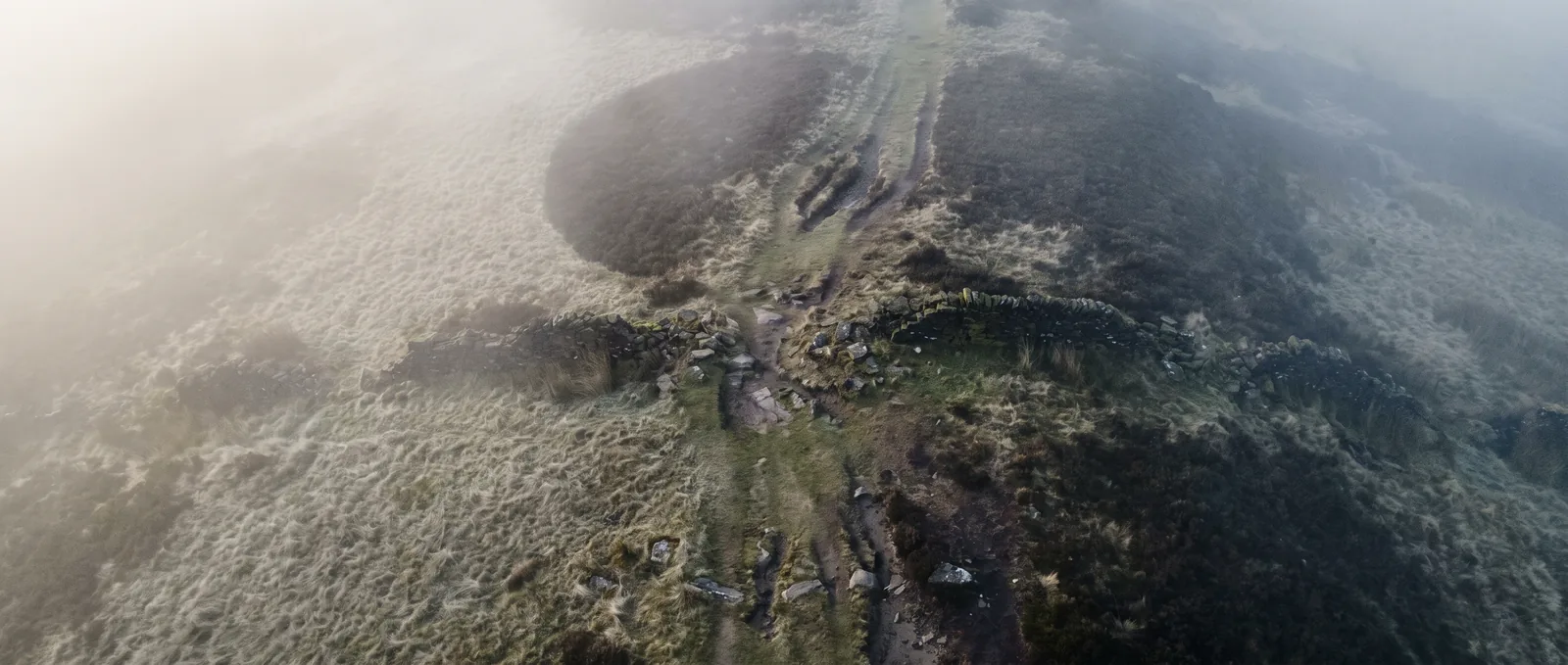
In the film: Jaime based the film's Outpost on Hadrian's Wall, and the research gave him exposed dark rock, shallow soil, short grass on the ridge and denser plants in the sheltered valley below.
How to get it
Research first: For each set, costume and prop, pick a real place, era or object. Note the terrain, plants, building materials and light.
Write a handbook: Ask the agent to turn the research into an environment handbook: one short document per location covering terrain, vegetation, materials and lighting.
Follow it in every prompt: Jaime has the agent follow the handbook "strictly" whenever it writes a prompt set in that place, so the land is always named as one specific place:
Note: A line from the film's workflow, quoted in its public breakdown
… a late-autumn upland ridge in northern Britain near Hadrian’s Wall …Fix 2: Make each still look photographed, not rendered
Most realistic shots start from a still, so the still sets the look of the clip. This is also how to make AI images look real.
2.1. Block the shot as a white model first
What it is
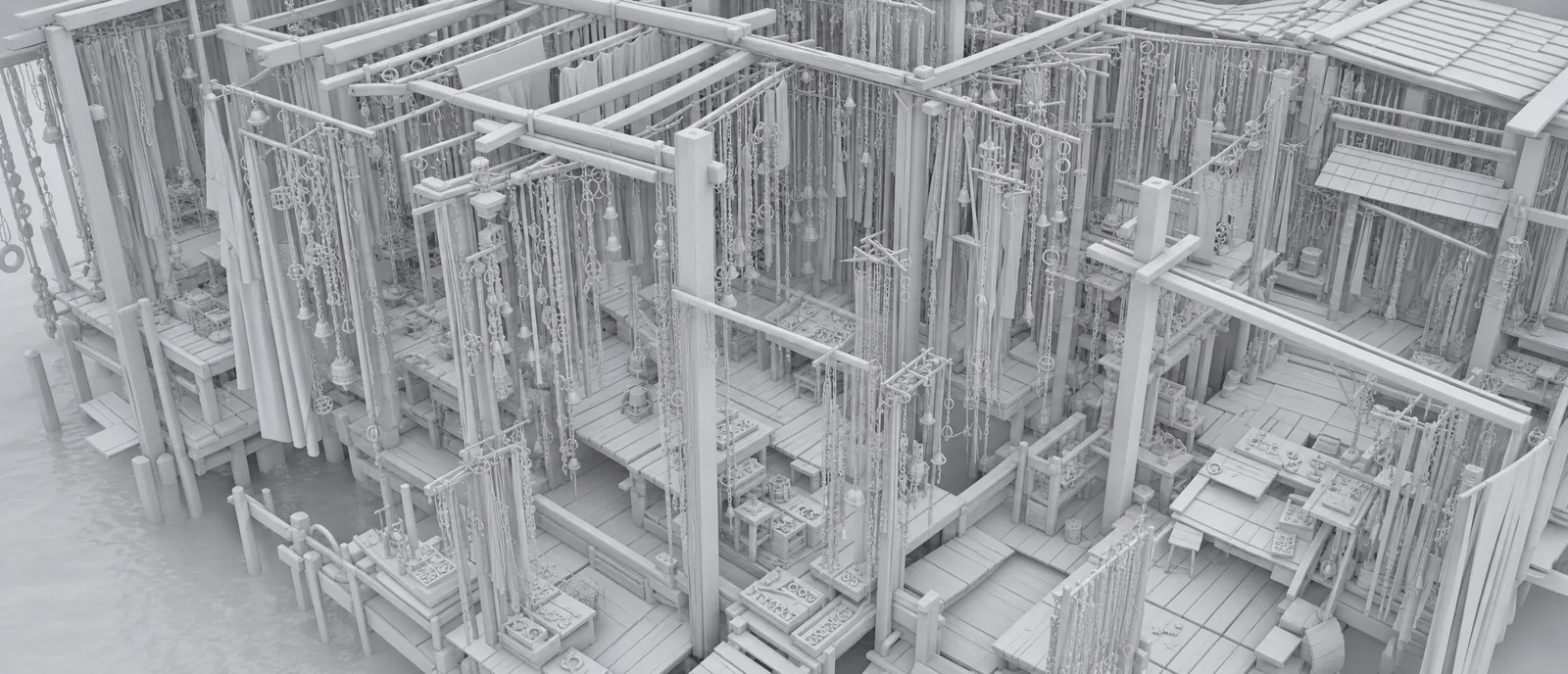
White model: A plain version of the shot where every surface is the same white, shaded only to show shape and depth (also called a clay render). Use it to block the shot: settle the camera angle and where everything sits before any texture exists.
Why first: Jaime uses GPT Image 2 here because, he says, it is the strongest at understanding spatial relationships. Keeping it white also avoids the "blotchy textures" he sometimes gets in its finished images.
How to get it
Prompt the layout only: Camera position and angle, the main shapes, and how the spaces connect. End with the white-model look so no materials sneak in. Prefer to draw? Our Viking film post shows the hand-sketch route.
Model: GPT Image 2 · Note: Trims marked …
3D white-model environment concept.

Semi-overhead three-quarter view. The camera is positioned above the environment and looks diagonally downward, placing the main architectural masses, platform relationships, hanging layers, and winding circulation paths within the same frame.

A half-open silversmith workshop constructed beside water. …

Unified 3D white model / clay render. All architecture, platforms, hanging elements, tools, and small objects use the same clean white modeled surface. Soft ambient shading defines volume, occlusion, spatial depth, and structural relationships.
…
2.2. Lock the layout, then change only how things are rendered
What it is
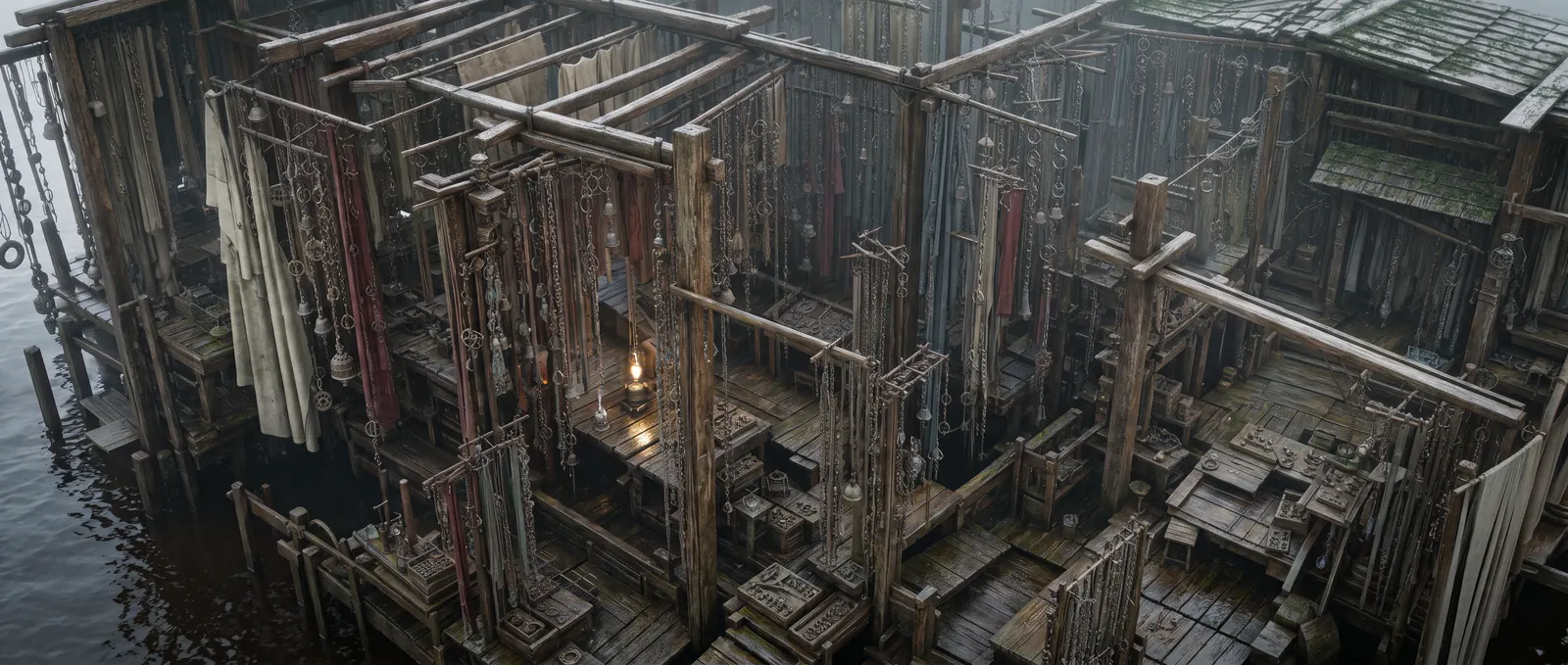
Edit target: Give the photoreal model the white model as the image to edit, not as loose inspiration. As Jaime puts it: "I'm changing how the existing objects are rendered rather than asking for more objects or more detail everywhere."
How to get it
Lock first: One "Keep … 100% unchanged" line for each settled thing: composition, camera, framing, layout.
Then transform: One sentence that names the change, here from white model to live action.
Give each image one job: With people in the shot, add one reference per character. For the blacksmith shot in his talk, Jaime gave Nano Banana Pro three images: the layout, plus a reference for each of the two characters.
Model: Nano Banana Pro · Note: One reference, the white model above, shown by its canvas name; trims marked …
Keep composition 100% unchanged.
Keep camera position 100% unchanged.
Keep framing 100% unchanged.
Keep the entire architectural layout, platform structure, hanging-object density, spatial layering, and all object placement 100% unchanged.

Transform [Silversmith Workshop White Model] from a 3D white-model render into a live-action environment.
…
2.3. Write light, materials and focus as things you can check
What it is
Visible instructions: "Cinematic" or "realistic" gives the model nothing to check. Say where the light comes from, what catches it, what stays dark, and what each material has lived through. Jaime: "Those are concrete relationships I can check in the result."
How to get it
Light: One main source, what it hits, what falls into shadow, and any small light inside the scene, like a lamp.
Materials: The history of each surface: damp, wear, repairs, oxidation. That history makes wood and metal look used.
Focus: Name the focal subject and what falls out of focus. In his blacksmith shot, the blacksmith is the clearest part of the frame, but "not unnaturally razor-sharp."
Model: Nano Banana Pro · Note: The same prompt, continued; trims marked …
All timber posts, beams, platforms, hanging racks, roof edges, shelves, tables, stools, and wooden boxes become real aged wood.

The wood has been exposed to damp air and waterside conditions for a long time. Most surfaces are deep wet brown, dark gray-brown, and weathered aged brown. Timber close to the water is darker and visibly more moisture-soaked. The surfaces show natural wear, slight warping, small cracks, repeated repair marks, and reinforcement pieces of slightly different ages. …

The silverwork is mainly aged silver-gray and pale oxidized gray rather than fresh bright silver. Frequently touched and rubbed edges retain small cold metallic highlights, while recesses and gaps are darker. …

The main light source is cool gray-white natural daylight from an overcast sky, entering through the open edges and structural openings.

Timber edges near the open sides, cloth edges facing the sky, and selected silver surfaces receive brighter cool light. Deeper work areas, spaces beneath the roof, areas behind hanging layers, and the undersides of platforms remain distinctly darker.

One work area contains a very small oil lamp. The lamp creates only a small local pool of warm light, mainly touching the nearby workbench and a few silver objects.
…
Words that do the work: "rather than fresh bright silver" rules out the shiny new look. "remain distinctly darker" tells the model where not to add light.
2.4. Add grain and lens flaws last
What it is
Finishing details: Real cameras leave marks: film grain, sensor noise, slightly soft lenses and color fringes on edges (chromatic aberration). Jaime calls them "restrained finishing details, not a substitute for lighting and materials."
How to get it
One line at the end: Put it after the light and materials, and reuse it on every still so the shots match. All 5 of the film's Nano Banana Pro prompts we checked end with grain, sensor noise and lens softness.
Model: Nano Banana Pro · Note: The last lines of the same prompt
Live-action realism.
Include subtle film grain, slight sensor noise, mild lens softness, very slight chromatic aberration, soft bloom on small highlights, and natural imperfect real-camera rendering.
Wood, fabric, metal, water, and damp surfaces all have tactile, physically realistic material detail.
Watch for: Grain can't save a weak frame. If the light and materials are wrong, grain only makes a noisy fake.
Fix 3: Move the camera like a person is holding it
What it is
Handheld: The camera is held by a person, not a rig, so it bobs, drifts and corrects. You prompt it by describing what that person's body does to the frame.
How to get it
Place the operator: Say where the camera is and what the person holding it does. Here they walk backward in front of her.
Write the shake as steps: Bobbing from each step, drift, roll, a bigger dip when the operator steps over something, then the correction. Allow one brief focus slip that recovers.
Ask for clean output: No cuts, no subtitles and no background music. Add music in the edit.
Model: Seedance 2.5, reference to video · Note: 30 s, 720p; the opening and camera part of a longer prompt; trims marked …
Live-action photographic realism.
No cuts.
No subtitles.
No background music.

Camera

Chest-up medium close-up from directly in front of her.
She keeps walking forward while the camera operator walks backward facing her.

Use strong, heavy handheld throughout:
irregular vertical bobbing from every backward step,
slight lateral drift, slight roll, slight height changes,
and occasional stronger dips or side shifts when the operator steps over roots or moves around trunks, then quick correction within one or two steps.
Allow one very brief natural focus slip, then quick recovery to her face.
…
When a prompt can't get the move: For an exact path, like the 90 degree turn Jaime needed for one shot, block the shot in 3D Stage (Flick's 3D space for recording a camera move) and give the recording to Seedance as the camera reference. Our guides to AI camera movements and how to make AI movies show both steps.
Fix 4: Direct the performance as behavior, not emotion
What it is
Why it works: Jaime: "The problem isn't that AI can't deliver a good performance. It's that we haven't directed it carefully enough." "Sing sadly" gets the model's average sadness.
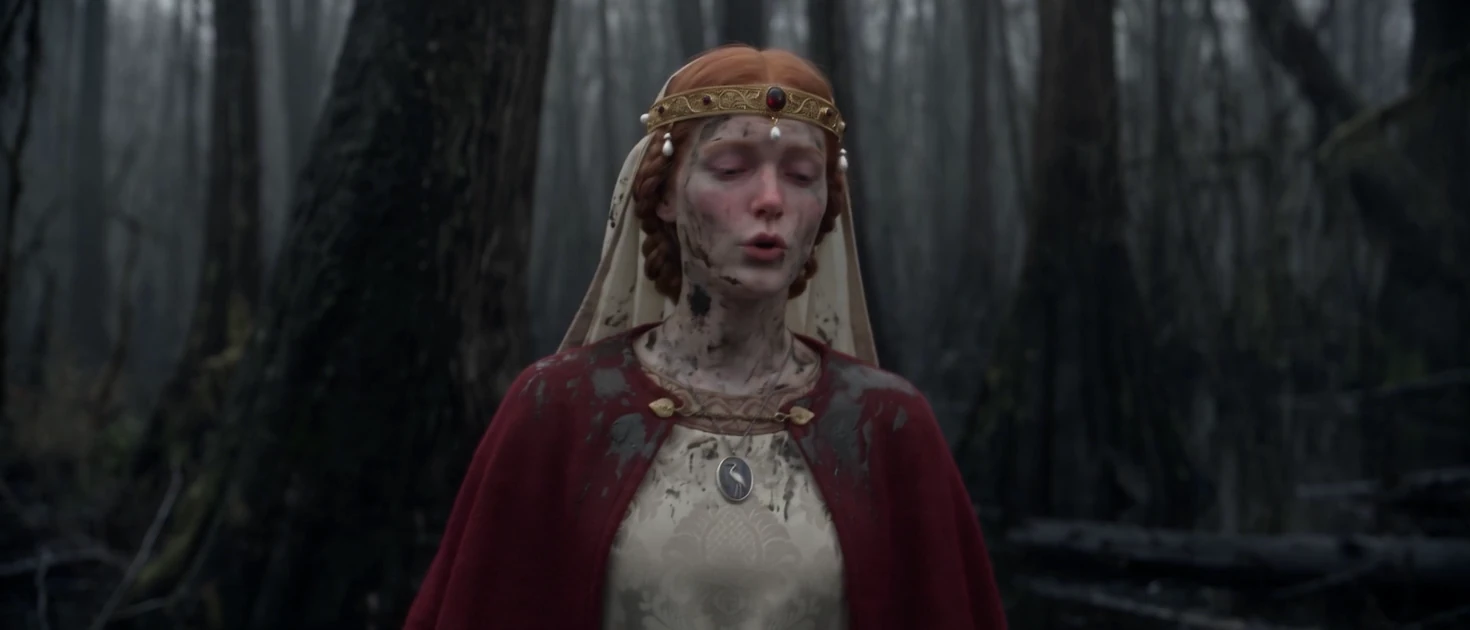
In the film: Lady Caerwyn is cold, exhausted, grieving and still trying to keep the song going, so the prompt spells out what that does to her breath, body and face.
How to get it
Know the character first: Talk with the agent about who they are, what they've been through and what they want, then work out how they'd react.
Write the body, keep the face small: Posture and how they move; how far the mouth opens, where the eyes go, how often they blink.
Time the lines: Give each line a time window and say what happens on a specific word.
Give a voice reference: This take got a clip of her singing, for her voice and accent.
Model: Seedance 2.5, reference to video · Note: The same 30 s take as Fix 3, performance part; trims marked …
Overall performance

From the first frame she is already walking and already singing.
She does not walk upright and composed. She moves with fatigue and slight disorientation:
upper torso slightly folded inward,
shoulders low,
neck loose,
head slightly pitched forward,
chin slightly lowered.
…
While singing, do not use large mouth shapes.
The singing stays quiet, breathy, slightly unstable in pitch, uneven in phrase timing, with no stable vibrato.
Many phrase endings leak softly toward near-speech.
Lips open only as much as quiet speech,
jaw movement stays small,
…
gaze drifting toward distant points beside the camera rather than meeting the lens,
blinks infrequent and slow.
…
On "remember," raise the inner brow ends slightly more and lift both mouth corners very slightly for less than one second, with no teeth.
Words that do the work: "do not use large mouth shapes" and "Lips open only as much as quiet speech" stop the over-sung look. "beside the camera rather than meeting the lens" keeps her inside the scene instead of performing to it.
Fix 5: Write action as contact, force and reaction, with a time window
What it is
Beats: Floaty fights happen when a blow lands with no weight and the body that's hit doesn't react. Break each move into four beats: contact (what touches what), force (how hard, and from where), reaction (what the other body does), and the next movement.
How to get it
Give the beats a time window: If three strikes happen in one second, the prompt has to fit each strike, its target and the response inside that second.
Let the agent write the beats: You only state the timing. What Jaime tells the agent:
Note: From Jaime's talk, an example request to the agent
his attacks are extremely fast. He delivers 3 consecutive strikes in 1 second, so make sure the timing reflects that.The full timed fight prompts from this film are in our guide on how to choreograph a fight scene with AI.
Have the agent write the prompts, then check them yourself
Jaime's rule for long, detailed prompts is not to type them: "don't write the prompts yourself. Have the agent write them, then review and correct them yourself."
- Give the agent the rules. Flick's docs have a guide for each part of this page: the Image Generation Prompts Guide for stills, the Seedance Performance Guide for acting and the Seedance Action Guide for action. Ask the agent to follow them whenever it writes a prompt.
- Give it your research. The environment handbook from Fix 1, and what you've worked out about each character in Fix 4.
- Read every prompt before you generate. Is the layout locked, is the light named, is the acting small? If not, say exactly what is wrong so the agent doesn't repeat it. Talking to the agent (docs) shows how to save rules it keeps.
Which AI models make realistic video, and what it costs
In ’twixt Vows gave each model one job: ideas, layout, final stills, then video.
| Model | Its job in the film | Made for the film | Credits per generation (median) | Time per generation (median) |
|---|---|---|---|---|
| Midjourney | Ideas and first looks | 84 images | 210 in total (21 generations) | about 20 s |
| GPT Image 2 | White-model layouts | 158 images | about 11 new, 18 as an edit | about 1.5 to 2 min |
| Nano Banana Pro | Final photoreal stills | 903 images | about 30 | about 30 to 40 s |
| Seedance 2.0 | Video takes | 157 clips | about 540 with references | about 5 min |
| Seedance 2.5 | Video takes | 190 clips | about 360 with references | about 5 min |
"Made for the film" is from Flick's public breakdown of the film and includes discarded takes. Credits and time are medians per successful generation in this film's project, except Midjourney's credits, which are the total (Flick data, July 24 to October 14, 2026).
- Stills are cheap, video is not. 72% of the film's 1,549 successful generations were images, but video took 86% of its 223,959 credits (Flick data, July 24 to October 14, 2026). Settle the frame before you animate it.
- About 14,000 credits per finished minute: 223,959 credits for a 16-minute film (same data).
- 5.6 times as much video as the film runs: 5,381 seconds of generated video for a 960-second film (Flick's public breakdown), so most of it never made the cut.
Make your first realistic AI video in Flick
Sign up, open a canvas and try the 5 fixes on one shot.
Every account gets 100 free credits when you sign up, and 100 more every Monday.
Create your free Flick account →
Keep going
- Behind the scenes of In ’twixt Vows Jaime Yao's full talk in his own words.
- Nano Banana Pro guide What the still model does well, including matching a 3D blockout.
- AI camera movements 12 camera moves with real prompts, and when to draw a move in 3D Stage.
- How to make AI movies The whole process, from beats to the edit, with data from 9 films made in Flick.
- How to choreograph a fight scene with AI Timed, numbered fight shots from In ’twixt Vows.
- Omni Reference (docs) How Flick's reference-to-video mode uses each reference: start frame, character, camera movement and speech.
About the author
Bilguun Bayarkhuu is a growth engineer at Flick. This guide is built from the public workflow of In ’twixt Vows by Jaime Yao, Jaime's tutorial on Flick's YouTube channel, and Flick's own generation data for the film.
Frequently Asked Questions
Which is the most realistic AI video?
There is no single winner, and the model matters less than the direction. For In ’twixt Vows, a 16-minute photoreal film, Jaime Yao made the final stills in Nano Banana Pro and the video in Seedance 2.5 and 2.0. What made it look filmed was the input: a still that already looks photographed, and prompts that describe light, materials, camera and acting as physical things.
How to get realistic AI videos?
Base every set on a real place. Build each still from a locked layout, with named light, material wear and a focal subject, and add grain last. Write the camera as a person holding it, direct the acting as small timed behavior, and write action as contact, force and reaction inside a time window.
How does AI generate such realistic videos?
It looks real when you leave the model few gaps to fill. A video model fills every gap in the prompt with its most average guess. That average look reads as AI. Start from a frame that already looks photographed, and write light, materials, camera and acting as physical behavior.
How to make an AI image look realistic?
Lay out the shot as a plain white model, then have a photoreal model such as Nano Banana Pro keep that layout "100% unchanged" while it changes only materials and light. Name the light source and what stays dark, say what each surface has been through, and end with one line of film grain, sensor noise and mild lens softness.
What are some good prompts for AI videos?
Prompts that describe things you can check on screen. Instead of "handheld, emotional", In ’twixt Vows writes "the camera operator walks backward facing her" and "Lips open only as much as quiet speech". Lock what your references already show, describe only what changes, and add "No background music" if you will score the film later.
How are people making realistic AI videos?
By making a photoreal still first and then animating it, with one model for each job. For In ’twixt Vows, a 16-minute film made in Flick, Jaime Yao used Midjourney for ideas, GPT Image 2 for layouts, Nano Banana Pro for the final stills and Seedance 2.0 and 2.5 for video.