
How to Use Wan 3.0 in 2026: The Complete Guide
Oct 2026
Wan 3.0 is Alibaba's newest video model: up to 30 seconds in one generation, at up to 1080p, with sound generated alongside the picture. On Flick it runs from an image-to-video node, as a video extension, and as reference to video. Premium video models are available on Standard and above, and Wan 3.0 is one of them.
The most useful thing to know before you spend credits on it: Wan 3.0 edits as well as animates. Give it a loose prompt and it will cut between angles on its own. This guide shows when that happened in our tests, when it did not, and how to steer it.
Quick answer: how do you use Wan 3.0?
Connect a start frame to a video node, pick Wan 3.0, and describe the action. Then:
- Start at 720p, 5 seconds. 60 credits, and enough to see how Wan reads your frame.
- Write the shots you want. A loose prompt lets Wan 3.0 storyboard the clip itself, with cuts.
- Go long only with one simple action per shot. Wan runs to 30 seconds, but more beats in one prompt means more cuts.
| Spec | Wan 3.0 on Flick |
|---|---|
| Maker | Alibaba (Wan, Tongyi Lab) |
| Modes on Flick | Image to video (start and optional end frame), video extension, reference to video |
| Length | 2 to 30 seconds, in one-second steps |
| Resolution | 480p, 720p (default on Flick), 1080p; 30 fps |
| Aspect ratios | 16:9, 9:16, 1:1, 4:3, 3:4 |
| Audio | Native: dialogue, sound effects and music, on by default |
| Price | 60 credits for 5 s at 720p; half at 480p, double at 1080p |
| Prompt length | Up to 20,000 characters |
| Measured time | 720p, 5 s: 2 to 3 min. 720p, 15 s: about 5 min. 1080p, 5 s: about 17.5 min |
Turn a still into a sequence with Wan 3.0
One frame in, up to 30 seconds out, with sound.
What Wan 3.0 is
Alibaba Cloud describes Wan 3.0 as an all-in-one video model that switches task by what you give it: text, a first frame, a first and last frame, a mix of image, video and audio references, a document or web page, a video to edit, or a video to extend. It generates up to 30 seconds at 30 fps in 480p, 720p or 1080p, and produces dialogue, ambient sound and music in the same pass (Wan 3.0 guide, Alibaba Cloud Model Studio).
Flick exposes three of those modes: image to video, extension, and reference to video. Text-only, document-to-video and video editing are not in Flick's picker.
Version history on Flick
- Wan 2.6 is still in the picker for image to video: 5, 10 or 15 seconds, 720p or 1080p, with automatic scene segmentation.
- Wan 2.7 is an image model on Flick, for text to image and image editing.
- Wan 3.0 adds clips up to 30 seconds, 480p to 1080p, native audio, extension and reference to video.
How to generate with Wan 3.0 on Flick
- Make or import a start frame. Wan 3.0 keeps the look of the frame, including its style: a flat illustration stays a flat illustration.
- Add a video node. Hover the image, open Video, and choose Generate Video. The first project walkthrough shows the step.
- Pick Wan 3.0, then resolution and length. 720p and 5 seconds is the cheapest useful test. Open the duration menu and scroll for anything past 8 seconds.
- Decide on shots before you write. One action and "(fixed camera)" for a single locked shot; labelled shots if you want cuts. Plan shots that cut together helps here.
- Leave audio on. It costs nothing extra on Wan 3.0, and you can mute it later in the edit.
- Extend or re-roll. A clip of 15 seconds or less can be extended, as long as the source plus the extension stays within 30 seconds.
Test 1: "animate this image"
The shortest prompt we have run through Wan 3.0, on a flat Midjourney illustration of a man in a leopard-print suit, a pink car with a dollar sign on its roof, and a woman in red: "animate this image". 1080p, 5 seconds.

Wan 3.0 did not just move the picture. It cut it into four shots in five seconds: a wide, a close-up of the suit, a medium of a banknote changing hands, and a close-up of the dollar sign, now glowing like neon. The flat, risograph-like style held through every cut. That is a generous reading of a two-word prompt, and a warning: if you want one shot, you have to ask for one.
Test 2: one prompt, 15 seconds, several beats
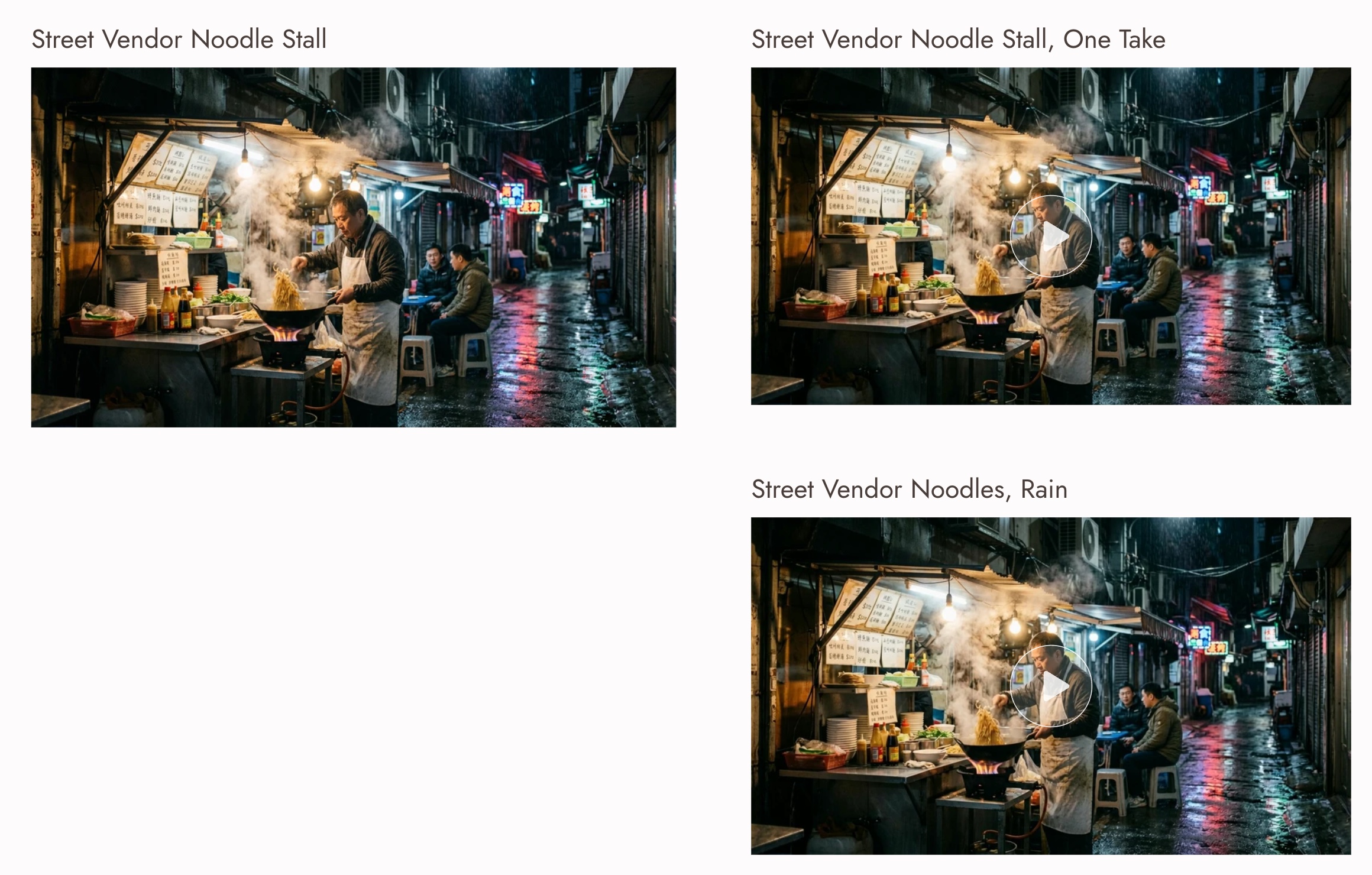
On a photographic still of a noodle vendor in a rainy alley, we asked for a single 15 second take with five beats and a line of dialogue:
Static camera, one continuous take. The vendor tosses the noodles in the wok as flames flare up, then plates them and slides the bowl across the counter. The customer on the left picks up chopsticks and says, "Smells even better than last night." The vendor laughs, wipes his hands on his apron, and turns back to the wok as rain keeps falling in the alley. Sound: sizzling wok, rain, distant traffic.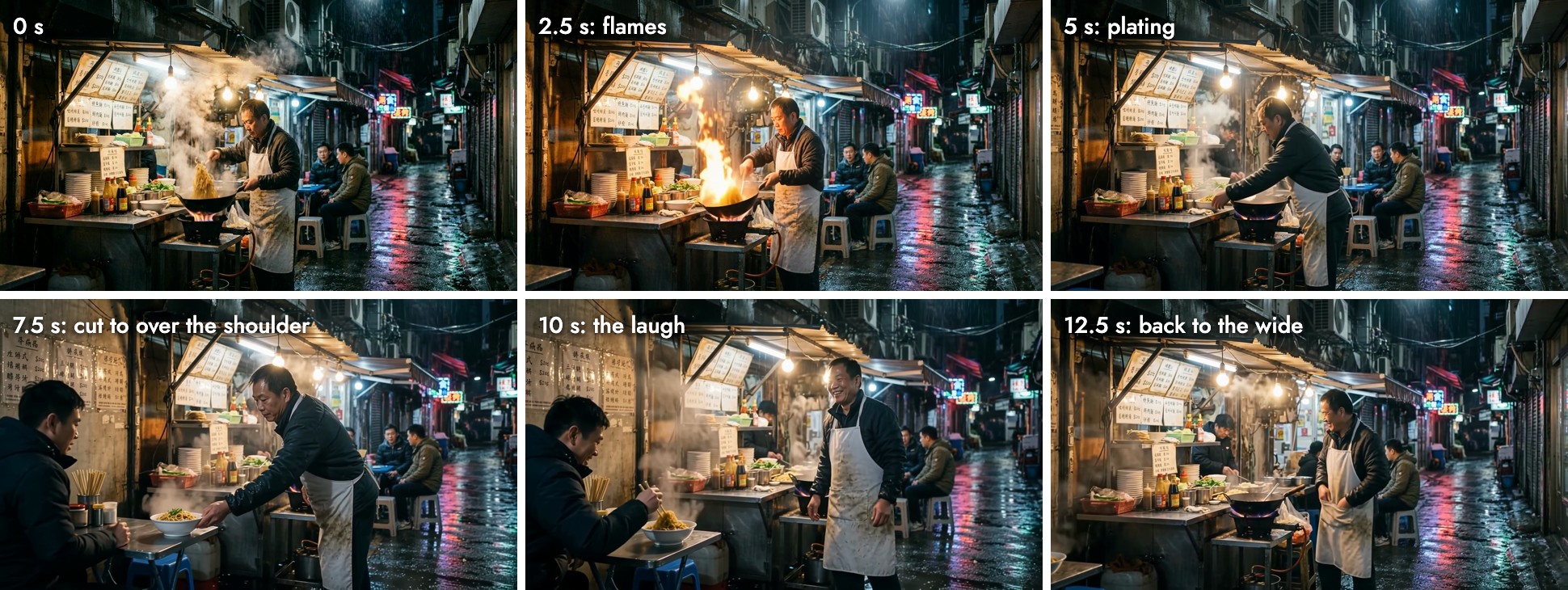
Every beat happened, in order: the flare, the plating, the bowl across the counter, the laugh, the hands on the apron. What it ignored was "static camera, one continuous take". At about 7.5 seconds Wan 3.0 cut to an over-the-shoulder angle on a customer who was not one of the two on the stools, then cut back to the wide at 12.5. The sound bed of rain and sizzling runs through the whole clip; we did not transcribe it, so we cannot confirm the dialogue line word for word.
Test 3: one action, fixed camera, 5 seconds
Same still, a much simpler prompt:
The vendor tosses the noodles in the wok while steam rises and rain falls in the alley. (fixed camera)
This time the frame stayed locked: the stall, the alley and the two customers sit in the same place from the first frame to the last, and only the vendor and the steam move. With one action and an explicit camera note, Wan 3.0 behaved like a single-shot model.
It is not guaranteed. On a different still, an aerial of a film crew on sand, the same "(fixed camera)" note produced a slow push-in and the crew drifting toward the centre, where Kling O3 Pro held the frame. Our Kling O3 guide has that shot.
What it costs
Wan 3.0 charges by length and resolution. Audio is included.
| Length | 480p | 720p | 1080p |
|---|---|---|---|
| 5 s | 30 | 60 | 120 |
| 10 s | 60 | 120 | 240 |
| 15 s | 90 | 180 | 360 |
| 30 s | 180 | 360 | 720 |
Credits on Flick; extension and reference to video use the same rates. The tests in this guide cost 60 for each 720p 5 second clip and 180 for the 15 second one, as shown on the run button. Rates for every model are on model credit costs, and a failed generation is refunded automatically (how credits work).
How long it takes
The picker estimates about 3 minutes. Our runs:
| Run | Time |
|---|---|
| 720p, 5 s (two runs) | 2 min 4 s and 3 min 2 s |
| 720p, 15 s | 5 min 6 s |
| 1080p, 5 s | 17 min 32 s |
Four runs is a small sample, but the 1080p run is worth planning around: draft at 720p and keep 1080p for the take you will use.
Wan 3.0 vs Kling O3 and Seedance 2.5
| You want | Use | Why |
|---|---|---|
| A short sequence with cuts from one still | Wan 3.0 | Storyboards on its own from a loose prompt |
| The cheapest long take | Wan 3.0 at 720p | 180 credits for 15 s, sound included |
| A locked frame you can trust | Kling O3 Pro | Held "(fixed camera)" on a shot where Wan pushed in |
| Exploring cheaply before a 1080p final | Seedance 2.5 Draft | Render the exact take you liked at 1080p |
The column "Why" is our assessment from these tests. Seedance 2.5 also reaches 30 seconds; see our Seedance 2.5 Draft Mode guide for its draft-then-render workflow.
Prompting Wan 3.0
- Decide whether you want cuts. Loose prompts invite Wan to edit. If you want one shot, say "one shot" and give it one action.
- Label shots when you want a sequence. Alibaba's guide writes multi-shot storyboards with timestamps and suggests 4 to 6 seconds per shot.
- Keep each shot to one verb. Five beats in one take produced a cut halfway through.
- Write sound into the prompt. "Sound: rain, sizzling wok" gives the audio pass something to aim for.
- For extension, say "extend" or "continue". Alibaba's guide notes that edit and extension requests need those intent words.
- If motion goes somewhere you did not ask for, motion not what I asked lists the usual fixes.
Best Practices
- Test at 720p and 5 seconds; it is a quarter of the 1080p price at 10 seconds.
- Keep start frames clean and readable; Wan takes the composition and style from them.
- Use "(fixed camera)" plus one action for locked shots, and check the last frame.
- Plan 1080p renders around a wait of minutes, not seconds.
- Keep takes and their prompts side by side to choose the best one.
Häufige Fehler
- Writing "animate this image" and expecting one shot. Wan 3.0 cut a two-word prompt into four shots.
- Packing a long take with beats. Every beat played, but the take was not continuous.
- Trusting the camera note on every frame. "(fixed camera)" held on one still and not on another.
- Rendering 1080p while exploring. Twice the price and, in our run, more than five times the wait.
- Extending a clip longer than 15 seconds. The source must be 15 seconds or less.
Sources
- Wan 3.0 video generation guide, Alibaba Cloud Model Studio, updated October 11, 2026
- wan3.0-video model information, Alibaba Cloud Model Studio, checked October 20, 2026
- Tests, credit prices and timings from Flick canvases, October 2026
Verwandte Anleitungen
- Generate a video
- Omni Reference
- Plan shots that cut together
- Model credit costs
- Choosing a model
- Build the sound
- How to use Kling O3
- Seedance 2.5 Draft Mode
Häufig gestellte Fragen
What is Wan 3.0?
How long can a Wan 3.0 video be? Up to 30 seconds. On Flick you can pick any length from 2 to 30 seconds.
How long can a Wan 3.0 video be?
How much does Wan 3.0 cost on Flick? 60 credits for 5 seconds at 720p, 30 at 480p and 120 at 1080p, scaling with length up to 720 credits for 30 seconds at 1080p.
How much does Wan 3.0 cost on Flick?
Does Wan 3.0 generate audio? Yes. Audio is on by default and does not change the price.
Does Wan 3.0 generate audio?
Why does Wan 3.0 cut between shots? It treats loose or multi-beat prompts as a sequence and storyboards them. Ask for one shot, one action, and a fixed camera if you want a single take.
Why does Wan 3.0 cut between shots?
Can I extend a Wan 3.0 clip? Yes, if the source is 15 seconds or less and the source plus the extension is 30 seconds or less.
Can I extend a Wan 3.0 clip?
Is Wan 3.0 available on the Free plan? No. Premium video models, including Wan 3.0, are available on Standard and above.