How to Use Krea 3 in 2026: Image Editing
By Zoey ZhangOct 2026

Krea 3 is Krea's new image editing model, announced on October 15, 2026. It changes what you ask for and keeps the rest of the picture, and it can combine several reference images in one edit. On Flick it runs in Generate Image and Edit Image, takes up to 8 reference images, and is included on the Free plan.
This guide covers what Krea 3 costs on Flick, how to use it, and what happened when we used it to edit locations, add people to a room, and run four edits in a row on one image.
Quick answer: when should you use Krea 3?
Use Krea 3 when you already have an image and want to change one thing in it, or when you want to build a new shot inside a location you already made. Then:
- Make or upload the base image. A location, a character, a product. Krea 3 can also generate from text.
- Connect it to an image node and choose Krea 3. Add up to 8 references and type @ in the prompt to name each one.
- Say what changes and what stays. Edit at 1K (14 credits with one reference), then re-render the keeper at 2K.
| Krea 3 | Nano Banana 2.1 | Nano Banana Pro | GPT Image 2.5 (medium) | |
|---|---|---|---|---|
| New image, 1K / 2K | 10 / 16 credits | 8 / 12 credits | 30 / 30 credits | 5 / 9 credits |
| Edit with 1 reference, 1K / 2K | 14 / 32 credits | 10 / 15 credits | 30 / 30 credits | 5 / 9 credits |
| Edit with 3 references, 1K / 2K | 22 / 64 credits | 10 / 15 credits | 30 / 30 credits | 5 / 9 credits |
| Reference images on Flick | Up to 8 | Up to 9 | Up to 9 | Up to 10 |
| Highest resolution | 2K | 4K | 4K | 4K |
| Picker estimate | about 35 s | about 15 s | about 45 s | about 2 min |
| Plan | Free | Free | Free | Free |
Krea 3 is the only model in this table that charges for each reference image, so its price climbs with every image you connect. At 2K each reference adds 16 credits.
Edit your next frame with Krea 3
Make the set once, then stage every shot inside it.
What is Krea 3?
Krea describes Krea 3 as its image editing model: it "changes what you ask for and leaves the rest of the image alone", including product labels and logos (Krea). It generates natively at 2K, with a cheaper 1K tier. Krea's announcement says it takes up to 6 reference images per edit; Replicate's model page and Flick accept up to 8. We have not tested 7 or 8.
It can also make images from text with no reference at all (Replicate), though launch coverage describes text to image as experimental while editing is the focus (TestingCatalog).
Krea quotes edits in under 8 seconds on its own setup. Flick runs Krea 3 in its more careful high thinking mode, which Replicate describes as better for complex or multi-step edits but slower, so expect 20 to 60 seconds on Flick.
How to use Krea 3 on Flick
- Add an image node. Generate an image walks through it.
- Choose Krea 3 in the model picker.
- Connect your references. Up to 8 images: the image to edit, a location, a character, a prop. Edit Image shows how to connect them.
- Name each reference in the prompt. Type @ and pick the connected image. Flick passes it to Krea 3 as a numbered image tag, so "the sofa from @Loft" points at the right picture.
- Set resolution and ratio. 1K is the default. 2K costs 1.6 times as much before references, and each reference costs four times as much at 2K. Ratios run from 21:9 to 9:16.
- Write the change, then what must stay. One edit per run works best. Prompting tips are below.
A Flickpedia style only applies to Krea 3 when no reference image is connected. With a reference connected, Flick sends the references instead of the style images, so describe the look in the prompt or connect an image that has it.
Test 1: build a shot inside a location you already made
We generated an empty Hong Kong diner at 2K from a one-line prompt, then connected it as the location and asked Krea 3 for a closer shot with exactly eight adults squeezed into the booth, a table full of food, and no text anywhere.
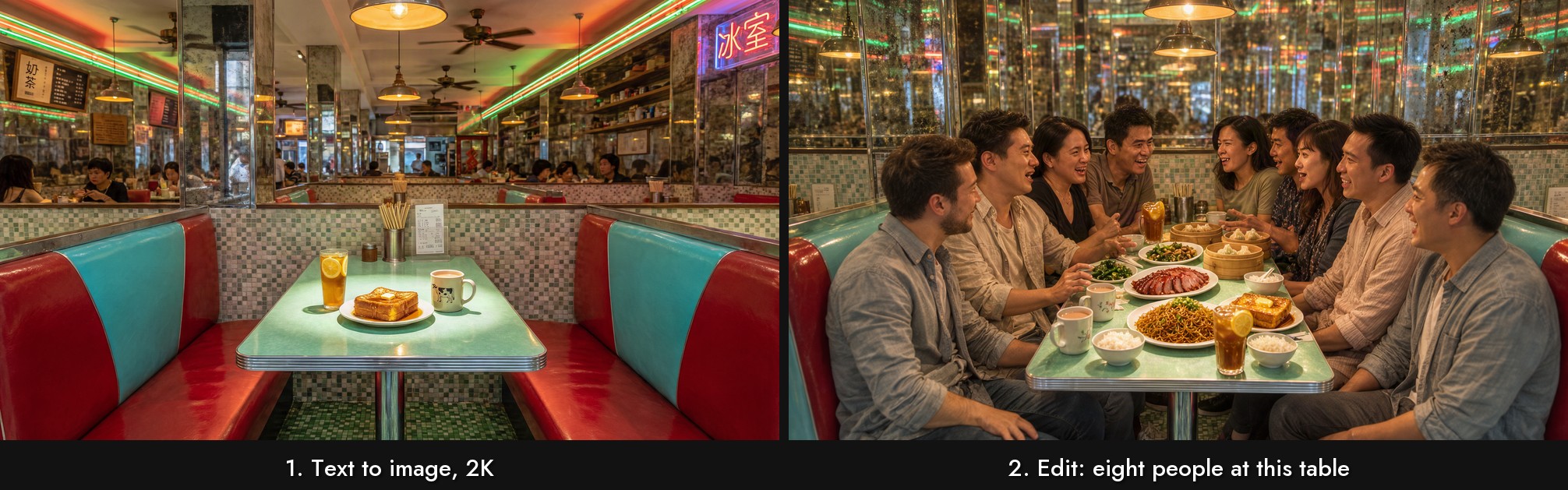
- The location held. Red and turquoise booths, the chrome-edged mint table, mosaic tiles, pendant lamps, the iced lemon tea and the French toast all carried over.
- It followed "no text". The original diner had neon signs in Chinese, legible and unrequested; the edit replaced signage with blurred reflections.
- The count was off by one. We asked for exactly eight people, four a side. We count nine: four on the left and five on the right. If a number matters, check it before you animate.
The diner cost 16 credits at 2K and the edit 14 at 1K.
Test 2: put a couple into an empty room
Same method in a loft: an empty room at 2K, then an edit asking for a couple talking on the rust velvet sofa, framed as an eye level two shot with a 50mm lens.
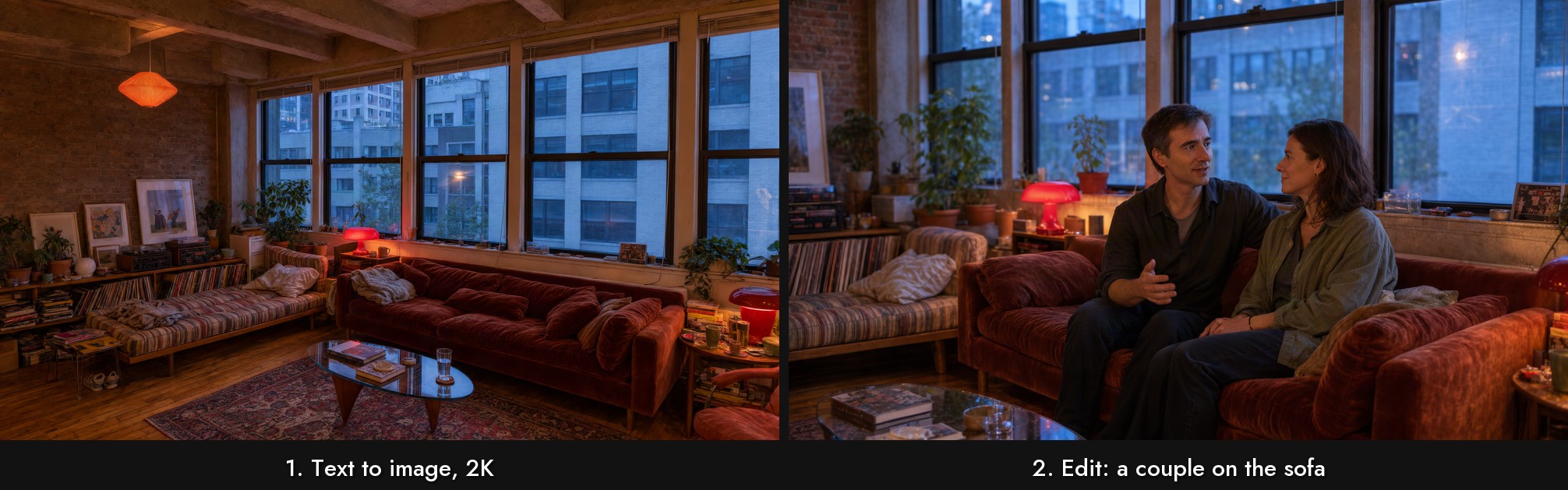
Krea 3 moved the camera in and kept the room: the red mushroom lamp, the striped daybed, the record shelves, the glass coffee table and the dusk light in the windows are all where they were. The couple look at each other rather than the lens, as the prompt asked. This is the workflow Krea 3 suits best for film: make the set once, then stage each shot in it.
Test 3: four edits in a row
One image, four runs, each feeding the next. The second run also had a colour palette image connected as a second reference (not shown).
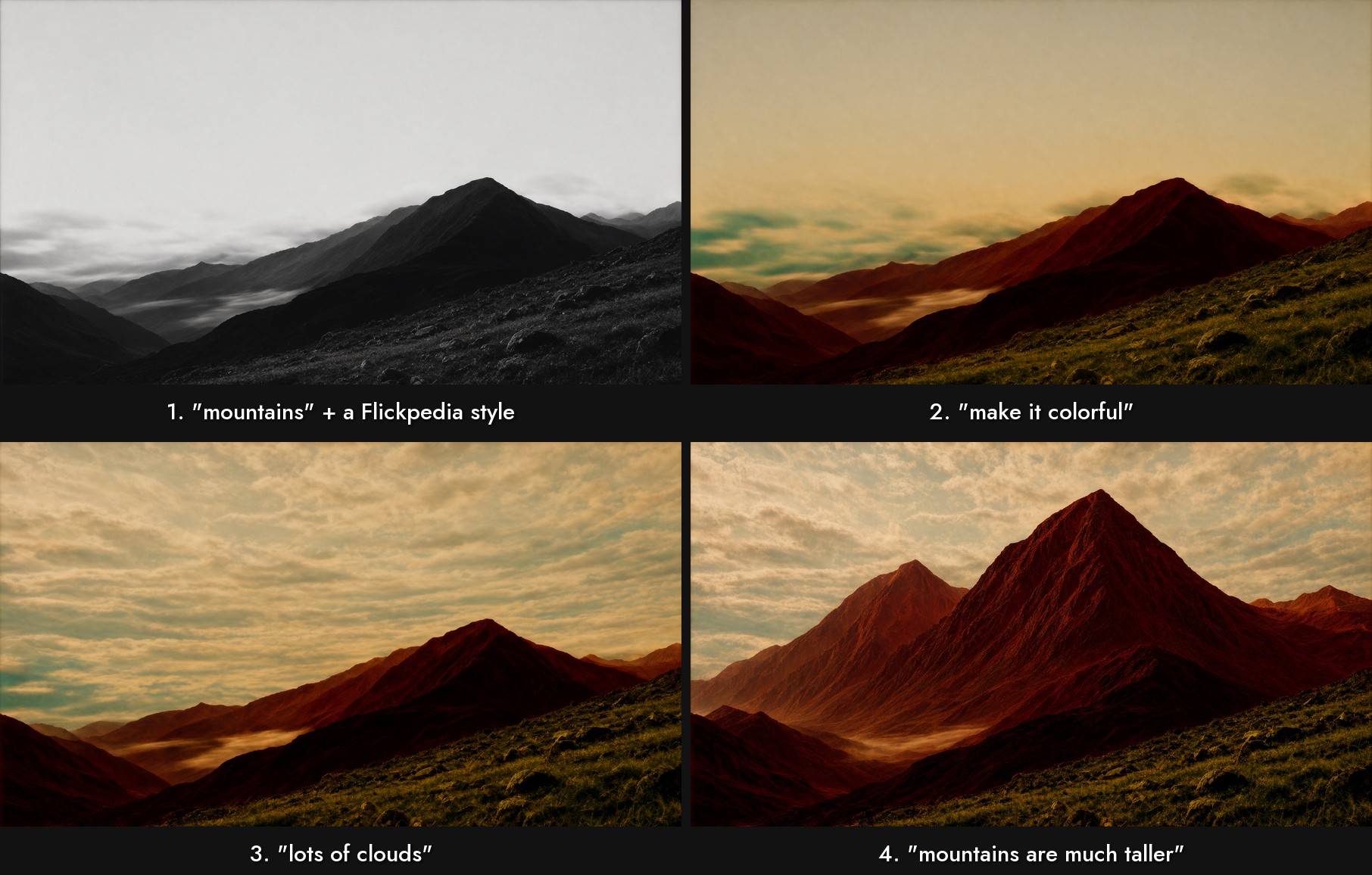
Each edit changed what the prompt named and little else. "Lots of clouds" filled the sky without touching the slope or the mist in the valley. "Mountains are much taller" rebuilt the peaks and kept the grass and the colour grade. The foreground slope survived all four runs. Across the four runs this cost 56 credits at 1K: 10, 18, 14 and 14.
Test 4: swap the subject, keep the room
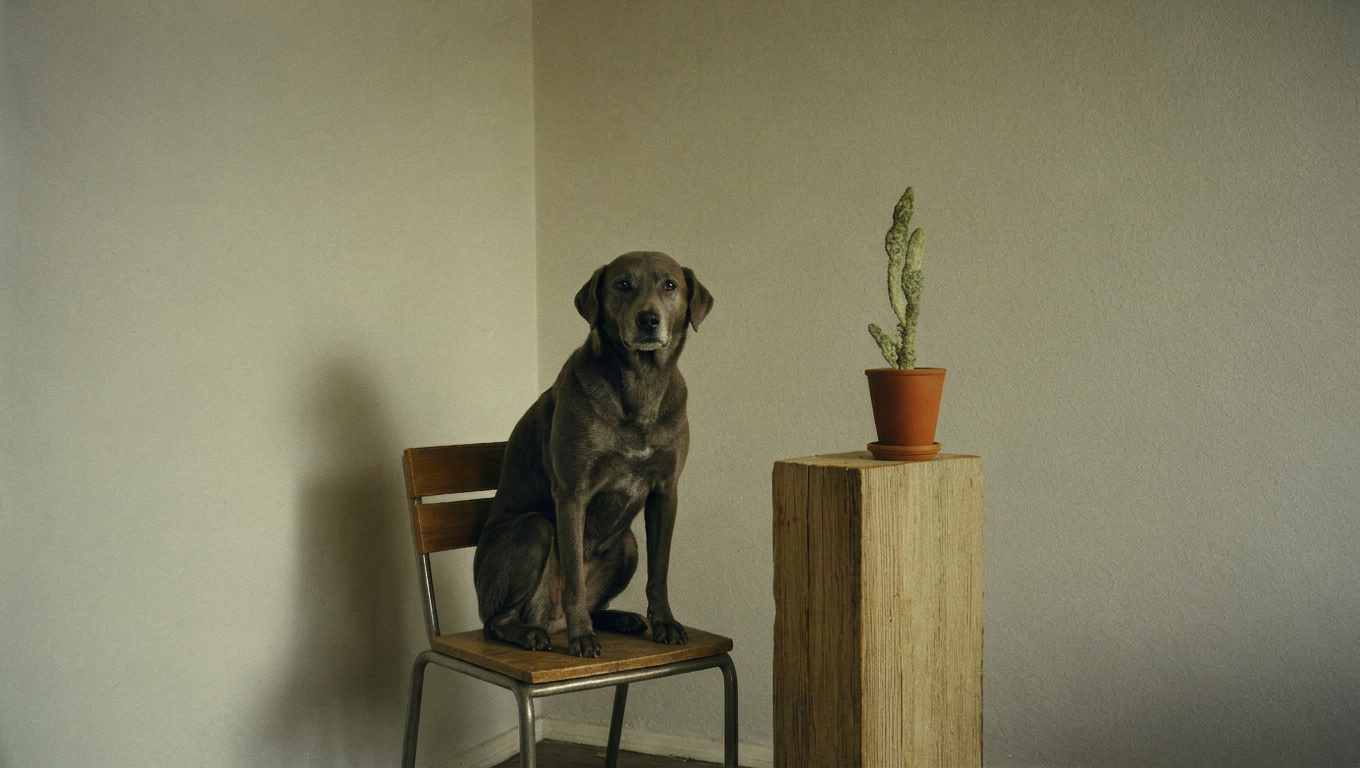
We connected a photo of a person sitting on a chair in the corner of a room and prompted "a dog. reference the style", at 2K.
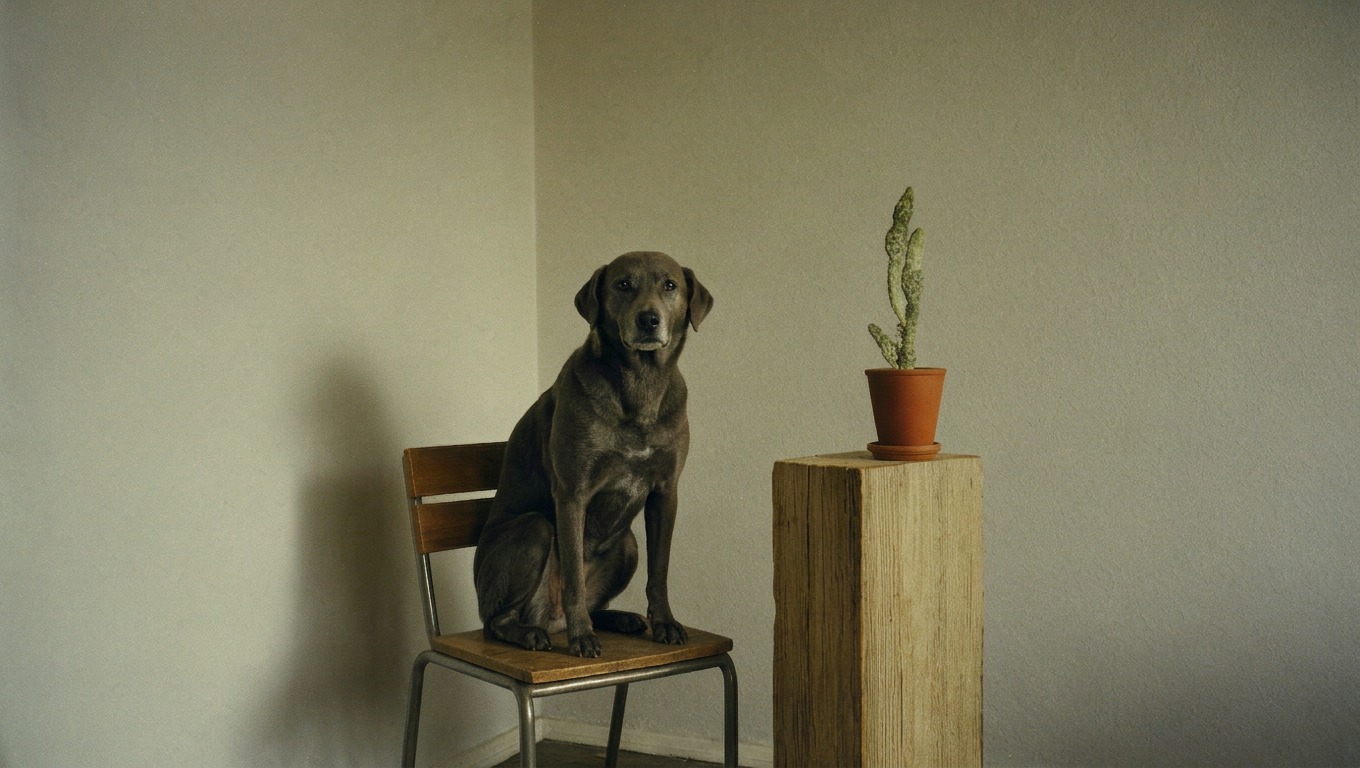
The chair, the cactus, the pedestal, the bare corner and the soft light all came from the reference; only the sitter changed. It also copied the magazine logo printed in the reference photo's corner onto the result, which we removed. That fits Krea's claim that it preserves logos and labels, so check the corners of anything you edit from a published photo. This edit cost 32 credits at 2K with one reference.
Test 5: Flickpedia styles, one hit and one miss
With no reference connected, a Flickpedia style's images go to Krea 3 as its references. We tried two styles with one-word prompts.
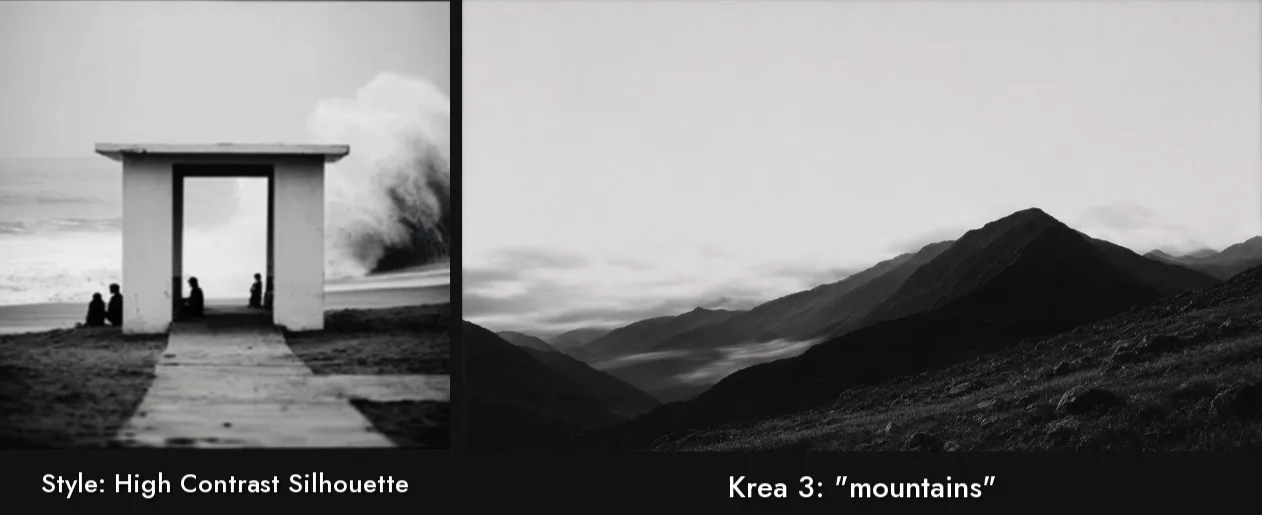
High Contrast Silhouette carried over: the mountains came back in grey, moody black and white. Cinematic vintage did not: "a dog" came back as a bright, clean lawn photo with none of the style's grain, colour or period feel. One run each, so treat this as a warning rather than a rule: check the first result before batching, and if a style does not take, add its key words to the prompt or try a model that follows style references more closely, such as Nano Banana 2.1.
Faces in a crowd
Text to image, 1K, prompt "a crowd of people, their faces visible":
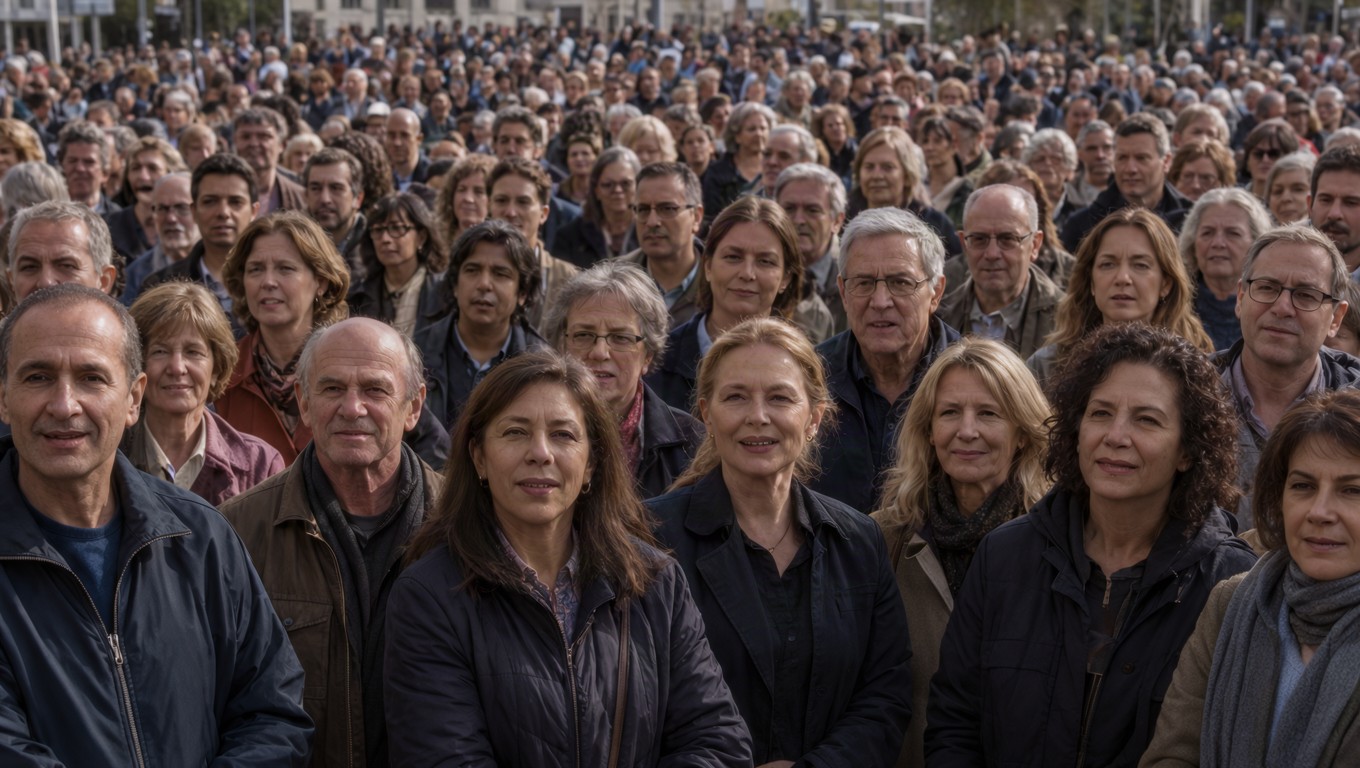
The front three rows have distinct, natural faces with no merged features, and the crowd stays believable into the distance. For 10 credits it is a usable background plate.
How long it takes
Times from the 24 Krea 3 runs on two of our canvases:
| Run | Runs | Range | Median |
|---|---|---|---|
| 1K, with references | 17 | 20 to 54 s | 29 s |
| 1K, no references | 2 | 37 to 49 s | 43 s |
| 2K, no references | 3 | 31 to 60 s | 38 s |
| 2K, with references | 2 | 44 to 49 s | 46 s |
The picker estimates about 35 seconds. These times include Flick's queue on busy canvases, so treat them as what to expect, not as the model's speed. Output size at 16:9 was 1360 × 768 at 1K and 2720 × 1536 at 2K.
Prompting Krea 3
- Name the change and what stays. Krea suggests stating what must stay the same ("Keep the product exactly as it is"); Replicate suggests leading with the change and adding one sentence about what stays. Either order works; include both.
- Say what each reference is for. "Use @Loft as the location, @Anna as the woman on the sofa." Krea's own tip: say which image is the room and which is the sofa.
- Use "only" for single changes. Krea's example: "Remove only the woman in the red coat."
- Describe light and camera like a photographer. Our loft prompt named the lens, the eye level and the lamplight, and the edit followed all three.
- One change per run. Our mountain chain changed one thing at a time and kept everything else.
- Check counts and corners. It added a ninth person and copied a logo in our tests.
Krea 3 vs other image models on Flick
Krea 3
Pros:
- Keeps the location, objects and light when you change one thing, in all four of our edit tests.
- Up to 8 references, named in the prompt with @.
- Cheap at 1K with few references: 14 credits for a one-reference edit.
- Runs four edits in a row without the image drifting.
Cons:
- Charges for every reference, so many references at 2K get expensive: 64 credits with three, 144 with eight.
- No 4K.
- A Flickpedia style is ignored when a reference is connected, and was not followed in one of our two style runs.
- Text to image is described as experimental at launch.
When to pick something else
- Cheapest edits: GPT Image 2.5 at medium quality is 5 credits at 1K whatever the number of references. See our GPT Image 2.5 guide.
- Exploring new frames from text: Nano Banana 2.1 at 8 credits. See our Nano Banana 2.1 guide.
- Matching complex geometry or a 3D blockout: Nano Banana Pro. See our Nano Banana Pro guide.
- 4K output: any of the three above.
Common mistakes
- Connecting every image you have. Each reference adds 4 credits at 1K and 16 at 2K. Connect only what the edit needs.
- Editing at 2K while still exploring. A one-reference edit is 14 credits at 1K and 32 at 2K.
- Expecting a Flickpedia style to apply to an edit. With a reference connected, the style is not sent.
- Asking for several changes at once. Chain single edits instead.
- Trusting an exact count. We asked for eight people and got nine.
Sources
- Introducing Krea 3, Krea, October 15, 2026
- krea/krea-3 model page, Replicate, checked October 22, 2026
- Krea launched Krea 3 for fast and precise image editing, TestingCatalog
- Tests, credit prices and timings from Flick, October 2026
Related guides
- Generate an image
- Edit image
- Visual styles
- Model credit costs
- Choosing a model
- How to use Nano Banana 2.1
- How to use GPT Image 2.5
- How to use Nano Banana Pro
Frequently Asked Questions
What is Krea 3?
Krea's image editing model, announced on October 15, 2026. It changes what you ask for, keeps the rest of the image, combines several reference images, and can also generate from text.
How much does Krea 3 cost on Flick?
10 credits for a new image at 1K and 16 at 2K, plus 4 credits per reference image at 1K or 16 per reference at 2K. A one-reference edit is 14 credits at 1K.
Is Krea 3 free on Flick?
It is included on the Free plan. Each image uses credits.
How many reference images can Krea 3 use?
Flick accepts up to 8. Krea's announcement says up to 6 per edit.
Can Krea 3 generate images from text?
Yes. With no reference connected it generates from the prompt. Launch coverage describes text to image as experimental; editing is its focus.
How fast is Krea 3?
Krea quotes under 8 seconds on its own setup. On Flick, which uses Krea 3's slower, more careful high thinking mode, our runs took 20 to 60 seconds including queue time.
Does Krea 3 support 4K?
No. It offers 1K and 2K.
Do Flickpedia styles work with Krea 3?
Only when no reference image is connected. In our two tries, one style carried over and one did not.