Seedance 2.5 Draft Mode: Preview Cheap, Render the Take You Like (2026)
Oct 2026
Most AI video budgets do not go to the shot you keep. They go to the takes before it: the one where the camera drifts, the one where the hand melts, the one that is almost right. With Seedance 2.5, each of those used to cost a full 1080p render.
Draft Mode changes the order. You generate a 480p preview, re-roll it as many times as you need, and when one take is right you render that exact take at 1080p. Same prompt, same inputs, same seed, so the framing, camera move and action you approved carry over. It is not a new roll.
ByteDance's Volcano Engine launched Draft mode for the Seedance 2.5 API on September 22, 2026. It is live on Flick for both Image to Video and Reference to Video. New to the model? Start with our Seedance 2.5 guide.
Quick answer: how does Seedance 2.5 Draft Mode work?
Draft Mode is a 480p preview of a Seedance 2.5 take that you can later render at 1080p without re-rolling it. On Flick:
- Pick Seedance 2.5 Draft in the video model picker and generate at 480p.
- Re-roll until a take works. Each draft costs about a fifth of a 1080p render.
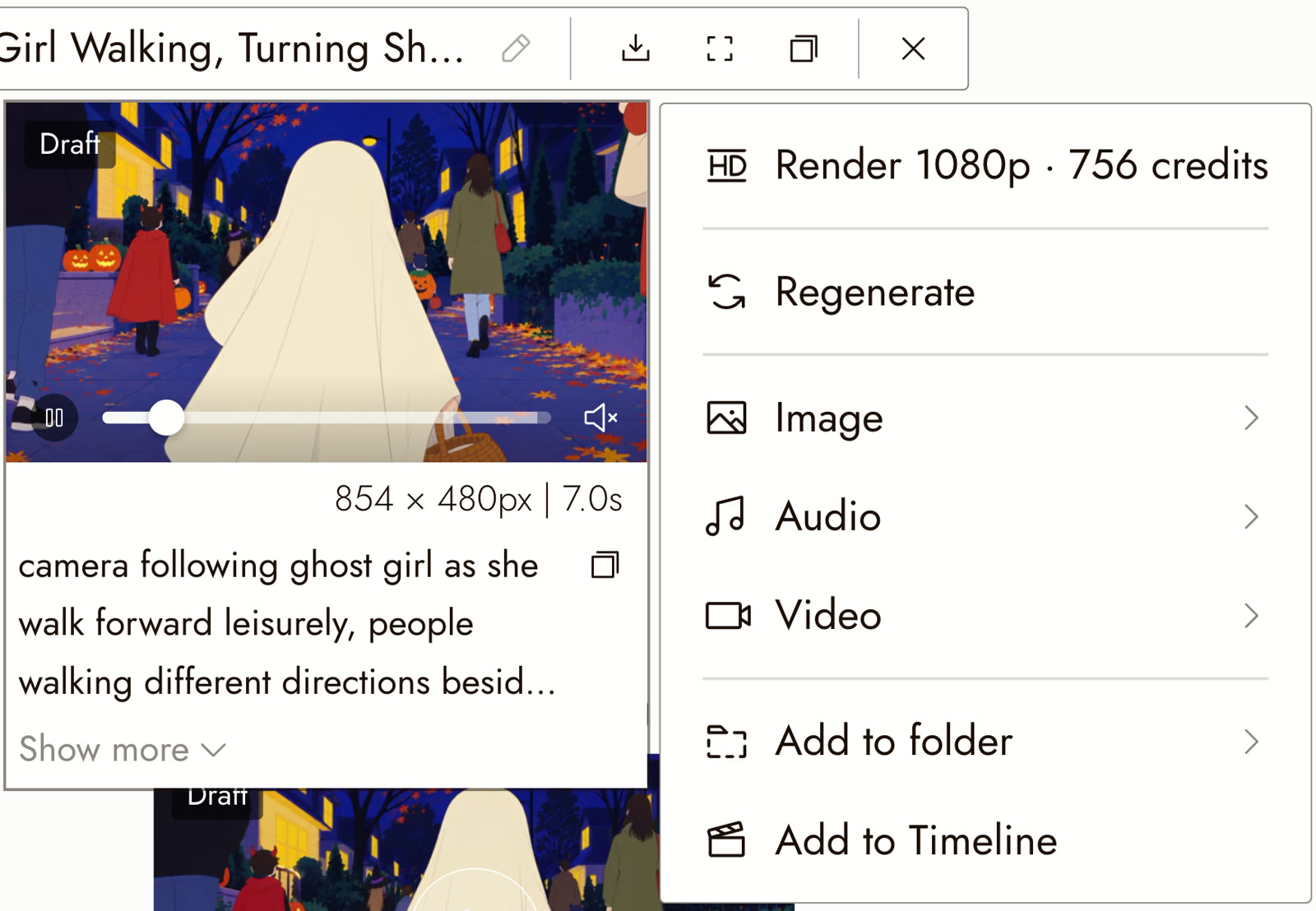
- Hover that take and choose Render 1080p within 7 days. Flick renders the same take at 1920 × 1080.
| Question | Answer |
|---|---|
| What is it? | A 480p preview model for Seedance 2.5 |
| Where is it? | The video model picker, in Image to Video and Reference to Video |
| Draft resolution | 854 × 480 |
| Final resolution | 1920 × 1080, the same take |
| Clip length | 4 to 30 seconds |
| Audio | Generated with the draft, same price on or off |
| Draft cost | About a fifth of a 1080p render |
| Render window | 7 days after the draft is generated |
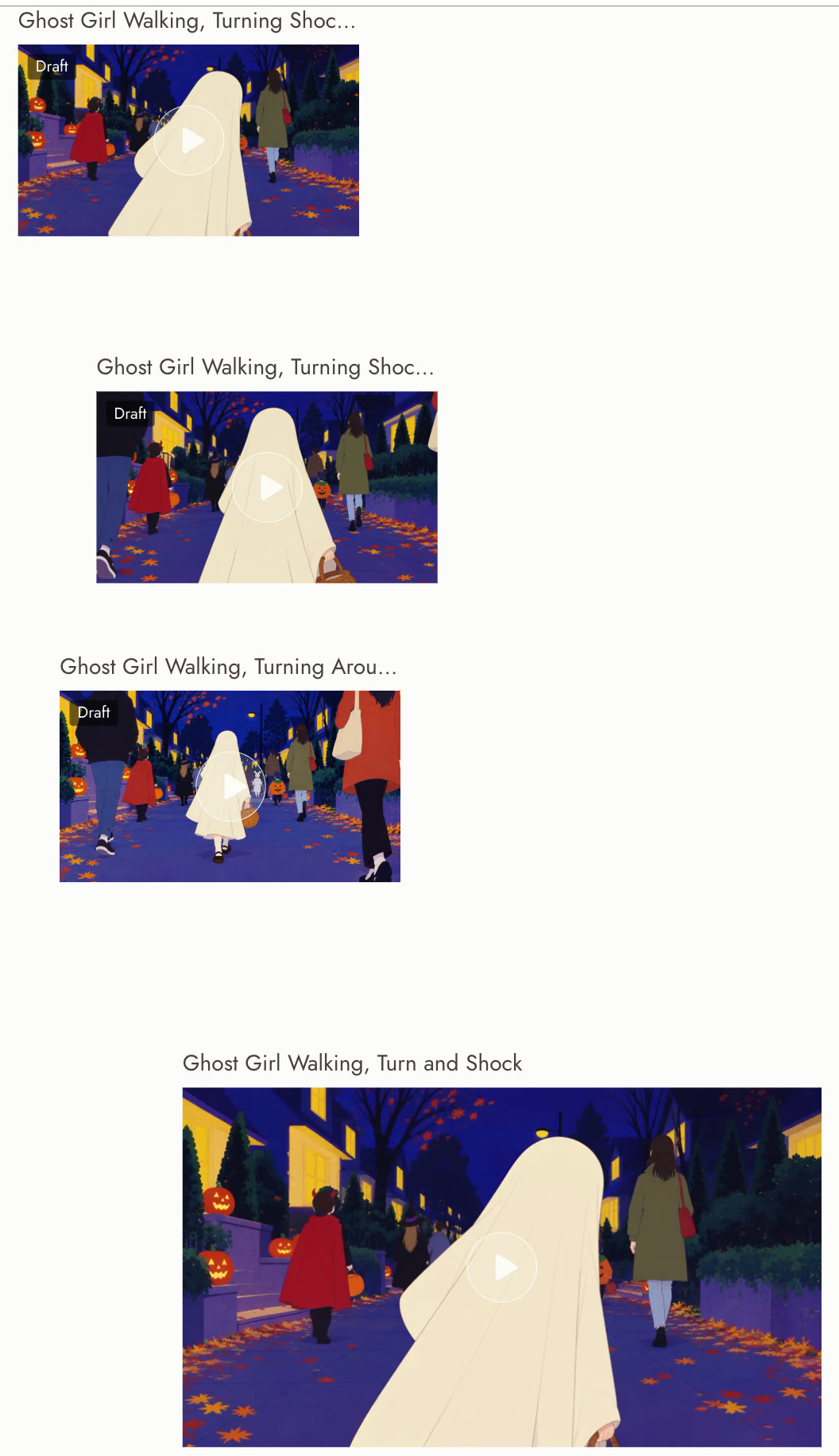
The example in this guide is by Hannah L. from the Flick team, from a short Halloween film she made on Flick. It is a 7 second Reference to Video shot: a child in a sheet-ghost costume walks down a busy street on Halloween night, turns back toward the camera, and her eyes go wide. She drafted it three times at 480p, then rendered the first take at 1080p.
Draft your next shot in Flick
Re-roll at 480p. Render only the take you would actually cut in.
What Draft Mode is
Seedance 2.5 Draft is a separate model in the picker, next to Seedance 2.5. It takes the same inputs (a start frame, or a reference pack) and the same prompt, and it renders at 480p.
Every draft remembers which take it was. On the finished video you get a Render 1080p item that sends that take back to ByteDance to be rendered at full resolution. According to ByteDance's documentation, the final reuses the draft's model, prompt, input media, seed, audio setting, aspect ratio and duration. You cannot change any of them on the final, which is what keeps it the same take.
That is the difference from simply generating at a low resolution. A normal 480p generation followed by a 1080p generation is two separate rolls. A draft followed by Render 1080p is one roll, rendered twice.
Three drafts, one final
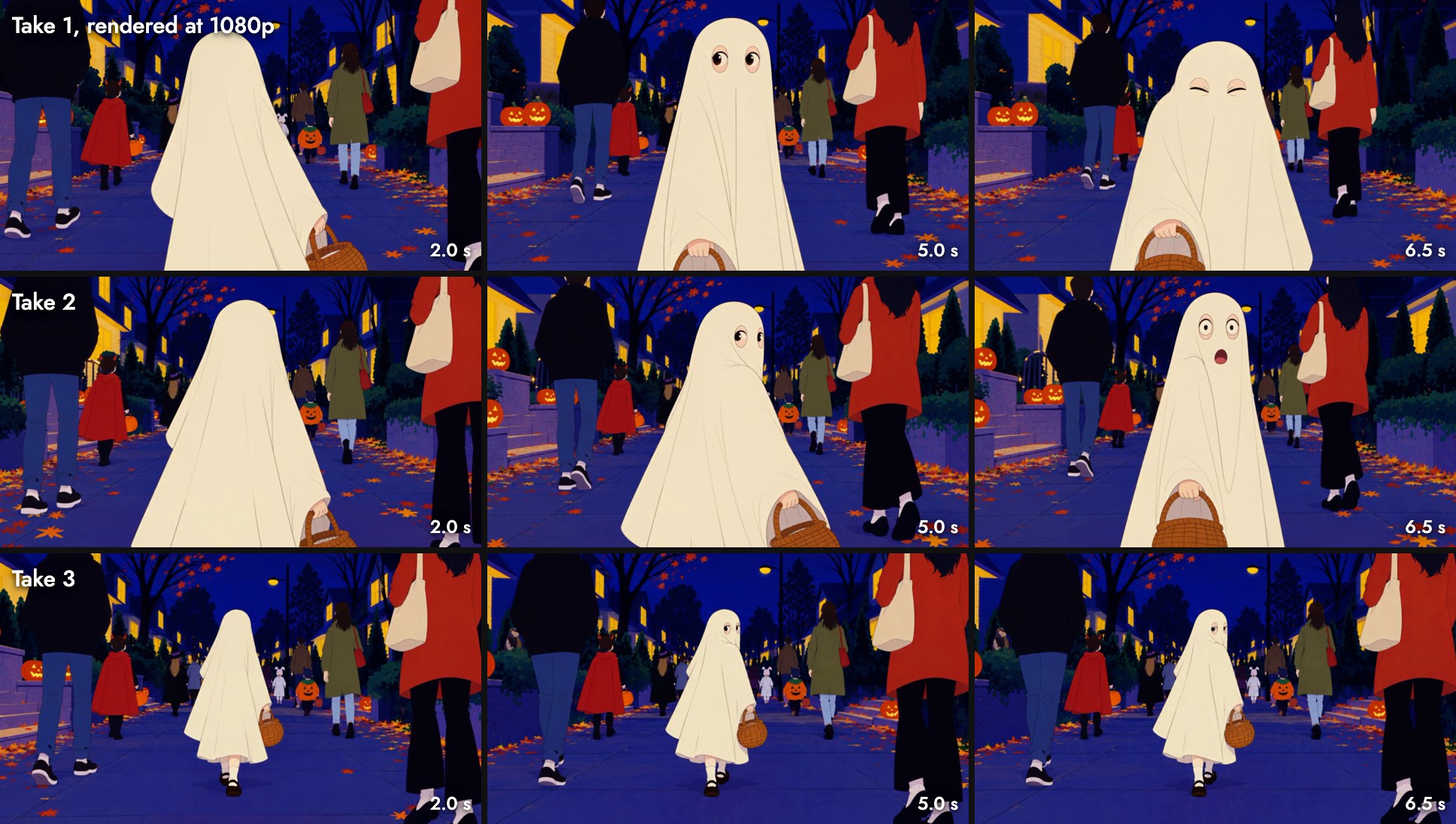
Same two references, a lightly reworded prompt, three different takes. Take 1 turns, looks back wide-eyed, then squints. Take 2 adds an open-mouthed gasp. Take 3 came back as a wider shot with the ghost small in the frame. At 147 credits a draft, all three cost less than a single 1080p render.
What carries over, and what can change
The 1080p final is rendered natively at 1080p, not upscaled from the draft. So it is sharper, and it is also not pixel identical. Here is the same moment, 5 seconds in, from take 1's draft and its final:
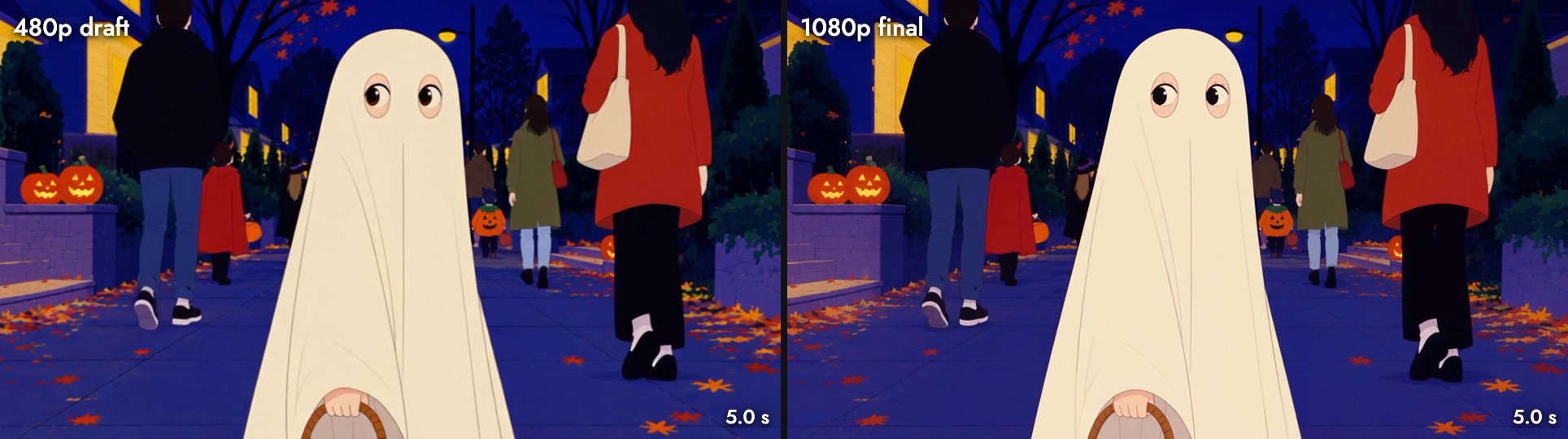
The shot is the same: the ghost, the basket, the passers-by in red and green, the pumpkins and the framing sit where they were. That is the part Draft Mode protects.
Zoom in and the small things move:
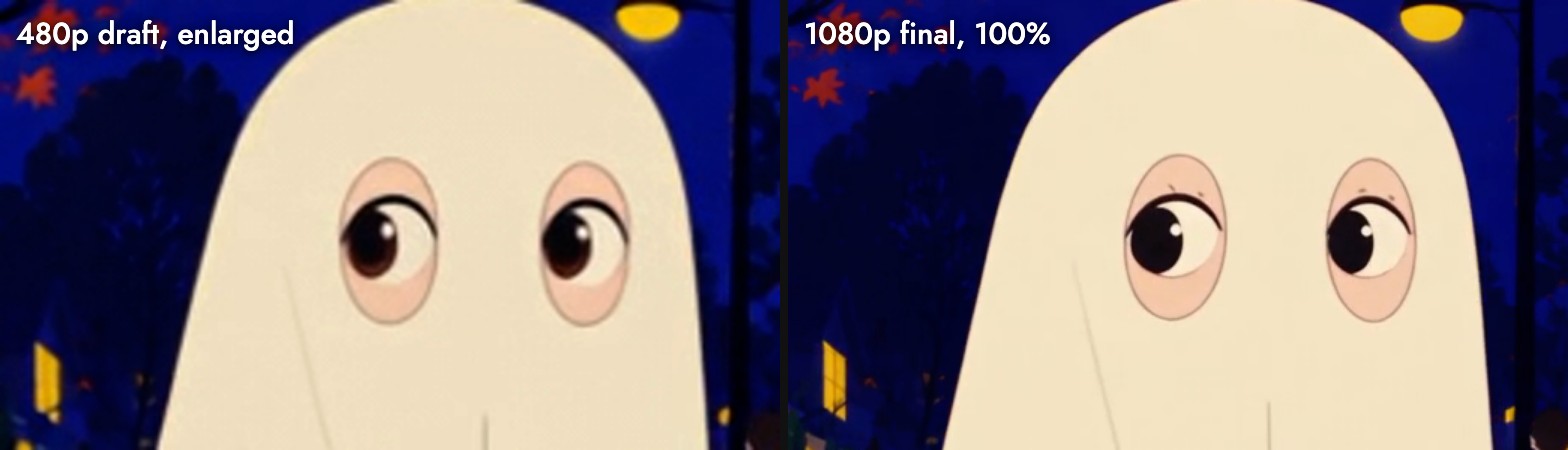
The eyes keep their shape and where they look, but the brown pupils come back black and small lash marks appear above them: redrawn, not sharpened. ByteDance says the same thing in its announcement: local texture, complex patterns, small text and the number of people in a dense crowd can shift slightly between draft and final, while the structure and motion carry through.
So use the draft to judge:
- Framing and composition
- Camera movement and pacing
- What the subject does, and when
- Dialogue and sound timing
And check these again on the final:
- Faces at a distance, and small facial details
- Any text, logos, tattoos or lettering
- Fine patterns on clothing or props
- How many people are in a crowd
What it costs
A draft is billed like any 480p generation, and the 1080p final like any 1080p generation. Both scale with duration:
| Clip length | Draft (480p) | Render 1080p |
|---|---|---|
| 4 s | 84 | 432 |
| 5 s | 105 | 540 |
| 7 s | 147 | 756 |
| 10 s | 210 | 1,080 |
| 15 s | 315 | 1,620 |
| 30 s | 630 | 3,240 |
Credits on Flick. Generating straight to 1080p costs the same as Render 1080p at every length. The full list lives on model credit costs.
Hannah's 7 second shot took three tries. Each draft was 147 credits and the 1080p render 756:
- Straight to 1080p: 3 × 756 = 2,268 credits
- Draft first: 3 × 147 + 756 = 1,197 credits
That is 47% less, and the gap grows with every extra try: at four tries a 5 second shot costs 960 credits instead of 2,160, 56% less. ByteDance's own example lands in the same place: for a 5 second 1080p shot that takes four tries, Draft mode saves about 57%, and at 20 tries per keeper the saving reaches 77%. Turning audio off does not change either price.
Draft Mode vs other ways to save
| Approach | Cost per retry | Do you keep the take? | Final quality |
|---|---|---|---|
| Straight to 1080p | Full 1080p price | Yes | Native 1080p |
| 480p, then a new 1080p generation | 480p price | No, the 1080p run is a new roll | Native 1080p, different take |
| 480p or 720p, then an upscaler | Low-res price | Yes | Upscaled; the upscaler invents the detail |
| Draft, then Render 1080p | 480p price | Yes, same seed and inputs | Native 1080p, same take |
Draft Mode is the only one that gets both the cheap retry and a native 1080p version of the take you picked.
How to use Seedance 2.5 Draft on Flick
- Set up the shot. Add an Image to Video or Reference to Video node and connect your start frame or references, the same as any Seedance shot. The first project walkthrough shows where the video node lives.
- Pick Seedance 2.5 Draft. Choose it in the video model picker, set the duration and write your prompt. Seedance prompts covers how to phrase motion for this model family.
- Run it, and re-roll freely. Drafts land on the canvas with a small Draft tag, so you can tell them apart from finals at a glance.
- Choose the take. Play the drafts side by side and pick the one that works. Judge framing, motion, timing and sound.
- Render 1080p. Hover the take you want. The first item in its menu is Render 1080p, with the price on it.
- Use the final. The 1080p clip lands next to the draft, wired to the same inputs, and keeps the draft's prompt so you can always see where it came from.
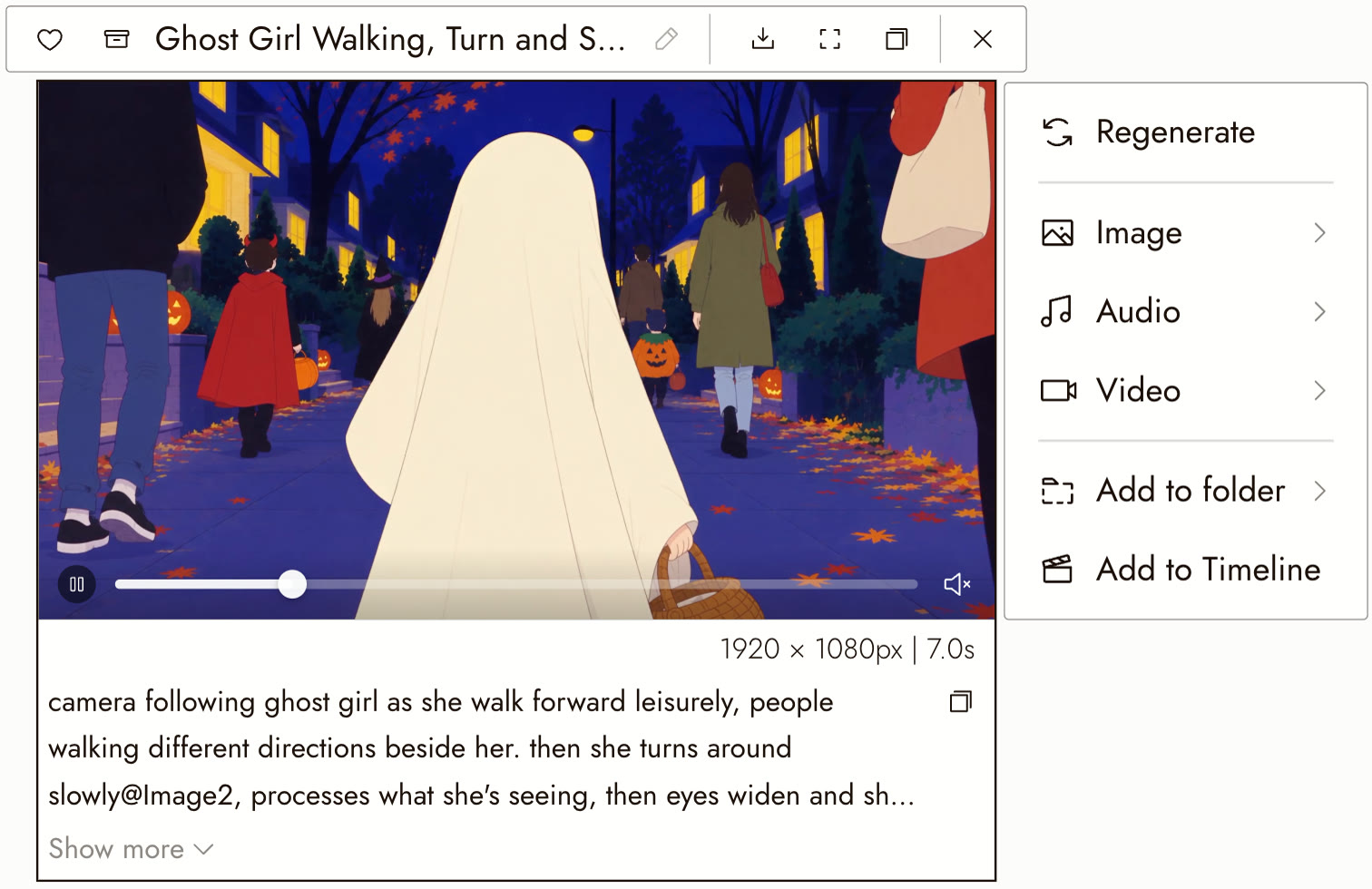
You do not set anything on the final. It inherits the prompt, duration and inputs from the draft.
The 7 day window
A draft can be rendered at 1080p for 7 days after it was generated. After that ByteDance no longer holds the take, and the Render 1080p item turns off with a note saying why. The draft video stays on your canvas; you just cannot upgrade it any more.
If a project runs longer than a week, render the takes you are sure of as you go.
When to draft, and when not to
Draft when:
- You are finding the shot: blocking, camera move, timing, a performance beat.
- The prompt or the references are new, and you do not know how Seedance will read them yet.
- You are working through a shot list and want to see the whole sequence before spending on any of it.
- The clip is long. A 15 second take costs three times a 5 second one, so a bad roll hurts more.
Go straight to 1080p when:
- You have already landed this shot and only want a variation.
- You need fine detail to judge the take at all, such as small text or a distant face. 480p may not show enough to decide.
Best practices for drafting
- Judge motion, not texture. 480p is for deciding whether the take works. Skin, fabric and fine detail come from the 1080p render.
- Change one thing per re-roll. If you edit the prompt and the references at once, you will not know which one fixed the shot.
- Keep the drafts. Leaving the near misses on the canvas makes it easy to compare takes and to explain your pick to a collaborator.
- Name your drafts. Flick names each node from its prompt; rename the keeper so the final is easy to find in a busy canvas.
- Build the references first. Draft Mode makes bad references cheaper to discover, not good. Our Seedance 2.5 guide covers reference packs.
常见错误
- Treating a 480p draft as the final. It is a preview. Render the keeper at 1080p before it goes in the edit.
- Editing the prompt and expecting Render 1080p to use it. The final always reuses the draft's own prompt. To change it, make a new draft.
- Waiting more than a week. After 7 days the take can no longer be rendered at 1080p.
- Drafting a shot you have already solved. If you know the take will work, go straight to 1080p and skip the extra step.
- Approving small text, tattoos or crowd detail at 480p. Those are the parts that can change. Check them again on the final.
Sources
- Volcano Engine: Seedance 2.5 Draft mode documentation, checked October 20, 2026
- IT Home via Sina: Seedance 2.5 launches Draft mode, September 22, 2026
- Example shot, drafts and 1080p render by Hannah L. (Flick team), from her Halloween canvas on Flick, October 2026
- Resolutions and the 756 credit Render 1080p price read from that canvas, October 21, 2026; other prices from Flick's model configuration
相关指南
- Generate a video
- Omni Reference
- Seedance prompts
- Model credit costs
- Choose and improve your takes
- How to use Seedance 2.5
- How to use Kling O3
常见问题
Is the 1080p render the same video as the draft?
It is the same take: the same model, prompt, inputs, seed, aspect ratio, duration and audio setting. Framing, camera movement and action carry over. Fine detail such as texture, small text and crowd counts can shift slightly, because the final is rendered fresh at 1080p.
Is the final upscaled from the draft?
No. It is generated natively at 1080p from the draft's settings, which is why it is sharper than an upscale and why small details can differ.
How much cheaper is a draft?
About a fifth of a 1080p render at the same duration. A 7 second draft is 147 credits; the same clip at 1080p is 756.
Can I change the prompt before rendering 1080p?
No. The final always uses the draft's prompt. To change it, generate a new draft.
Does Draft Mode work with reference to video?
Yes. There is a draft model for both Image to Video and Reference to Video. The example in this guide is a Reference to Video shot.
How long can I wait before rendering 1080p?
7 days from when the draft was generated. After that the draft stays on your canvas but can no longer be upgraded.
Does turning audio off save credits?
No. Seedance 2.5 costs the same with or without generated audio.