Title Sequence: How to Make One With AI in 5 Steps

A title sequence is the run of shots that opens or closes a film and carries its title and credits: with AI, you generate the worlds as stills, move one thing in each shot, then give the words a place in the picture.

An ink drawing of a theatre curtain parting around a blank card

An AI film can look finished until the title appears in a default font on black. A title sequence gives those seconds the same care as the story. We read the prompts behind the titles and credits of Duro, Still Time, In ’twixt Vows, Battery Boy, The Herder and Drop of Water, and the 59 video clips Jaime Yao generated for a main title tutorial. Here are the four kinds you can make, five steps to build one, and the wording those makers used.

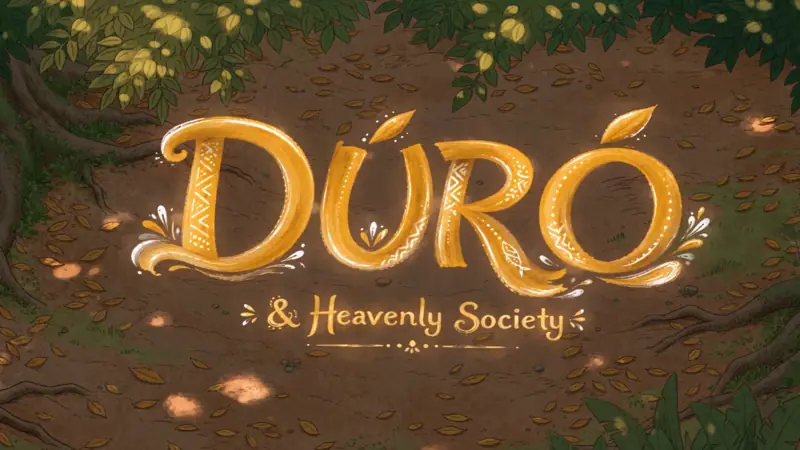
The gold title Dúró and Heavenly Society on a painted forest floor scattered with leaves and patches of sunlight00:10
In Duro, patches of sunlight on the forest floor gather into the title.Walter Mauro, director of Duro · Seedance 2.5 · Reference to video

What is a title sequence?

It is a designed run of shots that shows a film's title and credits, usually at the start or the end, and sets the mood before or after the story.
A title sequence, a title card and end credits compared
Title sequenceTitle cardEnd credits
What it isA run of shots with its own designOne shot with the titleNames after the story
Where it goesThe opening, or after a first sceneWherever the title landsThe end
What to planWorlds, motion and space for namesThe words and what sits behind themSpace for the names to stay readable
  • Naming the film comes first: our AI movie title generator covers that part, and this page starts once you have the name.

What kinds of title sequence can you make with AI?

There are four, and they differ in where the words live: in the world, on a held shot, as a graphic moved by sound, or added later over a run of images.
Four kinds of title sequence, what each one asks of the model, and a film that uses it
KindWhere the words liveWhat to ask forSeen in
Letters in the worldMade of something in the sceneThe material and how it movesDuro
Title over a held shotLaid quietly on the pictureA long pause, then a plain fadeDrop of Water
Graphic moved by soundA finished logo or titleThe exact artwork, kept unchanged, timed to audioStill Time
Worlds first, words laterAdded afterward in the editorSlow shots with space left in the frameThe worlds in Jaime Yao's main title tutorial

What does an AI title sequence look like?

These six designs come from five films, and each one puts the words on screen in a different way: under water, shaking to music, over a story's own world or on a plain card.
The words A Film by Walter Mauro glow gold on the sandy bottom of a painted forest pool, seen from above00:10

Duro: a credit under the water

Walter Mauro asks for glowing text painted in soft golden light on the bottom of a pool, so the ripples bend the words and then break them apart.

Walter Mauro, director of Duro
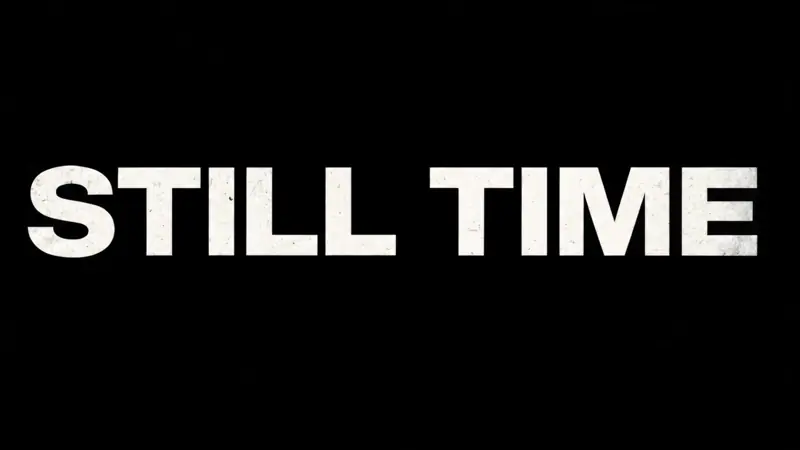
The title Still Time in heavy white capital letters on a black screen00:08

Still Time: a logo that gives way to the title

Marius Jensen gives the model two finished graphics and the soundtrack, so the Flick logo trembles with the sound and then fades under the title.

Marius Jensen, director of Still Time

The title Battery Boy in warm gold serif letters over a sunlit bedroom with a teddy bear on the floor

Battery Boy: letters that catch the light

The title sits inside the bedroom where the story happens, in gold letters that share the warm light of the room.

Adrien Bodson, director of Battery Boy

A small brass robot stands on a robot vacuum under the gold title Battery Boy, a cat asleep behind it

Battery Boy: a title for the ending

The end title shows how the story turned out, with the tiny brass robot riding across the floor beneath the name.

Adrien Bodson, director of Battery Boy

The words Directed by Jiaming in small dark serif letters on a soft cream background

The Herder: a quiet credit card

A credit can be this plain: small serif words with wide space around them, on a ground the prompt ties to the film's cotton world.

Jaime Yao, director of The Herder

The hand-painted words In Our Time in cream brush letters on a solid green background

In Our Time: a title on flat green

The painted title sits on solid green, so it can be laid over any shot in the editor.

Jaime Yao, director of In Our Time

How do you make a title sequence with AI?

In five steps: choose a world for each title, make each one as a still, move one thing per shot, give the words a place, then cut it to music with room for the names.
  1. Step 1

    Choose a world for each title.

    List your credits, then give each one its own image, because a sequence holds attention by moving somewhere new each time a name changes.

    • Jaime Yao's main title tutorial moves through a desert of signs, a painted ceiling, frozen weapons and pale sand miniatures.
    • Keep one thread through them, such as a palette or a material, so they read as one film.
    A domed ceiling mural centred above a glowing chandelier, in perfect symmetry
    Start frame: A domed ceiling mural centred above a glowing chandelier, in perfect symmetry
    Start frame
    00:10
    Jaime Yao, director of main title design tutorial · Kling 3.0 4K · Image to video
  2. Step 2

    Make each world as a still.

    Generate a still first, then animate the one you approve, because a picture is quicker to change than a moving shot.

    • Jaime Yao made 125 images with Nano Banana Pro on this canvas.
    • All 59 video clips begin from an image.
  3. Step 3

    Move one thing per shot.

    Say what moves and what stays, so the shot feels designed rather than busy.

    • 51 of the 59 clips use Kling 3.0 4K, and 37 of them run 5 seconds.
    • This one lets the signs shed coloured pencil powder while The other signs stay still.
    • Kling and Seedance need the Standard plan ($20 a month).
    A desert crowded with motel signs, some of them breaking into drifting coloured powder
    Start frame: A desert crowded with motel signs, some of them breaking into drifting coloured powder
    Start frame
    00:15
    Jaime Yao, director of main title design tutorial · Kling 3.0 4K · Image to video
  4. Step 4

    Give the words a place.

    Decide whether the words belong to the scene or sit on top of it, then ask for that in plain terms, with the exact spelling in quotes.

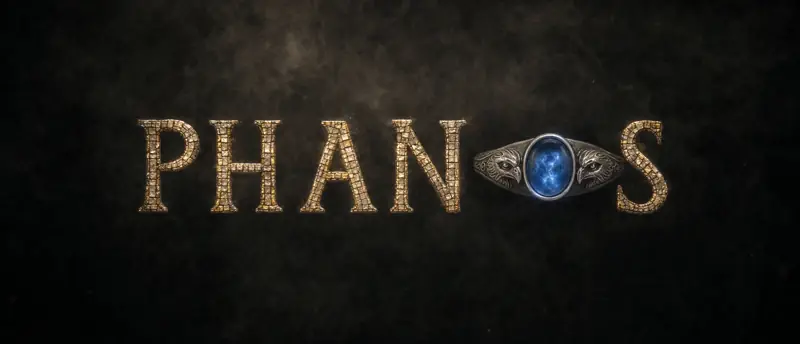
    • Generate letters inside the picture when they are made of something in the story, such as this mosaic with a ring from the plot as the O.
    • Set names and small text in the editor, because a misspelled credit is hard to fix inside a generated shot.
    The title Phanos in gold mosaic letters on smoky black, a silver ring with a blue stone as the O00:08
    Jaime Yao, director of In ’twixt Vows · Seedance 2.0 · Reference to video
  5. Step 5

    Cut it to music, with room for names.

    Line the shots up on the timeline, hold each one long enough to read its name, and let the music decide where it changes.

    • Karan Archana wrote this ending for credits, asking the model to Hold the composition almost still to create generous negative space suitable for end credits.
    A camera rises from a dark pool below waterfalls to reveal a vast grey fjord between mountains
    Start frame: A camera rises from a dark pool below waterfalls to reveal a vast grey fjord between mountains
    Start frame
    00:15
    Karan Archana, director of Drop of Water · Kling 3.0 4K · Image to video

How do you write a prompt for title sequence shots?

Say what the letters are made of, how they arrive, how long they hold, and what must not change, because a model given just the words will pick a style of its own.
  1. 1. Keep the spelling exact

    Ask for the words as written, so the model copies your capitals and does not guess at them.

    with correct spelling and capitalization exactly as written.
    Jaime Yao, director of The Herder
  2. 2. Let the world break the letters

    Write what happens to the words after they have been read, so they leave as part of the scene.

    breaking the letterforms apart into scattered golden shimmer
    Walter Mauro, director of Duro
  3. 3. Wait before the title

    Tell the model to hold the picture first, so the viewer settles into the shot before there is anything to read.

    After a long pause, the title DROP OF WATER slowly fades in
    Karan Archana, director of Drop of Water
  4. 4. Keep a quiet title out of the scene

    When the shot should stay the focus, say that the words leave it alone.

    It does not distort, animate, or interact with the water.
    Karan Archana, director of Drop of Water
  5. 5. Lock finished artwork

    If you already have a logo or title graphic, give it as a reference and rule out any redrawing.

    Preserve the typography, proportions, line structure, white color and red dot EXACTLY.
    Marius Jensen, director of Still Time
  6. 6. Time a graphic to the sound

    Give the model your track as a rhythm reference, so the title reacts to the music instead of shaking at random.

    The graphic animation must react precisely to the amplitude and percussive impulses of @Video1.
    Marius Jensen, director of Still Time
  7. 7. Set the size of the title

    Say how large the words should be, so the picture behind them stays visible.

    Place the title PHANOS in the center of the frame, but do not make it too large.
    Jaime Yao, director of In ’twixt Vows
  8. 8. Keep the motion slow

    Repeat the pace in every prompt, so separate shots still cut together as one sequence.

    All motion is slow, calm, and controlled.
    Jaime Yao, director of main title design tutorial

What do people ask about title sequences?

What is a title sequence?

A title sequence is the designed run of shots that shows a film's title and main credits, usually near the start. It sets the mood, and with AI you can generate its images and motion from prompts.

What is the difference between a title sequence and a title card?

A title card is a single shot that shows the title. A title sequence is a run of shots with its own design, and it can include one or more title cards along the way.

How long should a title sequence be?

Long enough to read every name you need to show. A single credit shot in Duro runs 10 seconds and the Still Time title runs 8 seconds, so a short film can use one shot rather than a full run.

Where does a title sequence go in a film?

Often at the very start, or after an opening scene once the story has given the viewer a question. In a short film it can also come at the end, over a shot held still for the names.

Can AI write the letters correctly?

Often, if you put the exact words in quotes and ask for them as written, but read every letter before you use the shot. Set small text and names in the editor, where spelling cannot drift.

Can I make a title sequence for free?

Yes, Flick has a free plan with no credit card: 100 credits at signup, 200 more for joining the Flick Discord, and 100 credits every week. GPT Image 2 stills run on the free plan, while Seedance and Kling need the Standard plan ($20 a month).

More on opening and finishing your film in Flick

Films on this page

Open your film on a title sequence

Build the worlds, move them slowly, and place your title on one canvas.

Make your title sequence in Flick

Try for free, no credit card required.

Ask AI about this page:ChatGPTPerplexityClaude