How to Use Wan 2.7 for Images in 2026: Styles and Text
Oct 2026
Wan 2.7 is Alibaba's image model in the Wan family. On Flick it costs 6 credits an image, takes Flickpedia visual styles, a negative prompt and a guidance scale, and returned 1024 × 576 for 16:9. In our tests it wrote clear text, including lines nobody asked for.
Quick answer: how do you use Wan 2.7 for images?
Add an image node in Generate Image, pick Wan 2.7, and write the scene. Then:
- Pin a style if you want one. It follows the reference's composition and texture.
- Say "no other text" when the image carries words; it adds its own.
- Use the negative prompt for anything that keeps appearing.
| Spec | Wan 2.7 on Flick |
|---|---|
| Maker | Alibaba (Wan) |
| Price | 6 credits per image |
| Output we measured | 1024 × 576 at 16:9 |
| Settings | Negative prompt, guidance scale (1 to 10, default 3.5), JPEG or PNG |
| Aspect ratios | 16:9, 9:16, 1:1, 4:3, 3:4, 21:9, 5:4 |
| Flickpedia styles | Yes |
| Reference images | Up to 4 |
| Prompt length | Up to 2,500 characters |
| Plans | All plans, including Free |
Alibaba's Model Studio page lists text-to-image, image editing, multi-image reference and better text rendering. All rates are on model credit costs.
Make an illustrated scene in your style
Pin a Flickpedia style and control the rest with a negative prompt.
How we tested
One prompt with Flickpedia styles, in October 2026:
A woman in a red coat walks her small dog along a seaside promenade at dusk, with a lighthouse and a ferry in the distance.We also ran three plain prompts for realism, typography and illustration, alongside ten other models. Our Vintage Naturalistic Photography run for Wan 2.7 was lost on our side, so the figure has two styles.
Two Flickpedia styles
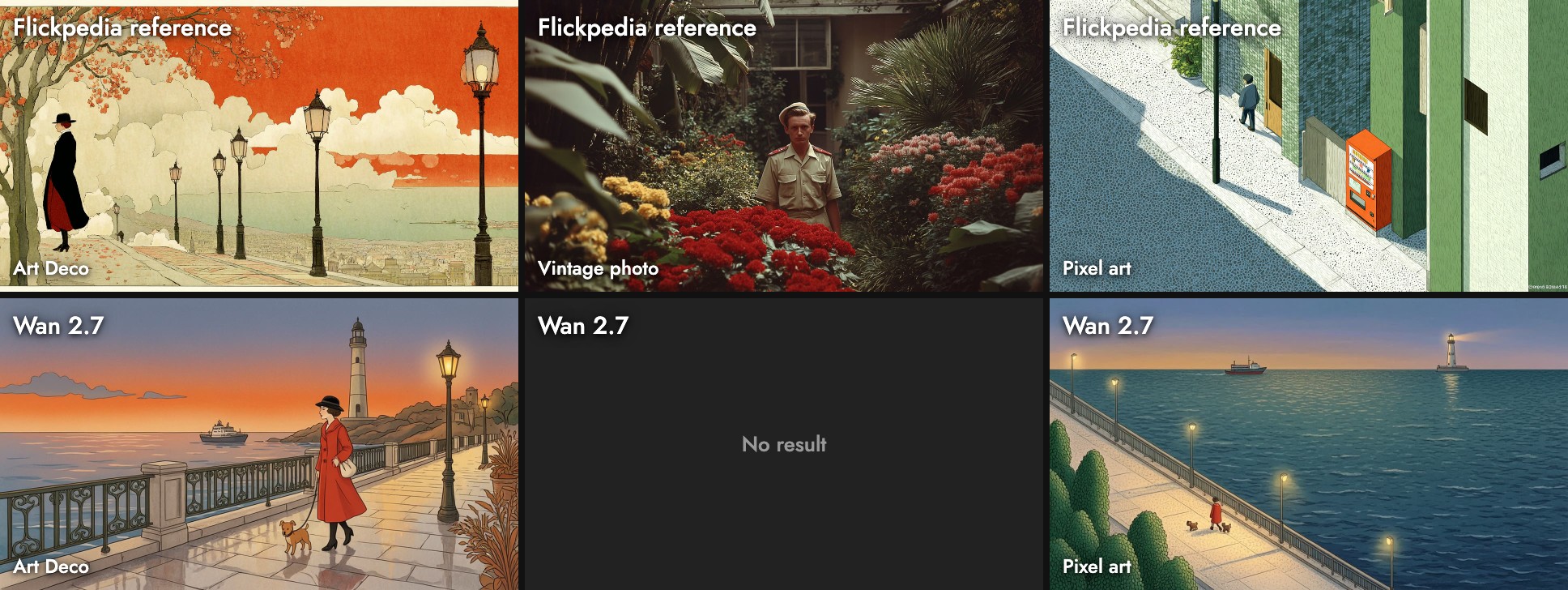
- Art Deco: a warm illustrated sunset with a cloche hat, a lamp post and potted plants, all echoes of the reference set.
- Pixel art: it took the reference's high camera angle and stippled trees, and made the woman tiny. That is faithful to the reference and far from the prompt's framing.
Three test prompts
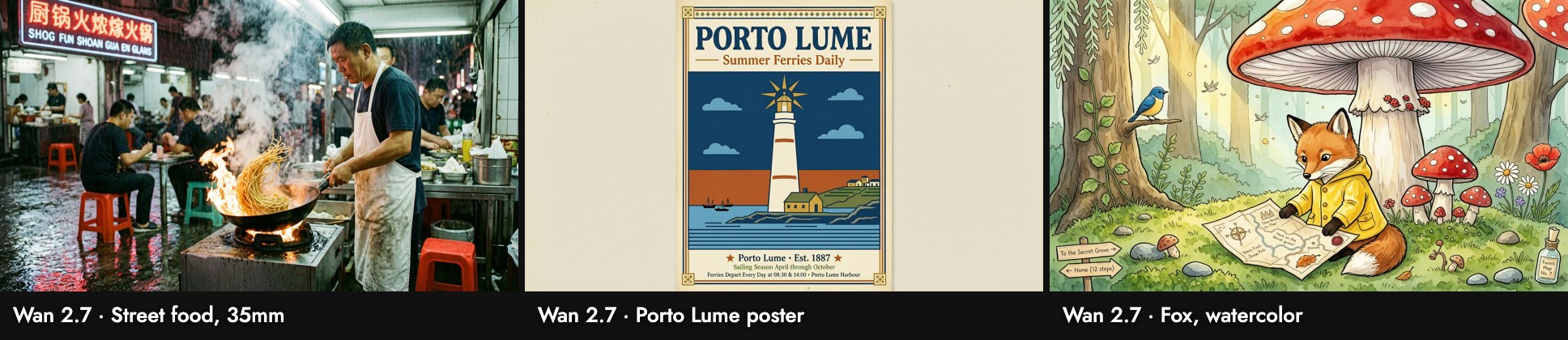
- Street food, 35mm: busy and believable, but the signs mix garbled Chinese with nonsense English ("SHOG FUN SHOAN").
- Poster: it drew a portrait poster inside the 16:9 frame. The title and tagline are right, and it added legible copy of its own: "Porto Lume · Est. 1887", a sailing season from April through October, and ferry times at 08:30 and 14:00.
- Fox: a detailed watercolor with a signpost and labels on the map, again text it chose to add.
Wall-clock time on our busy canvas ran from 35 to 112 seconds.
When to use it, and when not
Use it when: you want a style reference followed, a fuller illustrated scene, or a negative prompt to control what appears.
Skip it when: every word on the image must be yours, or you need a large file: 1024 wide is the smallest output in our tests. Seedream 5.0 Lite returned 3072 wide for 7 credits.
Sources
- wan2.7-image, Alibaba Cloud Model Studio, checked October 21, 2026
- Prices and settings from Flick's model configuration; images, sizes and timings from our Flick canvases, October 2026
Guides associés
- Generate Image
- Visual Styles
- Model credit costs
- How to use Wan 3.0
- How to use Seedream 5.0 Lite
- How to use Riverflow 2.0 Pro
- How to use Recraft V3
Questions fréquentes
How much does Wan 2.7 cost for images on Flick?
Does it work with Flickpedia styles? Yes.
Does it work with Flickpedia styles?
Why did extra text appear in my image? Wan 2.7 adds plausible copy to posters and maps. Ask for no other text, or list it in the negative prompt.
Why did extra text appear in my image?
What resolution does it output? 1024 × 576 for 16:9 in our tests.