
How to Use Recraft V3 in 2026: Text, Realism and Its Limits
Oct 2026
Recraft V3 is Recraft's image model, released in October 2024 and known for photorealism and text. On Flick it costs 8 credits an image and returned 1820 × 1024 for 16:9 in our tests. In our runs it leaned photographic: it kept the words of every prompt but often dropped the style we wrote.
Quick answer: how do you use Recraft V3?
Add an image node in Generate Image, pick Recraft V3, and write the scene. Then:
- Use it for realistic images. Photographic scenes are its default.
- Spell out the medium early and plainly if you want something else, and expect to retry.
- Quote exact text. Every word we asked for came back spelled right.
| Spec | Recraft V3 on Flick |
|---|---|
| Maker | Recraft |
| Released | October 2024 |
| Price | 8 credits per image |
| Output we measured | 1820 × 1024 at 16:9 |
| Settings on Flick | Aspect ratio only |
| Flickpedia styles | Not supported; write the style in the prompt |
| Plans | All plans, including Free |
Recraft's API documents named styles, with Recraft V3 Raw as the default for this model. Flick's node has no style setting, so you cannot pick one there. All rates are on model credit costs.
Make a realistic image with words in it
Signs, storefronts and labels, spelled right.
How we tested
Recraft V3 cannot take a Flickpedia style, so we wrote each style into the prompt:
A woman in a red coat walks her small dog along a seaside promenade at dusk, with a lighthouse and a ferry in the distance, in an Art Deco illustration style.The other two endings were "as a vintage naturalistic photograph" and "in a pixel art animation style". We also ran three plain prompts for realism, typography and illustration, in October 2026, alongside ten other models.
Three written-in styles

- Art Deco: a painterly, realistic evening. No flat shapes, no geometric ornament.
- Vintage photo: a convincing natural dusk photograph.
- Pixel art: a photograph again. There is no pixel structure even at 100%.
Only one of the three changed medium, and only slightly. If the look matters more than the realism, choose a model that takes styles.
Three test prompts
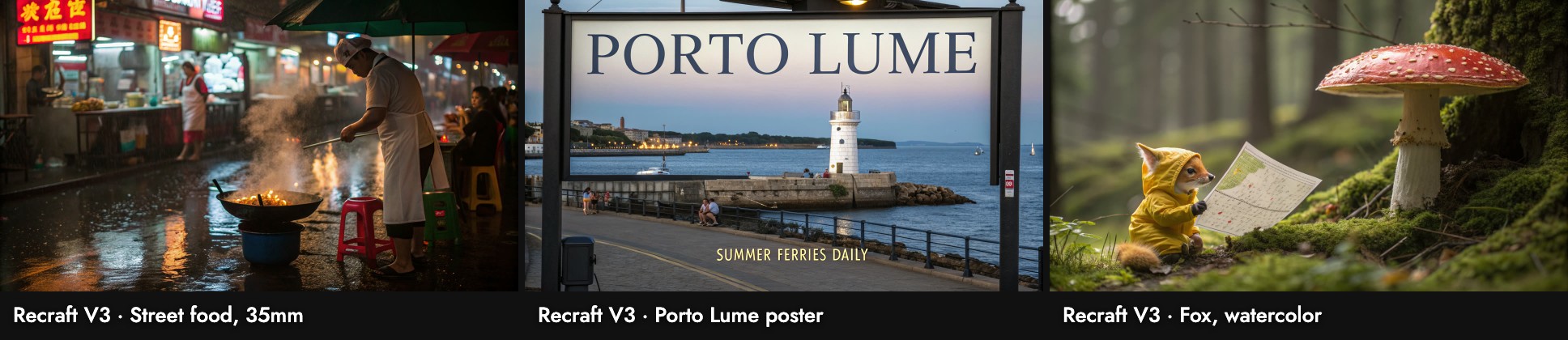
- Street food, 35mm: a believable night photograph with steam and wet pavement. The shop signs are invented characters.
- Poster: the text is perfect, "PORTO LUME" and "SUMMER FERRIES DAILY", but it is a photo of a poster on a stand by the sea, not the flat screen print we asked for.
- Fox: a photo-real fox in a raincoat. The prompt said watercolor and ink.
Wall-clock time on our busy canvas ran from 15 to 141 seconds.
When to use it, and when not
Use it when: you want a realistic image with correctly spelled words in it, such as a storefront, a sign or a product shot.
Skip it when: you need a specific illustrated style, or you need a pinned Flickpedia style to hold across shots. Seedream 5.0 Lite followed styles closely, and Kling Image V3 followed written-in styles.
Sources
- Recraft V3, Recraft API documentation, checked October 21, 2026
- Prices and settings from Flick's model configuration; images, sizes and timings from our Flick canvases, October 2026
Related guides
- Generate Image
- Image generation prompts guide
- Model credit costs
- How to use Seedream 5.0 Lite
- How to use Kling Image V3
- How to use Z-Image Turbo
- How to use GPT Image 2.5
Frequently Asked Questions
How much does Recraft V3 cost on Flick?
Can I use a Flickpedia style with Recraft V3? No. Write the style into the prompt instead.
Can I use a Flickpedia style with Recraft V3?
Why did my illustration come out as a photo? In our tests Recraft V3 kept a photographic look for two of three written-in styles and for a watercolor prompt.
Why did my illustration come out as a photo?
Is it good at text? Yes: every word we asked for was spelled right.