How to Make a Children's Cartoon Show With AI

Here is how to make a cartoon show for children with AI: build one small world, design two recurring characters, write a format you can repeat, then animate gently and add calm voices and music.

A rough ink drawing of a child sitting cross-legged, seen from behind, watching a small old television

A children's cartoon show has a harder job than a single clip, because the same characters have to come back looking and sounding like themselves, week after week. Most guides on how to make a cartoon series with AI walk through a tool and a sample clip, so here we show real clips and prompts from real canvases instead. Mila & Sasa, a 3:45 cartoon by Katrin Ann Orbeta from the Summer 2026 Flick Residency, shows the method: we use its 273 generated video clips, because its gentle look, small cast and reusable character sheets are what a kids' show is built from, and we mark what is our own advice for a series.

How do you make a cartoon show, step by step?

In eight steps: build a small world, design two characters, write a repeatable format, reuse the same character sheets, pace it gently, add simple voices, add music and sound, then make a title you can open with each time.
  1. Step 1

    Build one small world

    Pick a few places young viewers can learn by heart and make each one an empty background, so you can stage a new story there without redrawing the room.

    • Mila & Sasa keeps to a spaceship kitchen, a desert and a wrecked ship, and it returns to the kitchen in a second, ruined state.
    • The prompt below takes a character out of a finished picture to leave a clean set.
    • A show can come back to a set like this in later episodes.
    Empty yellow spaceship kitchen with vines, round windows and a stove, with no characters in the scene
    Katrin Ann Orbeta, director of Mila & Sasa · Nano Banana 2
    Remove the little girl (blue hair, blue backpack, yellow suit) standing in front of the stove completely. Fill in the space behind her naturally with the stove, counter, oven, and floor so it looks like she was never there. Keep everything else in the scene exactly identical: the yellow retro spaceship kitchen, vines, porthole windows with desert landscape, framed photo of mother and child on the wall, the stove with the tray of small colorful star cookies, the pans on the floor, and all lighting and colors unchanged.
  2. Step 2

    Design two characters

    Start with two characters who look nothing alike and fit in one sentence each, because a small child should know who is on screen from the shape alone.

    • Mila is tall with blue hair and a yellow suit, and Sasa is a tiny figure in a blue cat suit.
    • The sheet gives the model four views and six expressions to copy, so a reaction never has to be invented.
    • Its prompt spells out the design and the outline rule, which keeps a simple drawing simple.
    Character sheet of Mila with four full-body views above six facial expressions, on a white background
    Katrin Ann Orbeta, director of Mila & Sasa · Nano Banana 2
    Create a full character turnaround and expression sheet for Mila based on this reference image. Layout: top row shows 4 full-body poses in a row: FRONT, 3/4 FRONT-RIGHT (body at 45 degrees), SIDE (profile), BACK. Bottom row shows 6 facial expression close-ups: HAPPY, SAD, SURPRISED, ANGRY, CURIOUS, LAUGHING. Keep her exact design from the reference: blue bob hair, red/orange skin, yellow spacesuit/jumpsuit, blue boots/shoes. Outlines only at joints and where different colors meet, no heavy interior outlines within same-color areas. Flat 2D illustration style, tricolor blue yellow and red/orange palette, white background. Label each pose and expression. Title: "Character Turnaround: Mila".
  3. Step 3

    Write a repeatable format

    Write one story shape you can refill each time, with a small want, a trip, some trouble and a comfort at the end, so every episode feels familiar before it starts.

    • Mila's radar watch points her toward what she is looking for.
    • In a series, a device like this could start each episode by pointing somewhere new, which is our idea and not something the film does.
    • The four parts of the shape are shown below, each from a real scene.
    A red hand wearing a blue radar watch with a green dot, held out over a yellow desert00:05
    Katrin Ann Orbeta, director of Mila & Sasa · MiniMax H3 · Reference to video
  4. Step 4

    Reuse the same sheets

    Cite the same character sheets by name in each prompt and keep them on one canvas, because that is how the next episode picks up the characters you already have.

    • 108 of the film's 273 video prompts cite a character or expression sheet by name.
    • Those prompts carry lines such as Preserve reference style and character identity.
    • Katrin kept versions of Mila with and without her backpack, so a costume change does not mean a new design.
    Mila with a blue backpack walks into a ruined spaceship kitchen and looks around, seen from behind00:15
    Katrin Ann Orbeta, director of Mila & Sasa · MiniMax H3 · Reference to video
  5. Step 5

    Pace it gently

    Give each shot one simple action and time to finish it, because young children need a moment to follow what just happened before the next thing starts.

    • In The Little Fox's Dream by Jaime Yao, this take does one thing: the fox reaches at the lights, then falls asleep.
    • Mila & Sasa asks for the same restraint in words: Restrained natural movements. No exaggerated acting.
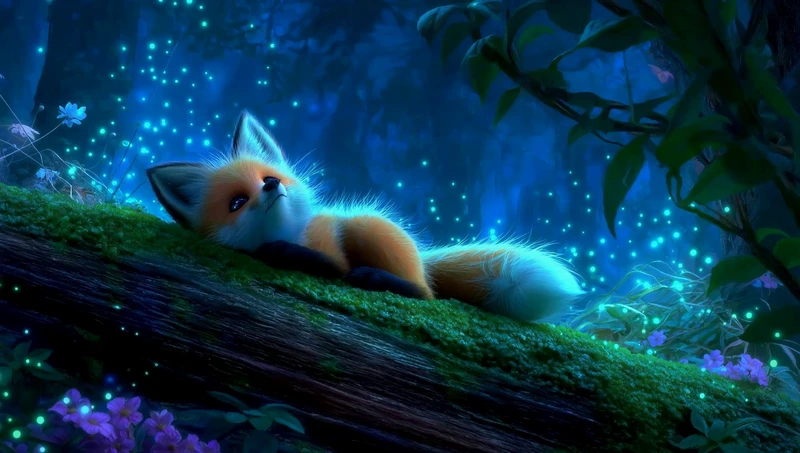
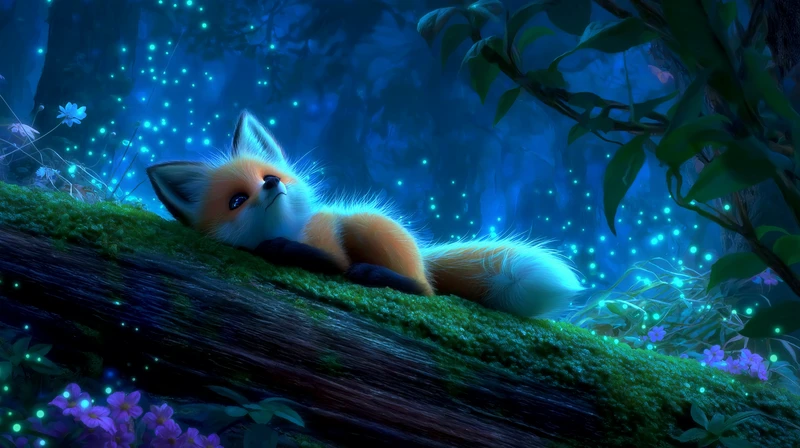
    • Avoid fast cuts and sudden flashes, which is our general advice rather than something we measured.
    A small fox lies on a mossy log at night among glowing lights and drifts off to sleep
    Start frame: A small fox lies on a mossy log at night among glowing lights and drifts off to sleep
    Start frame
    00:10
    Jaime Yao, director of The Little Fox’s Dream · Seedance Pro · Image to video
  6. Step 6

    Add simple voices

    Generate one recorded line for each character first and cite it in later shots, so a voice stays the same, and keep the sentences short enough to read aloud.

    • The canvas holds 19 Text to Voice lines made with Eleven v3, and 27 video prompts cite the line My Radar Apology.
    • This shot describes Sasa as Deep, warm, paternal adult male voice, calm and natural.
    • One line of hers shows the length to aim for: "Yeah, it's also the only one missing from my collection."
    Mila tastes soup in a pastel spaceship kitchen while small Sasa stands beside a tray of stars00:15
    Katrin Ann Orbeta, director of Mila & Sasa · MiniMax H3 · Reference to video
  7. Step 7

    Add music and sound

    Score the whole cut after the shots are done, in a mood you can name, and add playful sound effects where the picture is silly.

    • Katrin's music prompts carry the words never frightening, and one asks: Make a version to insert in a funny cute scene.
    • 37 of her video prompts say "No music", and the canvas holds 5 tracks made with Eleven Music.
    • This Mouse Chef take by Zoey Z., started from a Midjourney image, went through Mirelo SFX 2.0, a model that adds sound effects to a video.
    Cartoon mice scurry across a restaurant floor while a chef works at a counter in a green-tiled kitchen00:20
    Zoey Z., director of Mouse Chef · Mirelo SFX 2.0
  8. Step 8

    Make a title to reuse

    Make a title card in the show's own style with both characters on it, then open with it each time, so children know their show has started.

    • This card was made as a still in the film's style, then given a small animation.
    • The film's credits are a matching card with the same style line in the prompt.
    • Opening each episode with the card is our advice for a series, as this film uses it once.

    Open the Mila & Sasa workflow

    Illustrated title card reading Mila and Sasa, with both characters at a colorful spaceship control panel
    Start frame: Illustrated title card reading Mila and Sasa, with both characters at a colorful spaceship control panel
    Start frame
    00:05
    Katrin Ann Orbeta, director of Mila & Sasa · MiniMax H3 · Image to video

What could one episode of a kids' show look like?

A small want at home, a trip to somewhere new, some trouble that passes quickly, then a comfort shared with a friend, shown here from the one Mila & Sasa film as a shape you could repeat.
Mila tastes soup at a bright kitchen counter while small Sasa watches from beside a tray
Start frame: Mila tastes soup at a bright kitchen counter while small Sasa watches from beside a tray
Start frame
00:15

A small want

Mila's soup is missing one star spice, a problem a child can grasp at once.

Katrin Ann Orbeta, director of Mila & Sasa

Mila walks through a yellow desert with sand-colored towers and a pale moon behind her
Start frame: Mila walks through a yellow desert with sand-colored towers and a pale moon behind her
Start frame
00:10

A trip

She sets out across a desert, a new place that a later story could swap for another.

Katrin Ann Orbeta, director of Mila & Sasa

Mila stumbles backward and falls to the floor of a ruined spaceship kitchen00:07

Some trouble

A fright in the old kitchen, and you can set how scary this part gets by the age you make it for.

Katrin Ann Orbeta, director of Mila & Sasa

Mila and Sasa sit together on a spaceship roof at dusk and share a tart00:15

A comfort

The two friends share a tart on the roof, an ending that sends a young viewer off calm.

Katrin Ann Orbeta, director of Mila & Sasa

How long should an episode of a children's cartoon be?

Aim for a first episode of about 2 to 4 minutes, which you can finish and judge, because preschool cartoons often run about 5 to 11 minutes and each extra minute means more shots to make.
Shots counted from hard cuts in the finished films, so the figures are approximate and leave out soft dissolves. Neither film is an episode of a series.
FilmRunning timeShots, aboutOne shot every, about
Mila & Sasa3:45445 seconds
To My Grandma1:38119 seconds

At Mila & Sasa's pace, a 5 minute episode comes to about 60 shots, before you count the extra takes.

An old woman and a young girl sit close together in a soft painted garden and hold hands
Start frame: An old woman and a young girl sit close together in a soft painted garden and hold hands
Start frame
00:30
A long, quiet take on the To My Grandma canvas by Zoey Z., shown for its slow paceZoey Z., director of To My Grandma · Seedance 2.5 · Image to video

Questions about making a cartoon show

How do you make a cartoon series with AI?

Design the characters and places once as reference images, write a story shape you can repeat, then generate each episode shot by shot from those same references. Keep them on one canvas, so the next episode starts from the characters you already have.

How do you make an animated show on your own?

Keep it small: two characters, a few places and short episodes. One person can write, generate and cut a short cartoon with AI, as Katrin Ann Orbeta is credited for the character design, AI prompting and editing of Mila & Sasa, with an associate producer.

How do you keep cartoon characters consistent across episodes?

Make a sheet for each character with several views and expressions, then cite the sheet in each shot's prompt and describe the outfit the same way each time. Reuse the same voice line as a reference, so the character sounds the same too.

How long should an episode of a kids' cartoon be?

Preschool cartoons often run about 5 to 11 minutes, and Bluey is listed at about 7 minutes on Wikipedia. For a first AI episode, a shorter target of a few minutes is more realistic, since each minute needs many separate shots.

Can I make a show in the style of a famous cartoon?

Make your own characters and your own look instead. A famous show's characters and designs usually belong to its owner, and copying them can get a video taken down. Describe qualities such as flat shapes and pastel colors. This is general guidance, not legal advice.

Can I post an AI cartoon for kids on YouTube?

Yes, but check the rules first. YouTube asks creators to say whether a video is made for kids, which changes how it can be shown, and it has rules on disclosing some AI content. Read its current policies before you publish a series.

What voices work best for a children's cartoon?

Calm, clear voices with short sentences, so a young viewer can follow each word. Give each character a voice that sounds different from the other, and test the lines by reading them aloud before you generate them.

Can I make a children's cartoon show for free?

You can start for free in Flick, with no credit card, and make characters and backgrounds with Nano Banana 2 on free credits. Video models such as MiniMax H3 and Seedance 2.0 need the Standard plan or higher.

More on making cartoons and shows in Flick

Films in this guide

Every picture and prompt on this page comes from a public Flick film canvas, read on 2026-11-02, and is credited to its filmmaker, and the counts are of generated clips, archived takes included and upscales left out. Watch more films made in Flick on Flick TV.

Start your children's cartoon show

Design the world and the characters, animate the shots and add voices and music on one canvas you can return to for the next episode.

Start your cartoon show in Flick

Try for free, no credit card required.

Ask AI about this page:ChatGPTPerplexityClaude