Midjourney vs GPT Image 2.5: Which Image Model to Use in 2026
Oct 2026
Midjourney is the model people reach for when the picture has to look like something. GPT Image 2.5 is OpenAI's newest image model, built for following instructions. We took three prompts we had already run on Midjourney in Flick, with the same saved Flick style, and ran them again on GPT Image 2.5 from the same image node.
The short version: Midjourney held the mood and the style; GPT Image 2.5 followed the words, including the text on signs. At the time of writing Midjourney is temporarily unavailable in Flick's picker; the Midjourney images here come from our earlier runs.
Quick answer: Midjourney or GPT Image 2.5?
In an image node on Flick:
- Pick Midjourney for look and feel. It stayed closest to our saved style, grain and lighting included.
- Pick GPT Image 2.5 for exact instructions. It rendered both sign texts cleanly and placed every requested object.
- Keep the style attached either way. A Flick style carries across models when you regenerate and switch.
| Midjourney | GPT Image 2.5 | |
|---|---|---|
| Maker | Midjourney | OpenAI |
| Credits on Flick | 10 per batch of 4 images | 5 per image (Medium, 1K, launch price) |
| Output we got (16:9) | 1456 × 816 | 1536 × 864 |
| Text in images | Legible but rough in our test | Clean |
| Reference images | Style reference | Up to 10 references, plus editing |
| Status on Flick | Temporarily unavailable at the time of writing | Available on every plan |
Run one prompt on two image models
Keep your style, switch the model, compare.
How we tested
Three prompts from our own canvases: a dog carrying a bowl, a peach tree, and a haunted mansion with two hand-painted signs. Each was first run on Midjourney with a saved Flick style. We then used Regenerate on the Midjourney node and switched the model to GPT Image 2.5, which keeps the prompt, the aspect ratio and the style. One GPT image per prompt; Midjourney returns four, and we show the one from the node we regenerated.
Test 1: a dog carrying a bowl
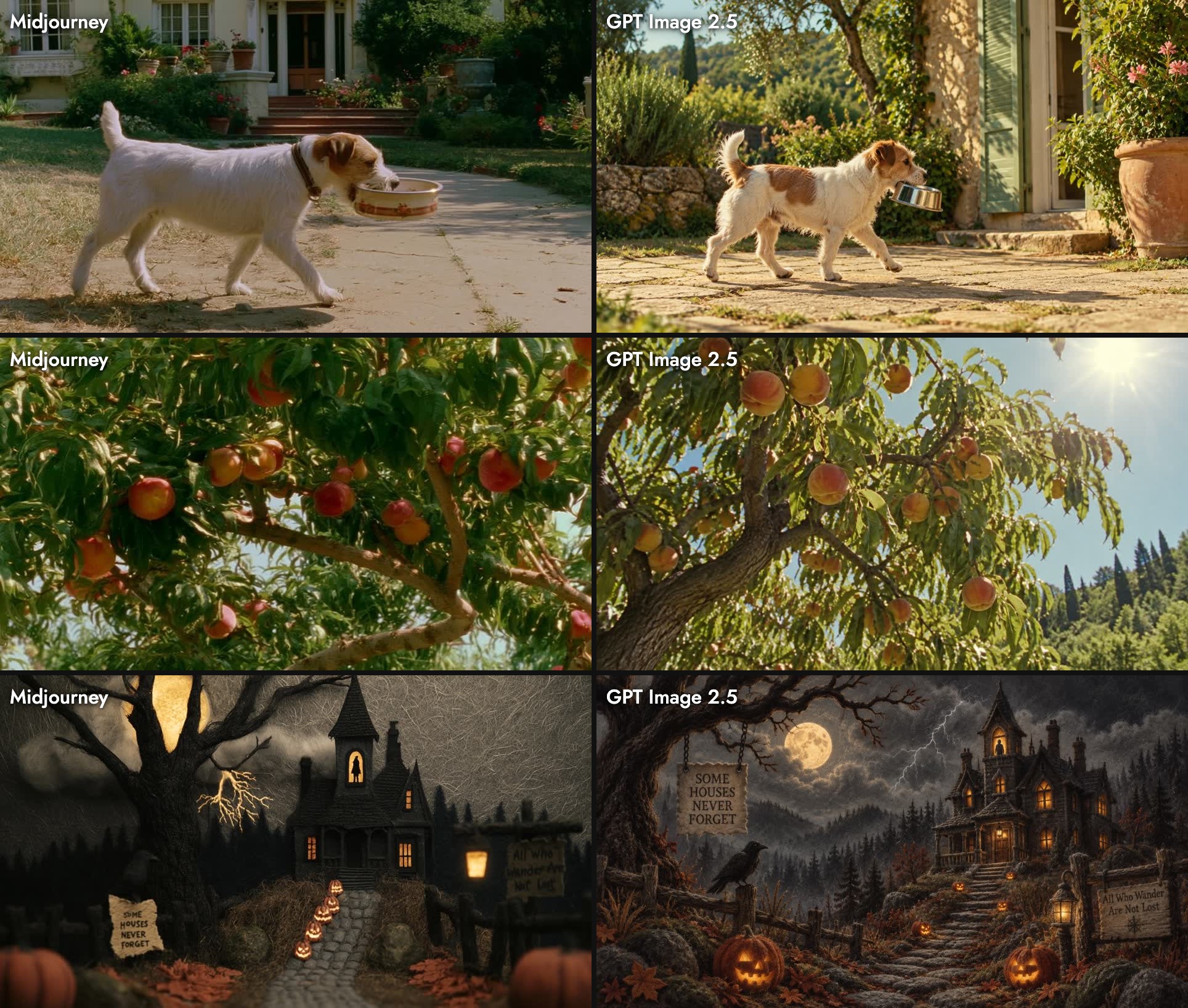
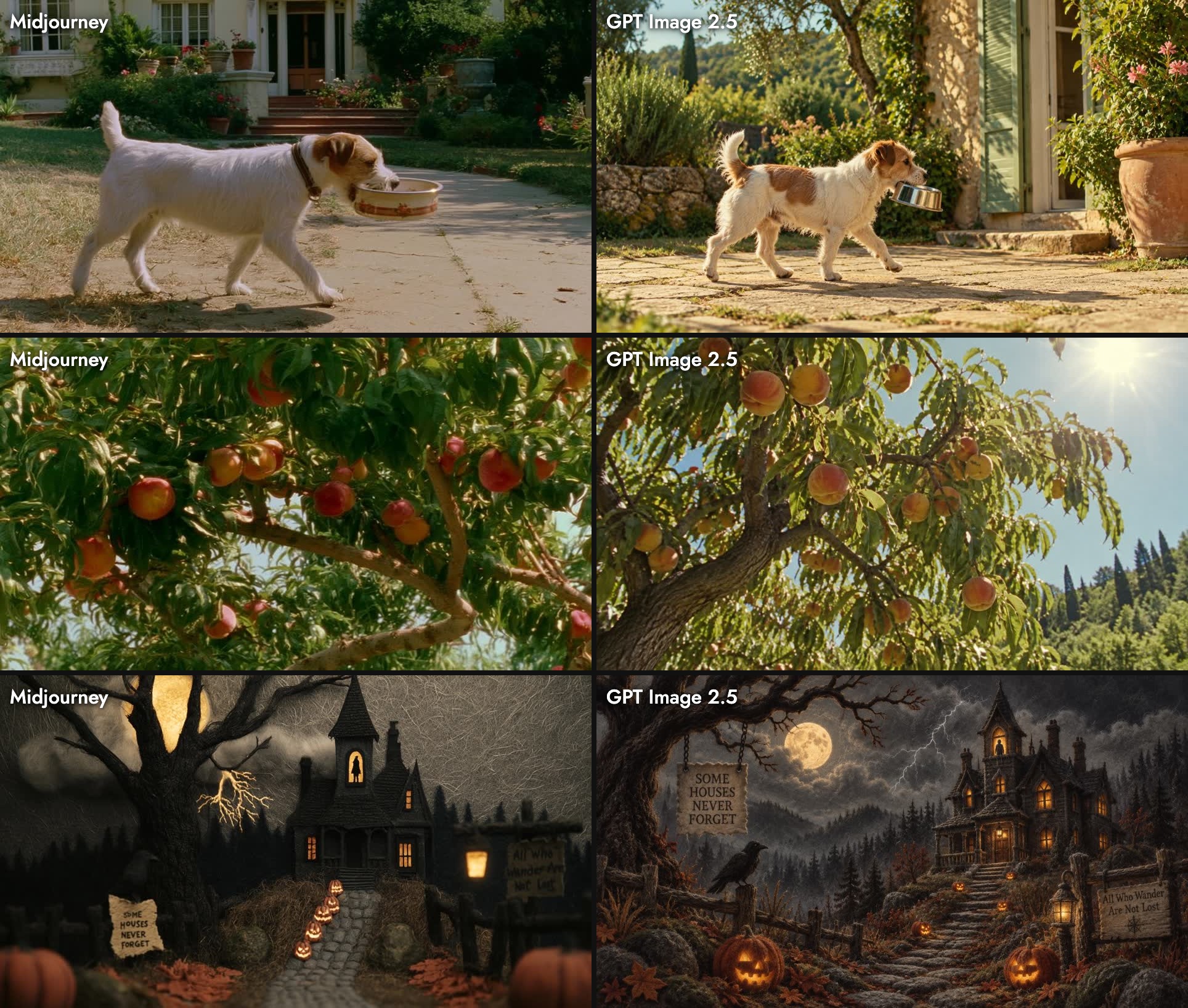
A small dog walks by carrying a dog bowl in its mouth. The dog is shown in profile, not facing the camera. The scene is sun-drenched and summery, filmed in rich, warm golden-hour light in front of a beautiful house.Both got the brief: a small dog, in profile, bowl in mouth, golden light, a house behind. Midjourney looked most like a film frame, with soft grain and a lawn that reads as a real garden. GPT Image 2.5 was cleaner and brighter, with a stone villa, shutters and a cypress hillside: more literal, more postcard.
Test 2: a peach tree
A low-angle view of a peach tree laden with fruit, under the blazing summer sun. It evokes a lazy, indulgent summer afternoon, something both fleeting and eternal, with the kind of lush, richly sensuous countryside aesthetic.Midjourney went close and low into the branches, with heavy, saturated fruit and film grain. GPT Image 2.5 pulled back to the whole tree with the sun in frame and hills behind. Both are usable; Midjourney carried the mood words ("lazy, indulgent") further.
Test 3: a haunted mansion with two signs
A long, specific prompt in a "Textured Silhouette Art" style: mansion on the right, a figure in the tower window, a winding stone path lined with pumpkins, a crow, a lantern, and two signs reading "Some Houses Never Forget" and "All Who Wander Are Not Lost".
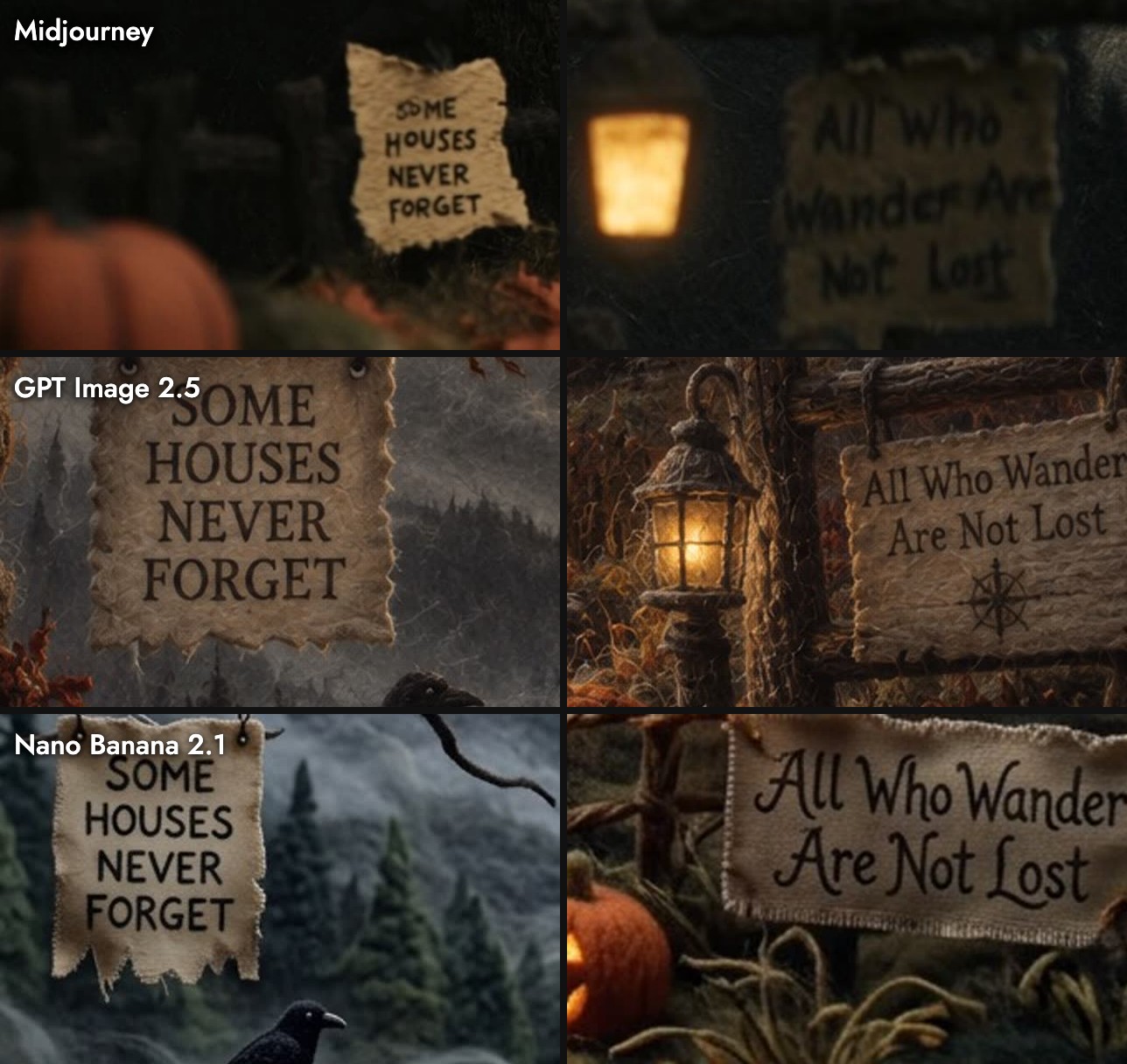
Midjourney kept the silhouette look: dark shapes, little interior detail, warm windows. Its signs are legible but small and rough, and the second is blurred. GPT Image 2.5 drew a more detailed illustration than "silhouette art" suggests, but it placed every listed object and set both signs in clean, readable lettering.
Cost and speed
| Midjourney | GPT Image 2.5 | |
|---|---|---|
| Credits | 10 for 4 images | 5 for 1 image |
| Per image | 2.5 | 5 |
| Our times | 32 s for a batch of 4 (mansion) | 23 s, 1 min 34 s, 2 min 25 s |
GPT Image 2.5's 5 credits is a launch price at Medium quality and 1K; High quality and larger sizes cost more. See model credit costs.
Which one to use
| You want | Use | Why |
|---|---|---|
| A frame with mood and texture | Midjourney | Stayed closest to the saved style |
| Exact objects and layout from a long prompt | GPT Image 2.5 | Placed everything we listed |
| Readable text on signs, posters, labels | GPT Image 2.5 | Clean lettering on both signs |
| Four options to pick from | Midjourney | Returns a batch of four |
| Edits to an existing image | GPT Image 2.5 | Supports reference images and editing |
The column "Why" is our assessment from these three prompts. More on each: GPT Image 2.5 guide, visual styles.
Sources
- Version and Style Reference, Midjourney documentation, checked October 21, 2026
- OpenAI API changelog, GPT Image 2.5 entry, September 8, 2026
- GPT Image 2.5 guide, Flick, with OpenAI's documentation linked there
- Images, credit rates and timings from Flick canvases, July to October 2026
Verwandte Anleitungen
- Generate an image
- Visual styles
- Image generation prompts
- Model credit costs
- How to use GPT Image 2.5
- Midjourney vs Nano Banana 2.1
- Nano Banana 2.1 vs 2 vs Pro
Häufig gestellte Fragen
Is GPT Image 2.5 better than Midjourney?
Which is cheaper per image? Midjourney: 10 credits for 4 images, 2.5 each. GPT Image 2.5: 5 credits per image at its Medium 1K launch price.
Which is cheaper per image?
Can I use the same style on both? Yes. A saved Flick style stays attached when you regenerate and switch models.
Can I use the same style on both?
Is Midjourney available on Flick? It is temporarily unavailable at the time of writing.