AI Transition Video: Match Cuts, Morphs and Dissolves

An AI transition video moves from one picture to another with generated motion rather than a preset wipe: a match cut, a dissolve, a transformation or a camera move that lands somewhere new.

An ink drawing of a small figure stepping across the gap between two strips of film

Most AI clips jump at a cut, because each one was generated on its own and nothing connects the last picture to the next. A generated transition makes the change part of the shot, so one picture becomes another on screen. We looked through the 4,324 video clips on Flick's team and residency canvases and picked 8 where you can watch it happen: match cuts, a morph, transformations, a swipe and a camera move that lands somewhere new. Each one below shows the words its maker used to ask for it.

Describe the transition you want

Describe the picture you begin on, what it turns into and the kind of transition, and it carries straight into a new Flick project as your first request.

What is an AI transition video?

It is a video where AI makes the passage between two pictures, generating the motion that travels from one to the next rather than blending two finished clips.
  • An editor transition, such as a dissolve or a wipe, blends two finished clips and adds no new picture of the scene.
  • A generated transition creates new frames, so a person can keep moving or a camera can keep travelling through the join.
  • To land a shot on one exact picture instead, see our guide to first and last frame video.

What kinds of AI transition can you make?

There are five you can write into a prompt, from a match cut to a swipe between named images, and the right one depends on whether the two pictures share a shape, a place or nothing at all.
Five kinds of transition, with what each one needs and a film that uses it
KindWhat you give the modelBest forSeen in
Match cutOne prompt with two shots and the shape they shareJumping to a new place on one gestureHappy Souls Alive
Dissolve or morphThe two pictures and the shape that links themA quiet link between two places or timesThe Miracle
TransformationOne image and the change, in stagesOne thing turning into another in the same placeA Proper Introduction, Lifeguard, To My Grandma
Camera moveOne image and a move that leaves the sceneLeaving one place for a bigger oneDuro
SwipeNamed images, each cited at a point in timeSeveral views of one scene inside one clipBunnies Brunch
  • You can also lay a ready-made blend over any cut: the Transitions tab in Flick's video editor holds types such as Cross dissolve, Morph and Wipe, and you drag one onto the boundary between two clips.

What do AI transitions look like?

These eight clips each carry you from one picture to a different one inside a single generation, with the maker's own words beside them and clips starting muted.
A woman in a plum bodice turns her head in a dormer window, then finishes the turn in a pastel forest00:09

Match cut: a head turn lands in a forest

Simay Ezer Pekcan plans 2 shots, 1 hard match-cut on the head turn, so one gesture starts in a window and ends in a forest that was not there a moment ago.

Simay Ezer Pekcan, director of Happy Souls Alive

A scholar writes in a notebook at night, and the lines on the page glow and become a star path above a distant castle00:15

Match cut: equations become a star map

The idea here is one line, equations become a star map, and the ink on the page carries the eye from a notebook out to the night sky.

Simay Ezer Pekcan, director of Happy Souls Alive

A raindrop ripples on dark water, and the ripple opens into a woman kneeling at a gravestone in autumn00:20

Morph: a raindrop opens into a cemetery

Sam Wasserman asks for one soft link, morph it naturally, so the ripple on the water widens until it holds the next scene.

Sam Wasserman, director of The Miracle

A little girl in pink holds her grandmother's hand in a meadow until the grandmother fades into a wisp of smoke00:15

Transformation: a grandmother turns to smoke

Zoey Z. asks for the change in plain words, gradually turn into a wisp of smoke, and the locked camera keeps the meadow in place around it.

Zoey Z., director of To My Grandma

A small knight on a windowsill taps a drawing and its pencil trees rise as dust and return as tiny real trees
Start frame: A small knight on a windowsill taps a drawing and its pencil trees rise as dust and return as tiny real trees
Start frame
00:10

Transformation: a drawing turns to dust, then trees

The drawing loosens into dust first, then it gradually transforms into several highly realistic miniature trees, so the change has steps the eye can follow.

Jaime Yao, director of A Proper Introduction

A man passes a sandy window in a dark steel wall, and the window turns into a bright display of a beach00:12

Transformation: a window becomes a screen

The sound is written to change with the picture, as the sandstorm fades into a low hum as the window becomes a screen.

Owen Doerr, director of Lifeguard

A tiny table in a green meadow, seen from high above, swipes to a wide view and then to a rabbit eating pancakes00:15

Swipe: from a meadow to the breakfast table

Hannah L. cites three images in one prompt and joins them with then fast smooth swipe transition to, so one clip travels from high above the meadow down to the table.

Hannah L., director of Bunnies Brunch

A woman works in a painted kitchen, walks to a window, and the view moves round to her worried face in the frame00:12

Camera move: from a kitchen to a face at the window

Two framings are joined with Shot 1 transitions into Shot 2 as one continuous camera move, not a hard cut, so the room and the woman stay with you throughout.

Walter Mauro, director of Duro

How do you make an AI transition video?

In four steps: make the picture you start from, choose the kind of transition, write the change in the prompt, then trim the result on the timeline.
  1. Step 1

    Make the picture you start from.

    Frame it with the transition in mind, because a dissolve or a match cut needs a shape that both pictures can share, such as a ripple or a raised arm.

  2. Step 2

    Choose the kind of transition.

    A shared shape suits a match cut or a dissolve, the same place suits a transformation, and a bigger world suits a camera move, so pick from the table above before you write anything.

    • MiniMax H3 Max runs on the free plan, and Seedance, Kling and Veo 3.1 need the Standard plan ($20 a month).
  3. Step 3

    Write the change in the prompt.

    Say what happens first, what it becomes and how it gets there, because the model cannot guess a change that the picture does not show.

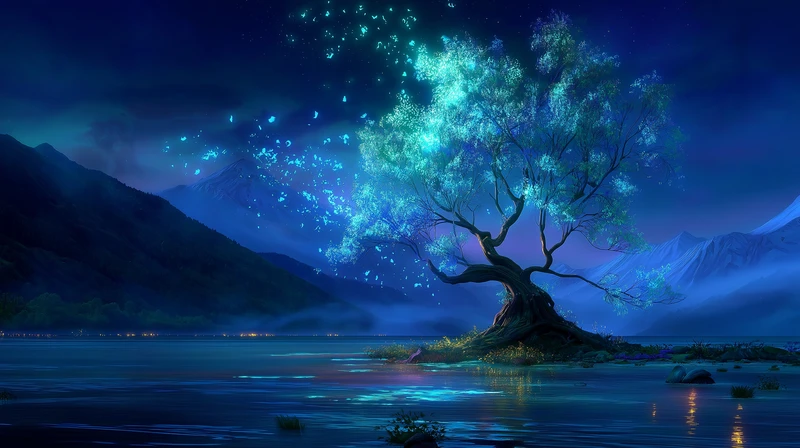
    A glowing blue tree stands alone on a dark lake below mountains, the start frame of a camera move into the stars, from The Little Fox's Dream
    Jaime Yao, director of The Little Fox’s Dream
  4. Step 4

    Trim it on the timeline.

    Line the clips up, trim to the frames you want, and drag a blend from the Transitions tab if a small jump still shows.

    A man and a woman in worn vests face each other in a dim house with a window behind them, from Drop of Water
    Start frame: A man and a woman in worn vests face each other in a dim house with a window behind them, from Drop of Water
    Start frame
    00:05
    Karan Archana, director of Drop of Water · Kling 3.0 4K · Image to video

How do you write a prompt for an AI transition?

Name the kind of transition, say what lines up, describe the change in stages and rule out what you do not want, so the model has fewer chances to invent an effect of its own.
  1. 1. Name the cut

    Say how many shots there are and where the cut falls, so the model treats the change as planned and does not smooth it into one drifting move.

    2 shots, 1 hard match-cut on the head turn
    Simay Ezer Pekcan, director of Happy Souls Alive
  2. 2. Say what lines up

    Name the shape the two pictures share, because the eye follows that shape across the change.

    The morph should feel organic, the droplet rippling outward and resolving into the cemetery framing.
    Sam Wasserman, director of The Miracle
  3. 3. Keep the change in the world

    Models like to dress a transition up, so say what the change should look like when it happens.

    The transformation must feel like hand-drawn magical animation, not a digital morph.
    Walter Mauro, director of Duro
  4. 4. Say where the move lands

    When a camera move leaves a scene, say what it arrives at, so the shot ends somewhere new.

    The sky opens gradually until the scene transitions into a vast night sky filled with countless stars.
    Jaime Yao, director of The Little Fox’s Dream
  5. 5. Write a transformation in stages

    Break the change into steps the eye can follow, so one thing does not simply pop into another.

    The trees in the drawing gradually loosen into colored-pencil dust and soft pigment particles, then slowly rise into the air.
    Jaime Yao, director of A Proper Introduction
  6. 6. Hold the frame you named

    When a clip moves through several images, say each one must be shown as it is, so the model does not invent a new angle on the way.

    it must show this exact shot (do not make up a new shot or composition)
    Hannah L., director of Bunnies Brunch

What do people ask about AI transition videos?

What is an AI transition video?

An AI transition video is a video where AI makes the passage between two pictures, instead of an editor blending them. You describe the change in the prompt, such as a match cut, a dissolve or a transformation, and the model generates it.

What is a match cut in AI video?

A match cut joins two shots on a shape or movement they share, such as a head turn that finishes in a different place. Write the number of shots and the shared shape into one prompt, as Happy Souls Alive does.

What is the difference between a transition video and first and last frame video?

First and last frame is one clip generated from two images, so it lands on a picture you chose. A transition video is any way of getting from one picture to another, which can be a match cut, a dissolve, a transformation or a blend in the editor.

Can I make an AI transition video for free?

Yes, Flick has a free plan with no credit card, with 100 credits at signup and 100 credits every week. MiniMax H3 Max video runs on it, while Seedance, Kling and Veo 3.1 need the Standard plan ($20 a month).

What is the difference between a morph and a dissolve?

A dissolve fades one picture through another, while a morph changes the shapes themselves so one thing appears to become the other. In a prompt, name which one you want and say what links the two pictures.

Can AI morph one person into another between shots?

Yes, describe the change in stages in the prompt, as A Proper Introduction does when a drawing turns to dust and then to trees. For a blend on screen, a Morph transition in Flick's video editor works between any two clips.

More on joining shots and video models in Flick

Films on this page

Write your transition into the prompt

Name the kind of transition, say what lines up, and generate the change as one clip.

Make a transition video in Flick

Try for free, no credit card required.

Ask AI about this page:ChatGPTPerplexityClaude