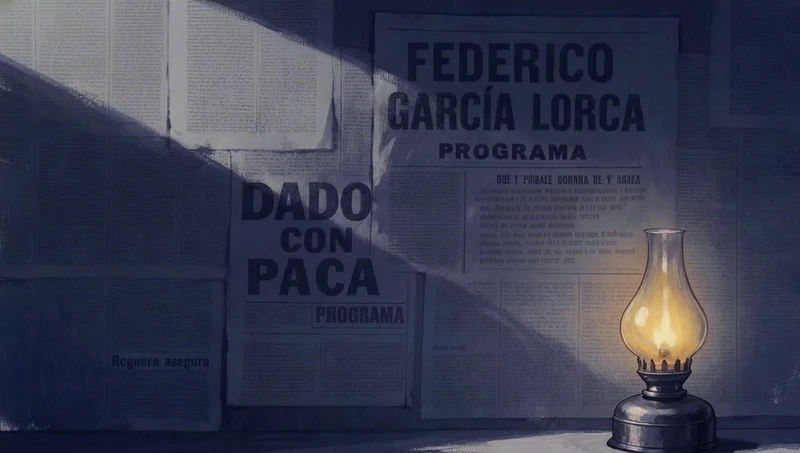
제거: 까마귀를 지우는 네 단어
대상의 이름을 지정하기 쉽고 그 자리를 대체할 것이 필요 없을 때는 이렇게 짧게 제거할 수 있습니다.
마스크를 그리고, 변경하려는 이미지 부분에 대략적인 브러시 스트로크를 한 다음, 그곳에 무엇이 들어갈지 설명하세요. 나머지 부분은 그대로 유지됩니다.
작성자 Zoey Z.최종 업데이트
하나의 디테일을 수정하기 위해 전체 이미지를 재생성하면 보통 마음에 들었던 부분을 잃게 됩니다: 얼굴이 바뀌고, 조명이 이동하며, 구도가 달라집니다. 인페인팅은 한 영역만 변경하고 나머지 그림은 그대로 두어 이를 방지합니다. 우리는 영화 제작자들이 Flick에서 만든 7편의 영화에서 단일 프레임을 수정하기 위해 작성한 8개의 편집 프롬프트를 수집했습니다. 4단어에서 209단어까지 다양하며, 8개 중 5개는 무엇이 동일하게 유지되어야 하는지를 명시합니다. 이 페이지는 각 프롬프트와 그 결과를 보여주고, 언제 마스크를 그려야 하는지 그리고 언제 텍스트 편집만으로 충분한지를 설명하며, Flick에서의 인페인팅을 4단계로 안내합니다.
| 원하는 작업 | Flick에서 사용할 도구 | 이유 |
|---|---|---|
| 객체 제거, 교체 또는 수정 | 마스크를 사용한 인페인트 | 마스크가 변경 범위를 한정함 |
| 다른 이미지의 객체를 이 이미지에 추가 | Nano Banana 2와 레퍼런스를 사용한 인페인트, 또는 편집 및 병합 | 레퍼런스가 추가할 내용을 정확히 보여줌 |
| 프레임 전체의 그레인, 색보정 또는 밝기 변경 | 텍스트 프롬프트를 사용한 편집 및 병합 | 변경이 전체에 적용되므로 마스크가 필요 없음 |
| 구도, 앵글 또는 포즈 변경 | 새로운 생성, 또는 앵글 변경 | 대부분의 픽셀이 이동해야 함 |
대상의 이름을 지정하기 쉽고 그 자리를 대체할 것이 필요 없을 때는 이렇게 짧게 제거할 수 있습니다.

프롬프트는 탑의 크기와 위치를 설정하고, 탑에 텍스트를 금지하며, 해안선부터 필름 그레이딩까지 유지되는 요소를 나열합니다.
Add a single classic California wooden lifeguard tower standing far back on the dry sand, set right up against the low grassy dune line on the distant horizon, well away from the shoreline. It should appear small and distant, placed deep in the background near the dunes, NOT in the near or mid foreground. Raised on tall stilts with a small enclosed cabin, ramp and railed deck, big sloped windows, weathered white paint with faded red trim, a small red flag on top. The tower has absolutely NO text, NO numbers, NO letters, NO signage or markings anywhere on it, clean bare weathered wood only. Keep everything else in the image completely identical: same wet sand and foamy shoreline foreground, same wide expanse of dry sand, same dunes and grass, same huge hazy sky and tan sandstorm haze, same washed out warm bleach bypass film grade and palette, same grain and dreamlike mood. The distant tower sits naturally with a soft grounded shadow, empty and quiet, no people. Cinematic wide shot.

두 번째 이미지가 구명환을 제공하고, 프롬프트는 나머지는 동일하게 유지하면서 금속과 어울리도록 풍화된 모습을 요청합니다.
Add the logo from Image 2 (the textless orange life-ring buoy) onto the metal door of the chamber in Image 1. Reproduce Image 2's logo EXACTLY as it appears, same ring design, same orange color, no text or lettering, no alterations. Place it centered on the upper portion of the door at a natural, readable size, weathered slightly to match the grimy metal and sand blasted surface so it sits believably on the door.

Keep everything else in Image 1 identical: the chamber, the big window, the "435" numbering, the sand drifts, the storm, the lighting, and the color grade. Preserve the palette: deep teals and cool greys #161E20, #253534, #1B2727, #3F5153, #545456, #777775, warm amber #F2A462 and burnt sienna #BE704A. Preserve the logo's own orange as given in Image 2.

여러 편집 중 하나로, 기사의 이동을 금지하면서 그림자 깊숙한 곳에 그림 두 개를 추가합니다.
Use the provided base image as the direct scene reference.

Continue editing from the current result.
Keep everything else in the current image unchanged.

Add two more children’s crayon drawings deeper in the hallway.
These two drawings lie flat on the wooden floor.
They sit behind the main drawing and extend farther into the shadowed depth of the hallway.
One drawing is placed in the mid-to-deep shadow area.
The other drawing is placed even farther back in the deeper hallway.
Both of these drawings are smaller in the frame than the main foreground drawing.
They must clearly read as children’s crayon drawings.
The two drawings must have different content.

One drawing shows the little knight in a swamp.
The drawing includes the little knight, green swamp ground, puddles, wet grasses, and a simple childlike fantasy setting.
The other drawing shows the little knight in snowy mountains.
The drawing includes the little knight, white snow ground, snowy mountains, a cool-toned sky, and a simple childlike fantasy setting.

Both drawings keep a children’s crayon style but in the shadow.
The paper is real white paper with slight bending and slight curling.
Do not change the position or content of the main drawing.
Do not change the little knight’s pose or position.

한 영역, 하나의 변경, 그리고 검은색에서 짙은 남색 또는 청록색으로의 방향 전환, 유리 하이라이트는 이름으로 유지됩니다.
Make the porthole windows slightly lighter — change them from very dark black to a deep dark navy blue or very dark teal, keeping the glass reflection highlights. Keep everything else identical.

프롬프트는 렌즈의 물방울까지 유지할 것을 먼저 나열한 다음, 구름 범위를 확장하고 질감을 유지합니다.
Use this image as the base. Keep everything exactly the same: ladder position and shape, camera framing, perspective, depth of field, color grade, rain direction, and the water droplets on the lens.

Only adjust the storm clouds so they occupy more of the frame. Increase the dark cloud mass and coverage so the sky feels more filled and heavy, with less open light area visible. Keep the same cloud texture and softness as the original, just expand the cloud coverage.
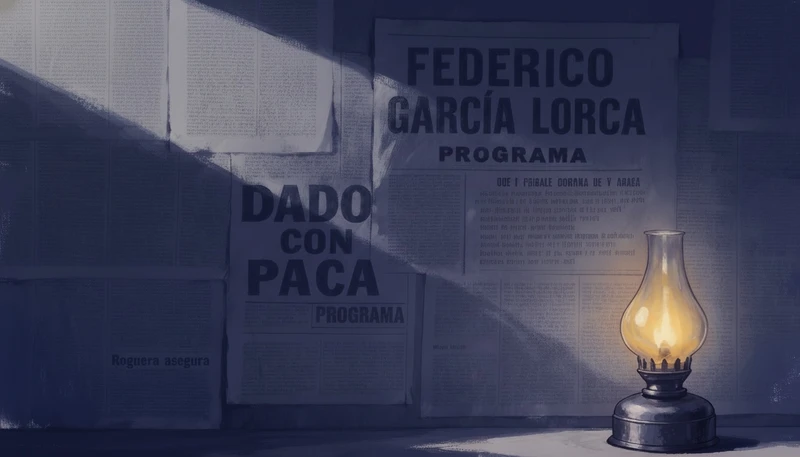
예외를 지정하는 것은 단어로 그린 마스크처럼 작동합니다: 방은 어두워지고 램프는 빛을 유지합니다.
make the whole scene sliightly darker, except the oil lamp

그레인이 전체 프레임을 덮고 있어 마스크 처리할 영역이 없으며, especially to the scenery and background, not just her가 피사체를 넘어서 효과를 전달합니다.
even more analog film grain, especially to the scenery and background, not just her
Flick 캔버스에서 이미지 메뉴를 열고, Image, Inpaint를 차례로 선택한 다음, 변경할 영역의 가장자리를 약간 넘어서까지 브러시로 칠하세요.
빠른 수정은 Pruna(2 크레딧)를, 레퍼런스 이미지가 추가할 내용을 정확히 보여줘야 할 때는 Nano Banana 2(20 크레딧)를 사용하세요.
마스크를 채울 내용, 그 크기와 조명을 작성한 다음, 위의 8개 영화 프롬프트 중 5개가 하는 것처럼 변경되지 말아야 할 것을 명시하세요.
원본과 가장자리를 비교하고, 일부가 여전히 맞지 않으면 처음부터 다시 하지 말고 결과물을 다시 편집하세요.
네 단어로라도 유지되는 것을 나열하면 모델에게 편집이 끝나는 지점을 알려줍니다.
한 번에 한 가지 변경으로 나쁜 결과를 쉽게 발견하고 취소할 수 있습니다.
Continue editing from the current result.
Keep everything else in the current image unchanged.
크기와 위치가 없으면 모델이 새 객체를 정면 중앙에 배치할 수 있습니다.
It should appear small and distant, placed deep in the background near the dunes, NOT in the near or mid foreground.
새 부분이 주변과 동일한 오염, 입자 또는 그레이드를 갖도록 요청하지 않으면 붙여넣은 것처럼 보입니다.
weathered slightly to match the grimy metal and sand blasted surface so it sits believably on the door.
프레임의 대부분이 변경될 때, 광원이나 얼굴처럼 변경되지 않아야 하는 부분을 보호하는 조건을 추가할 수 있습니다.
make the whole scene sliightly darker, except the oil lamp
이미지 모델이 추가하는 경향이 있는 텍스트, 추가 인물 또는 새로운 소품을 구체적으로 명시하여 제외하세요.
The tower has absolutely NO text, NO numbers, NO letters, NO signage or markings anywhere on it
AI 인페인팅은 이미지의 마스크된 영역만 재생성하고 나머지는 유지하는 이미지 편집 기능입니다. 변경할 부분에 페인팅하고, 그 자리에 무엇이 들어가야 하는지 설명하면, 모델이 주변의 조명과 질감에 맞춰 채워줍니다.
마스크는 모델에게 이미지의 어느 부분을 변경할 수 있는지 알려주기 위해 페인팅하는 영역입니다. 마스크 외부의 모든 것은 보호되므로, 인페인팅으로 옆에 있는 얼굴은 건드리지 않고 손이나 표지판만 수정할 수 있습니다.
네. Flick의 인페인트는 Pruna를 2 크레딧에, Nano Banana 2를 20 크레딧에 실행하며, 둘 다 Free 플랜에서 사용할 수 있습니다. 가입하면 100 크레딧을 받고, Flick Discord에 참여하면 200 크레딧을 추가로 받습니다.
네, 텍스트 편집으로 가능합니다. 하나의 변경 사항을 설명하고 나머지는 그대로 유지한다고 명시하세요. Flick에서는 Edit & Merge가 이 방식이며, 하늘의 새를 제거하거나 램프 주변의 방을 어둡게 하는 것처럼 변경 사항을 쉽게 설명할 수 있을 때 가장 효과적입니다.
인페인팅은 그림 내부의 무언가를 변경하고, 아웃페인팅은 그림을 가장자리 너머로 확장합니다. Flick은 인페인팅을 제공합니다. 인페인트는 페인팅된 마스크를 받아 Pruna 또는 Nano Banana 2로 채우며, Flick에는 아웃페인팅 도구가 없습니다.
두 번째 이미지를 레퍼런스로 첨부한 다음, 객체가 들어갈 위치와 그곳에서 어떻게 보여야 하는지 설명하세요. Flick에서는 Nano Banana 2 인페인팅이 레퍼런스 이미지를 받을 수 있으며, Edit & Merge는 프롬프트와 함께 여러 이미지를 결합합니다.
일반적으로 마스크가 너무 좁거나, 프롬프트에 빛과 질감에 대한 설명이 없기 때문입니다. 오브젝트의 가장자리를 약간 넘어서 칠하고, 새 부분이 씬의 그레인, 색 보정, 그림자와 일치하도록 요청하세요.
Flick의 인페인트는 정지 이미지를 편집합니다. 샷을 변경하려면 시작 프레임을 인페인트한 다음, 편집된 프레임을 Image to Video로 애니메이션화하세요.
잘못된 부분을 칠하고, 변경 사항을 설명하면 이미지에서 마음에 들었던 모든 것을 유지할 수 있습니다.
무료로 사용해 보세요. 신용카드가 필요하지 않습니다.
이 페이지에 대해 AI에게 묻기:ChatGPTPerplexityClaude