
How to Use Kling Image V3 in 2026: Styles, Text, Tested
Oct 2026
Kling Image V3 is Kling AI's text-to-image model. On Flick it costs 6 credits an image, returned 1360 × 768 for 16:9, and takes a negative prompt. In our tests it was the most literal reader of a written style: ask for pixel art and you get pixel art.
Quick answer: how do you use Kling Image V3?
Add an image node in Generate Image, pick Kling Image V3, and write the scene. Then:
- End the prompt with the style in plain words. It cannot take a Flickpedia style, but it follows a written one.
- Use the negative prompt for what keeps creeping in: text, extra people, a watermark.
- Pick from eight aspect ratios, 21:9 to 9:16.
| Spec | Kling Image V3 on Flick |
|---|---|
| Maker | Kling AI (Kuaishou) |
| Price | 6 credits per image |
| Output we measured | 1360 × 768 at 16:9 |
| Settings | Negative prompt |
| Aspect ratios | 16:9, 9:16, 1:1, 4:3, 3:4, 3:2, 2:3, 21:9 |
| Flickpedia styles | Not supported; write the style in the prompt |
| Prompt length | Up to 2,500 characters |
| Plans | All plans, including Free |
Kling's API lists this model as Kling Image 3.0 (kling-v3), with 1K and 2K output and multiple reference images. Flick's node has no resolution setting and returned 1K in our tests. All rates are on model credit costs.
Name a style, get that style
Kling Image V3 reads the style in your prompt literally.
How we tested
We wrote each style into the prompt, in October 2026:
A woman in a red coat walks her small dog along a seaside promenade at dusk, with a lighthouse and a ferry in the distance, in an Art Deco illustration style.The other endings were "as a vintage naturalistic photograph" and "in a pixel art animation style", plus three plain prompts for realism, typography and illustration. Ten other models ran the same tests.
Three written-in styles

- Art Deco: the most period-correct of the written-in set: an ocean liner, a graphic sea and a poster-like composition.
- Vintage photo: a natural photograph with soft dusk light.
- Pixel art: real pixel art with a game-like character.
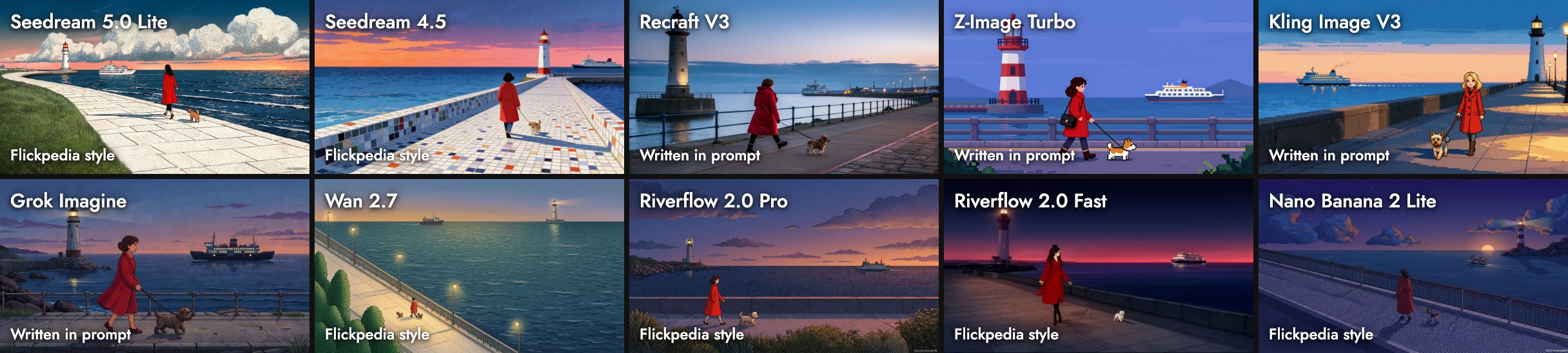
Why do the others look different? The Flickpedia "Pixel Art Animation Style" reference is a stippled flat illustration, and the models that took it copied that. Kling and Z-Image read the words.
Three test prompts
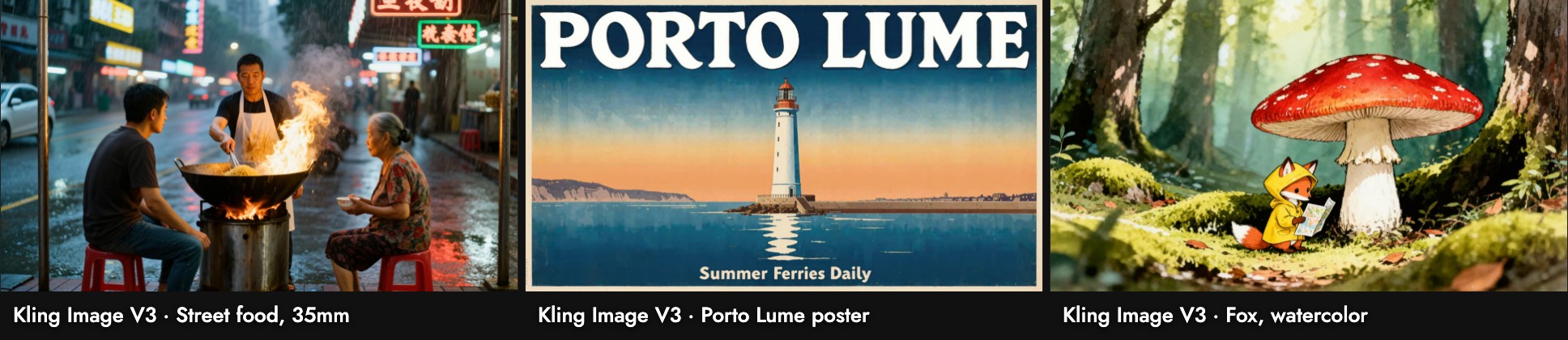
- Street food, 35mm: a natural scene with the cook between two customers, as the prompt asked.
- Poster: a bold title and "Summer Ferries Daily", both spelled right.
- Fox: closer to anime than to ink and watercolor, but clean and readable.
Wall-clock time on our busy canvas ran from 32 to 102 seconds.
When to use it, and when not
Use it when: you want a named style taken literally, a poster with short text, or a wide 21:9 frame.
Skip it when: you want one pinned style to hold across many shots. Use a style-capable model like Seedream 5.0 Lite with Visual Styles.
Sources
- Image capability map, Kling AI API documentation, checked October 21, 2026
- Prices, settings and aspect ratios from Flick's model configuration; images, sizes and timings from our Flick canvases, October 2026
Guide correlate
- Generate Image
- Visual Styles
- Model credit costs
- How to use Z-Image Turbo
- How to use Kling O3
- Kling 3.0 4K
- How to use Grok Imagine
Domande frequenti
How much does Kling Image V3 cost on Flick?
Can it use Flickpedia styles? No. Write the style into the prompt.
Can it use Flickpedia styles?
Can it make pixel art? Yes. It was one of two models that drew stepped pixel art in our tests.
Can it make pixel art?
Does it support negative prompts? Yes.