AI Wes Anderson Style Generator

Make images and clips in a Wes Anderson style from a prompt: centred symmetrical frames, pastel palettes and flat, deadpan staging. Free to try.

Why an AI Wes Anderson style generator?

The Wes Anderson style is a set of choices you can name: the subject dead centre, both halves of the frame mirrored, a camera that looks straight on, a limited pastel palette and actors who hold still and face the lens. The prompts below spell out each of these choices. The examples were made in Flick, one from Bunnies Brunch, a Flick team short, and the rest for this page with GPT Image 2.6. Flick is not affiliated with Wes Anderson; the page describes the look, not his films.

How do you make a Wes Anderson style image with AI?

In three steps: describe a centred, symmetrical shot with its palette, pick a matching style, then build the whole short on one canvas.
  1. Step 1

    Describe the shot.

    Put the subject dead centre and mirror everything around it: here a mint post office front-on, one figure in the doorway facing the lens, a bicycle on each side, and flat daylight that keeps the pastels soft.

    Mint seaside post office seen front-on, a woman in mustard yellow centred in the coral door, a bicycle each side
    A perfectly symmetrical, flat, front-on wide shot of a small seaside post office, framed dead centre. The building is pastel mint green with a coral pink door, two identical round windows and a striped awning, with a blank sign above the door. A young postmistress in a mustard yellow uniform and cap stands exactly in the middle of the doorway, facing the camera, holding a parcel tied with string. Two identical bicycles lean on either side. Pale blue sky, soft even daylight, 35mm film grain, muted vintage colours, deadpan stillness. No text, no logos.
  2. Step 2

    Pick the style.

    Pick a style once and every shot keeps the same palette and film texture, from pastel facades to vintage colour film; each opens in Flickpedia.

  3. Step 3

    Build the whole short.

    Connect each shot to the references it came from, so the sets and costumes match from scene to scene; this is part of the canvas behind Tomris and Ferret, Simay Ezer Pekcan's film set on a night train, with its compartments shot front-on and cut away like a dollhouse.

    Tomris and Ferret by Simay Ezer Pekcan

    Drag to look around, scroll to zoom.

    See film and full workflow

Wes Anderson style images made with Flick

Centred subjects, mirrored sets, flat front-on and overhead angles and small pastel palettes, each made from one written prompt.
Overhead flat lay of a yellow desk with two teacups, a pink cake, a pocket watch, a brass punch and a pen

A conductor's desk from above

Every object squared to the edges and mirrored left to right turns a flat lay into the overhead insert shot the look is known for.
A perfectly overhead flat lay of a train conductor's small desk, arranged with strict symmetry: a brass ticket punch in the centre, two identical teacups on saucers at the left and right edges, a folded paper map, a fountain pen laid parallel to the edge, a small pastel pink cake on a paper doily and an open pocket watch. Butter yellow leather desktop, soft even top light, 1970s film colour, fine grain. All papers blank, no text, no book covers, no logos.
Side cutaway of a vintage sleeper carriage with four compartments: dining, bunks, kitchen and luggage

A sleeper carriage in cross-section

With the wall removed, four rooms show at once in a level, dollhouse cross-section, so the set reads as built rather than filmed.
A flat side-on cutaway of a vintage sleeper train carriage, like a dollhouse with its outer wall removed, showing four compartments side by side in one straight row: a dining nook, a bunk room, a tiny kitchen and a luggage room, each with one passenger or attendant mid-task, all lit evenly. Powder blue walls and red-brown wood panelling, mustard upholstery, symmetrical composition, the camera perfectly level, 35mm film grain. No text, no logos.
Lavender museum hall with a ticket booth in the centre and a stuffed bear in a glass case on each side

A museum ticket booth

One-point perspective, a checkerboard floor and a matching bear on either side put all the attention on the attendant in the middle.
A centred wide shot of the entrance hall of a small natural history museum: a wooden ticket booth in the exact middle with one attendant in a burgundy uniform sitting perfectly upright inside, a stuffed brown bear in a glass case on each side, a black and white checkerboard floor running straight toward the camera, pastel lavender walls with dusty pink trim. Flat even light, strict one-point perspective, muted 1960s colour film, fine grain. No text, no signage.
Four brass band players in teal uniforms standing in a row on a pink bandstand, facing the camera

A brass band on a pink bandstand

Four people in one straight line, in matching uniforms and with blank expressions, turn a group portrait into deadpan staging.
Four members of a small-town brass band stand in a straight line on a pink bandstand, facing the camera, each holding a different instrument, in identical teal uniforms with gold buttons and deadpan expressions. The bandstand is symmetrical with a scalloped white roof, under a flat pale blue sky. The camera is level at chest height and centred, 35mm grain, muted vintage tones. No text, no logos.
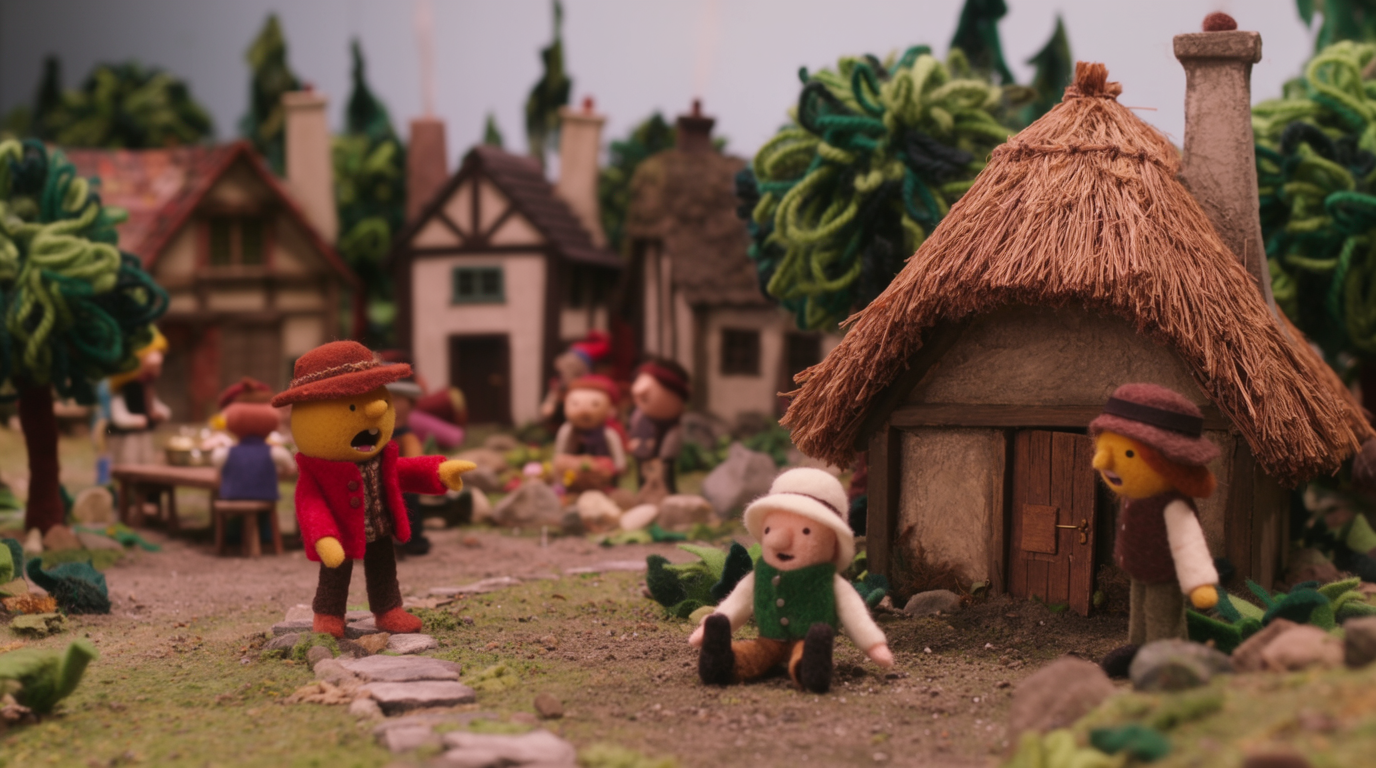
Felt hedgehog baker in a white apron behind a miniature counter, shelves of pastel cakes on both sides

A felt hedgehog baker

Handmade felt, a miniature set and shelves mirrored on both sides bring the same symmetry to a stop-motion style puppet.
A stop-motion style felt and wool puppet hedgehog baker in a tiny white apron stands centred behind a miniature bakery counter, facing the camera; shelves of identical pastel cakes rise symmetrically on both sides. Warm orange, cream and mint palette, handmade fabric textures, tabletop miniature lighting, flat front-on framing, shallow depth of field. No text, no logos.
White rabbit in a floral shirt eating pancakes at a table in a meadow, framed in the centre

A rabbit at brunch

A centred animal character facing the lens across a laid table, with analog film grain, is how Bunnies Brunch gets the look.
camera close up on one rabbit, as if the camera lens was the food in front of the rabbit on the table. the bunny is eating pancakes with strawberries and whipped cream. it should be a white rabbit, not bunny.

keep the same realism and visual look as my visual style – analog film grain, same textures, colors, aesthetic

wes anderson style
Hannah L., director of Bunnies Brunch

What makes a shot look like Wes Anderson?

Strict symmetry, a centred subject, a camera that faces the scene straight on and a palette of two or three pastel colours, with people standing still and looking at the lens.
  • Framing: perfectly symmetrical, framed dead centre, one-point perspective, camera perfectly level.
  • Staging: people lined up or alone in the middle, facing the camera, with deadpan expressions.
  • Overhead shots: a perfectly overhead flat lay of a desk or a table, every object squared to the edges.
  • Colour and texture: name the pastels (mint, coral, mustard, powder blue) and add 35mm film grain or muted vintage colour film.
  • Rule out what breaks it: no text, no logos, since generated signs and book covers add clutter and can copy real designs.

How do you make a Wes Anderson style video?

Keep the camera locked or moving in straight lines, because the look depends on symmetry, and a drifting handheld camera breaks it within a second.
  • Start from a symmetrical still and use it as the start frame, then write camera locked or a single straight move: a slow push in, a sideways track or a whip pan.
  • Keep the motion small and deliberate: a head turn, a hand writing a letter, a figure walking straight toward the lens.
  • Every clip prompt in Bunnies Brunch asks for camera locked, so the frame stays symmetrical while the rabbits eat.

AI Wes Anderson style generator FAQs

What is the Wes Anderson style?

The Wes Anderson style is a look built on symmetrical, centred framing, flat front-on and overhead camera angles, pastel colour palettes, handmade-looking sets and deadpan characters who often face the camera.

How do I get the Wes Anderson look with AI?

Describe one centred subject, ask for perfect symmetry and a straight-on or overhead camera, name two or three pastel colours, and add a film texture such as 35mm grain. Then pick a pastel or vintage film style in Flick and generate.

What colours does Wes Anderson use?

Each film has its own small palette, often pastel pinks, mint and powder blue, mustard yellow and warm red-browns, used across the sets, costumes and props so every frame holds a few colours.

Can I make a video in the Wes Anderson style?

Yes. Generate a symmetrical still, use it as the start frame of an image to video model in Flick, and keep the camera locked or moving in one straight line so the symmetry holds.

Can I use real actors or film stills in the prompt?

No real people or film stills are needed, and the examples on this page use none: describe the framing, palette and staging instead, and invent your own characters and sets.

Is the Wes Anderson style generator free?

Yes, it is free to start: the free plan gives 100 credits every week with no credit card, and GPT Image 2.6 runs on it. Video models such as Seedance 2.5 need the Standard plan ($20 a month).

More Wes Anderson style looks in Flick

Try the Wes Anderson style in Flick

Try for free, no credit card required.

Ask AI about this page:ChatGPTPerplexityClaude