Seedream 5.0 Pro Guide: Features, Price and Prompts

Seedream 5.0 Pro is ByteDance's flagship image model for layouts, dense designs and text in many languages: in Flick it makes an image from a prompt and up to 10 reference images for 14 credits at 1.5K.

An ink drawing of a camera with a seedling growing inside its lens

Seedream 5.0 Pro launched on July 8, 2026 and reached Flick on October 29, 2026, and its pitch is text and layout: posters, signs and sheets that come back spelled right. A model that misspells one word costs a rerun, so for this Seedream 5.0 Pro guide we ran six prompts in Flick at default settings, from a film still to Japanese signs, a comic page and a storyboard. Below are its features, prices, the exact prompts and what came back, letter by letter.

How do you use Seedream 5.0 Pro in Flick?

Add an image node, pick Seedream 5.0 Pro, write the prompt with every word you want shown in quotes, and run it at 1.5K for 14 credits.
  1. 1Pick Seedream 5.0 Pro

    Add an image node on a Flick canvas, choose Seedream 5.0 Pro in the model list, and set the aspect ratio of the frame you need.

  2. 2Quote the words

    Write the scene, then put every title, sign or label in quotes exactly as it should read, since the model copied quoted words letter for letter in our tests.

  3. 3Set size and run

    Keep 1.5K for drafts at 14 credits, switch to 2K for finals at 28, and zoom into any text before you use the image.

What is Seedream 5.0 Pro?

Seedream 5.0 Pro is an image generation and editing model from ByteDance Seed, built for information-dense layouts, readable text in over ten languages and realistic lighting and skin.
Seedream 5.0 Pro in Flick, from the app's model config on October 30, 2026, ByteDance Seed's launch post and our own test files
Seedream 5.0 Pro in Flick
MakerByteDance Seed
ReleasedJuly 8, 2026
In Flick sinceOctober 29, 2026
Ways to use itImage node, Text to Image and Edit Image
Price14 credits at 1.5K, 28 at 2K
Resolutions1.5K or 2K
Default 16:9 image, measured2048 × 1152
Prompt EnhancementStandard or fast, standard by default
Reference imagesUp to 10
Flickpedia stylesYes
Picker estimateAbout a minute
PlanFree
Where these figures come from

Prices, settings, reference limits, the plan and the picker's estimate are read from Flick's model config; the image size is measured on our test files. The release date and the claims below are from ByteDance Seed's launch post.

  • ByteDance names four advances: information-dense infographics, interactive editing, realistic light and skin, and native text in over ten languages.
  • ByteDance's editing tools include point and lasso selection, sketch guides and layer separation; Flick's nodes take a prompt and reference images, and we did not test those tools.

How much does Seedream 5.0 Pro cost in Flick?

Seedream 5.0 Pro costs 14 credits an image at 1.5K and 28 at 2K, the same for a new image and an edit, with no extra charge for reference images.
Seedream 5.0 Pro prices in Flick, in credits, from the app's model config on October 30, 2026
What you makeAt 1.5KAt 2K
A new image1428
An edit in Edit Image1428
  • Free to try: Seedream 5.0 Pro is on Flick's Free plan, and a new account gets 100 credits.
  • Compared with its siblings: Seedream 5.0 Lite costs 7 credits and GPT Image 2.5 5 at their defaults.

What did Seedream 5.0 Pro make in our tests?

In six default runs, Seedream 5.0 Pro spelled every quoted English word correctly and wrote the Japanese sign right, but dropped the accent from "Café" and used white gutters where the comic prompt asked for black.

Each card shows the prompt exactly as it was run, at 1.5K with no reference image or style.

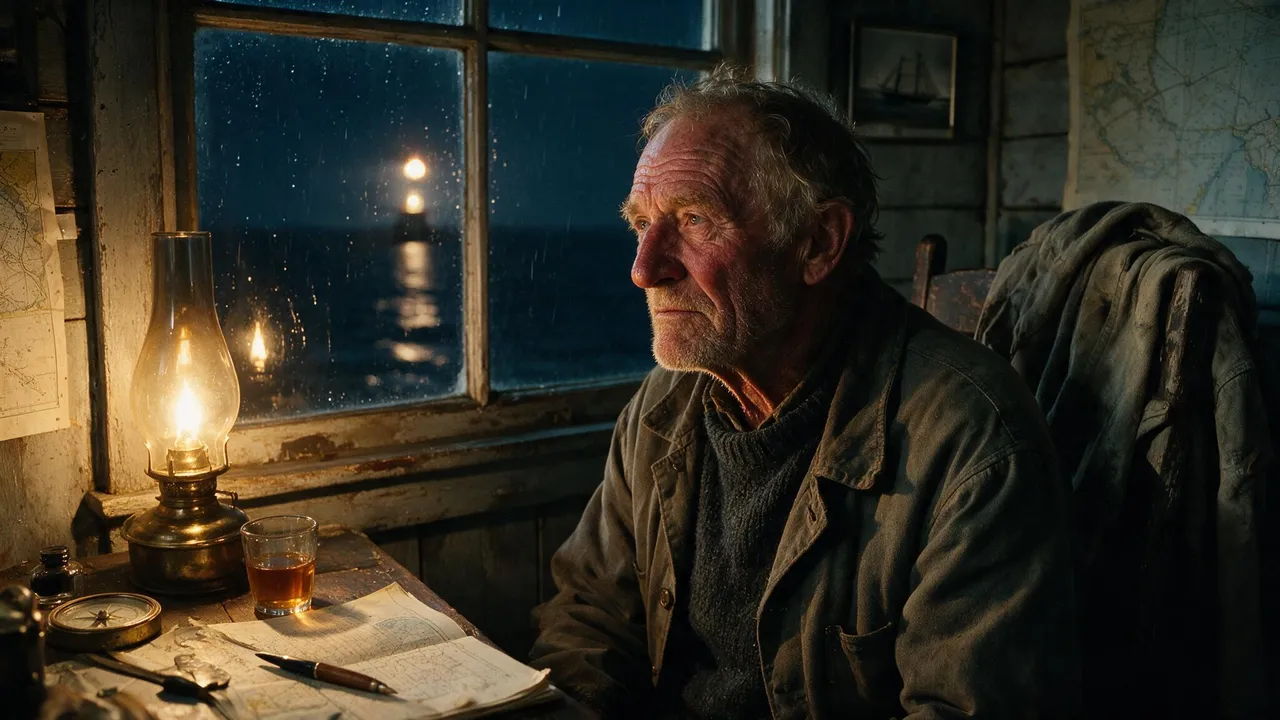
An old lighthouse keeper with grey stubble sits by a rainy window at night, lit by an oil lamp on his desk

A film still lit by one lamp

It gave the grey stubble, the single oil lamp and the rain on the glass, but framed him from the waist up rather than in the close-up the prompt asked for.

Cinematic film still, close-up of an old lighthouse keeper with a weathered face and grey stubble, lit by a single oil lamp at night, rain on the window behind him, shallow depth of field, 35mm film grain
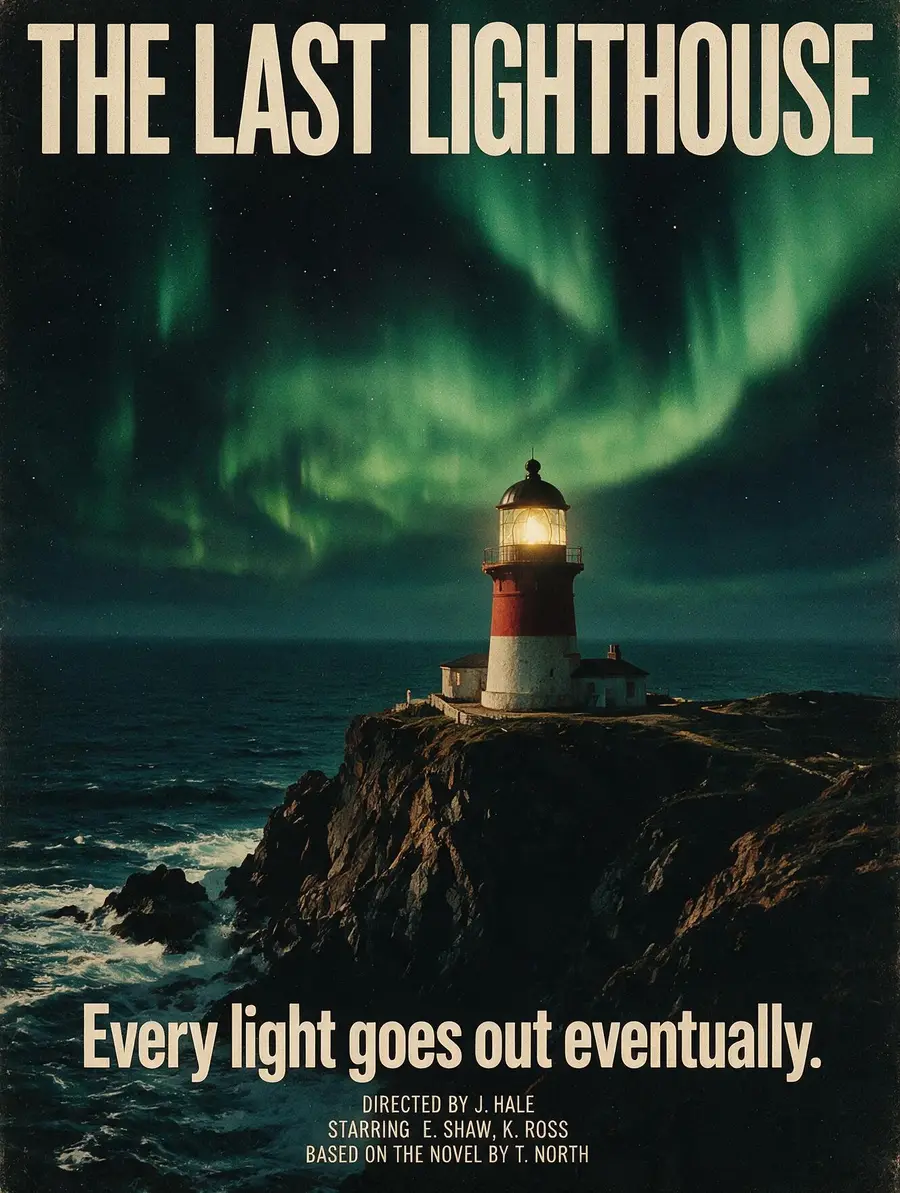
A vintage poster with a cream condensed title over a green aurora and a red and white lighthouse on a cliff

A poster with a title and tagline

Both quoted lines came back exact, and it added a readable credits block of invented names, "DIRECTED BY J. HALE" among them, so check names before you print.

A vintage sci-fi movie poster. Title at the top in bold condensed letters: "THE LAST LIGHTHOUSE". Tagline at the bottom: "Every light goes out eventually." A lone lighthouse on a cliff under a green aurora, a small credits block under the tagline.
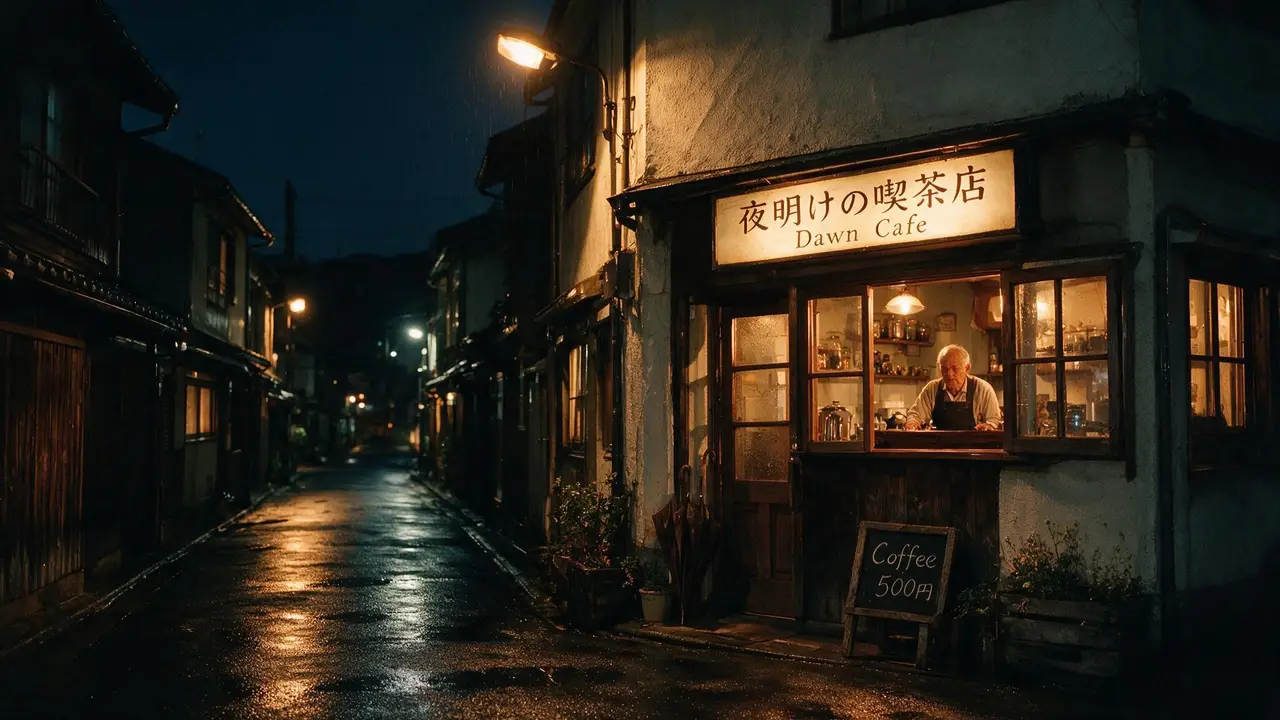
A lit café sign reading 夜明けの喫茶店 and Dawn Cafe on a rainy Tokyo lane, with a chalkboard by the door

Japanese and English on one sign

It wrote "夜明けの喫茶店" and "Coffee 500円" correctly but rendered "Dawn Café" as "Dawn Cafe", so check accented letters at full size.

A narrow Tokyo side street at night, rain on the asphalt. A small café's lit sign reads "夜明けの喫茶店" in large letters with "Dawn Café" underneath, and a chalkboard by the door reads "Coffee 500円". Cinematic, 35mm.
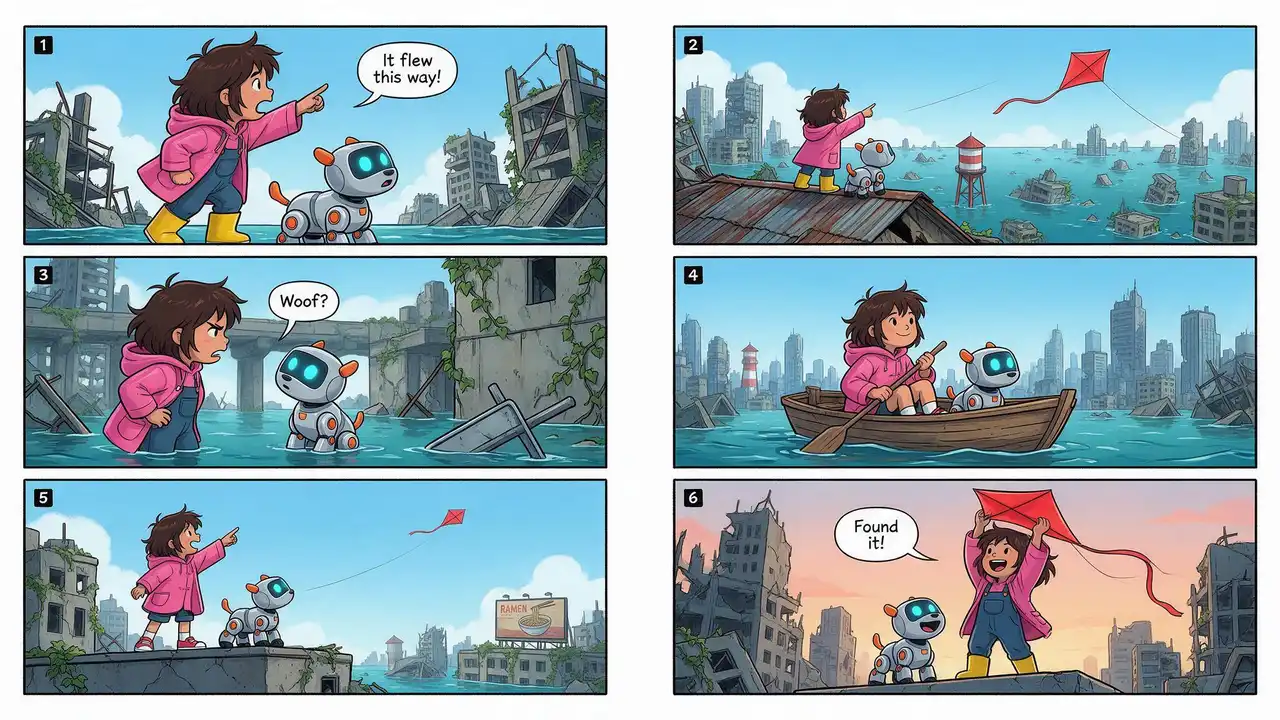
A six-panel comic page of a girl in a pink coat and her robot dog searching a flooded city for a red kite

A six-panel comic page

All three balloons landed in panels 1, 3 and 6 and read correctly, with panels numbered 1 to 6, though the gutters came out white inside black borders.

A full comic book page with six panels in a 2 by 3 grid, clean black gutters. A girl and her robot dog search a flooded city for a lost kite. Speech balloons: panel 1 "It flew this way!", panel 3 "Woof?", panel 6 "Found it!". Inked lines, flat colors.
A fluffy red fox sits in the snow reading an open map beside a glowing brass lantern in a winter forest

A watercolour picture book page

It painted a full scene with a blue grey wash across the sky, so near-white paper or snow covers 21% of the picture, less than the prompt's "lots of white paper" suggests.

A children's picture book illustration in soft watercolor and pencil: a fox reading a map by lantern light in a snowy forest, warm and cold colors, lots of white paper showing.
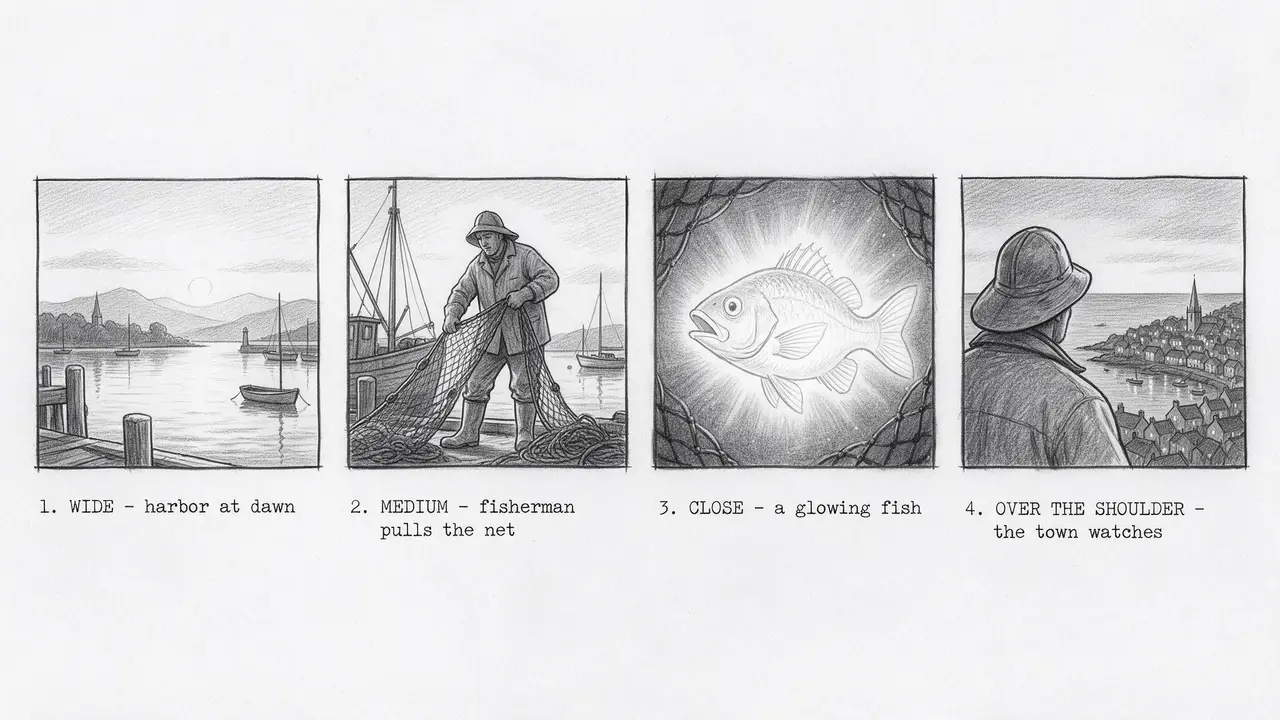
A pencil storyboard of four panels: a harbor at dawn, a fisherman with a net, a glowing fish and a view of a town

A storyboard sheet with labels

It drew four pencil panels in a row and typed all four labels letter for letter, hyphens kept, with a bright glow on the fish in panel 3.

A film storyboard sheet with four panels in a row, each with a hand-drawn sketch and a typed label underneath: "1. WIDE - harbor at dawn", "2. MEDIUM - fisherman pulls the net", "3. CLOSE - a glowing fish", "4. OVER THE SHOULDER - the town watches". Pencil on white paper.

How do you write a good Seedream 5.0 Pro prompt?

Name the layout, quote every word that must appear, and say what the empty space should look like, because Seedream 5.0 Pro followed structure and quoted text closely but filled any space it was not told to leave.
  1. 1. Quote every word you need

    Put titles, balloons and labels in quotes and say where each goes, as the comic prompt did with panels 1, 3 and 6, because each quoted line landed where it was asked.

  2. 2. Check accents and small type

    Zoom into accented letters and fine print before you use an image, since our test lost the "é" in "Café" and a billboard carried unreadable small print.

  3. 3. Rule out text you do not want

    Write "no credits" or "no extra text" when a poster should carry just your words, because Seedream 5.0 Pro added a credits block and a billboard on its own.

  4. 4. Describe the empty space

    Ask for plain white paper or an empty sky in so many words, since a single "lots of white paper" left most of the watercolour painted over.

  5. 5. Name the shot size twice

    State the framing in the prompt's first words and again later, because "close-up" alone came back as a waist-up shot of the lighthouse keeper.

  6. 6. Call references Figure 1, Figure 2

    In Edit Image, refer to each connected picture as Figure 1, Figure 2 and so on, which is how Seedream 5.0 Pro reads several references in one prompt.

How does Seedream 5.0 Pro compare with GPT Image 2.5?

On the same six prompts, both models spelled English text correctly; GPT Image 2.5 kept the accent in "Café" and costs less at its defaults, while Seedream 5.0 Pro returned larger images with a fuller, painted look.
Seedream 5.0 Pro and two neighbours in Flick, from the app's model config on October 30, 2026
Seedream 5.0 ProGPT Image 2.5Seedream 5.0 Lite
Credits at default1457
Reference imagesUp to 10Up to 10Up to 10
PlanFreeFreeFree

The full side by side, with all twelve images, is in Seedream 5.0 Pro vs GPT Image 2.5.

Seedream 5.0 Pro FAQ

What is Seedream 5.0 Pro?

Seedream 5.0 Pro is ByteDance Seed's flagship image model, launched on July 8, 2026, for layouts, dense designs and text in many languages. In Flick it makes and edits images at 1.5K or 2K from a prompt and up to 10 reference images.

How much does Seedream 5.0 Pro cost?

In Flick, Seedream 5.0 Pro costs 14 credits an image at 1.5K and 28 at 2K. Edits cost the same, and reference images add nothing.

Is Seedream 5.0 Pro free?

Seedream 5.0 Pro runs on Flick's Free plan, and each image uses credits. A new Flick account gets 100 credits, enough for several Seedream 5.0 Pro images.

Can Seedream 5.0 Pro write text in images?

Yes. In our tests it spelled a poster title, a tagline, three comic balloons and four storyboard labels correctly, and wrote a Japanese café sign right. It dropped the accent from "Café", so check accented letters.

What languages does Seedream 5.0 Pro support?

ByteDance says Seedream 5.0 Pro takes prompts and renders text natively in over ten widely used languages. We tested Japanese and English in one image, and both came back readable.

What is the difference between Seedream 5.0 Pro and Seedream 5.0 Lite?

In Flick, Seedream 5.0 Lite costs 7 credits an image and Seedream 5.0 Pro 14. ByteDance positions Pro for dense layouts, multilingual text and precise editing.

Can I use Flickpedia styles with Seedream 5.0 Pro?

Yes. Seedream 5.0 Pro accepts Flickpedia styles in Flick, which send the style's reference images with your prompt. We have not tested a style on it yet, so this guide shows plain prompts.

Sources

More on Seedream and AI images in Flick

Make your first Seedream 5.0 Pro image in Flick

Pick Seedream 5.0 Pro on an image node, paste a prompt from this guide, and keep the result beside the rest of your film.

Make a Seedream 5.0 Pro image in Flick

Try for free, no credit card required.

Ask AI about this page:ChatGPTPerplexityClaude