How to Make AI Ads
To make an AI ad, write a timed brief, build character sheets and sets, generate each shot from them, then reveal the product in the last seconds of the edit.
By Zoey Z.Last updated

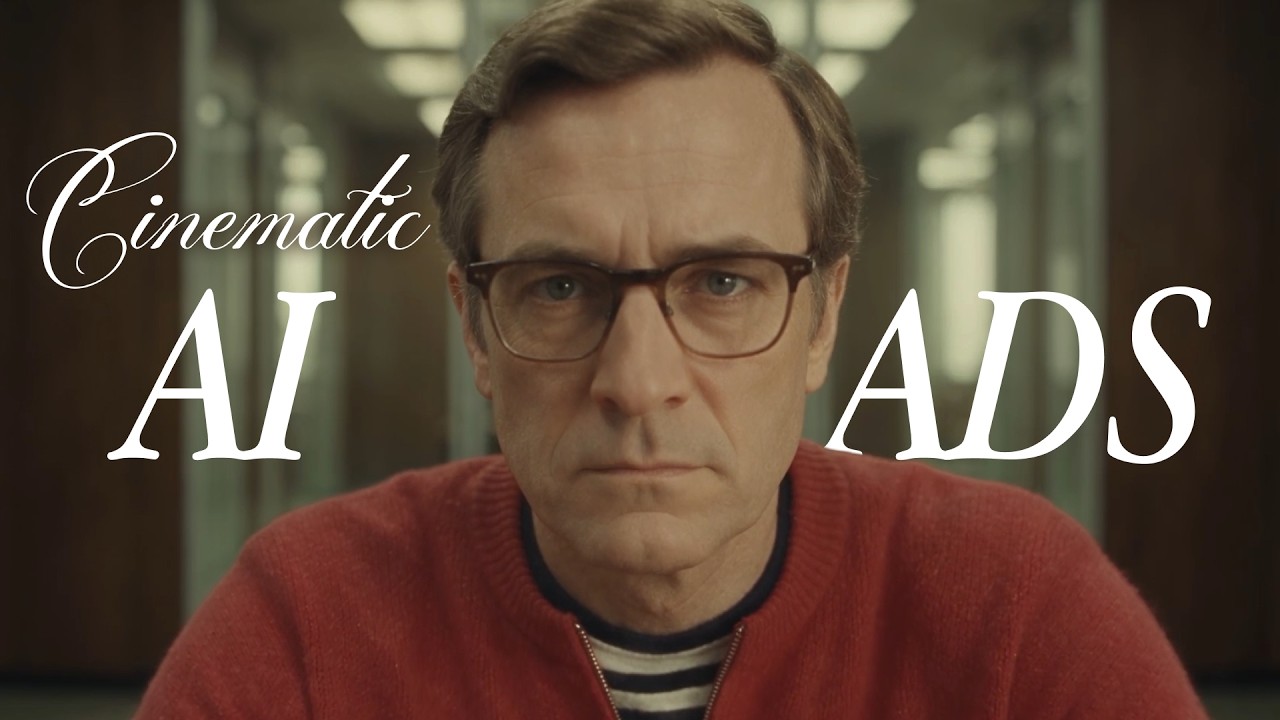
People scroll past anything that looks like an ad, but they stay for a short film. Zoey Z. made three ads in Flick for Pond, a platform that connects businesses with AI agents and human experts, and two of them, The Ghosted Boss and Pond Marketing video, have public workflows you can open. This guide walks through how to make an AI commercial the way they were made, in six steps, with the exact prompts.
Describe your ad
What makes an AI ad cinematic?
| Regular ad | Cinematic ad | |
|---|---|---|
| Opens with | The product and its name | A person, a place and a question |
| The product | On screen from the start | The answer, revealed at the end |
| The viewer | Knows it is an ad and scrolls | Wants to see what happens next |
| Looks like | A product shot | A scene from a film, with one look throughout |
How to make an AI ad in 6 steps
Each step works for any ad. "With AI" shows how it was done in Flick, with the real prompts from The Ghosted Boss and Pond Marketing video.
1. Write a timed brief before you generate anything
What it is: a page that says what happens in every second of the ad: the action, the camera and every line of dialogue, in order.
Why it matters: the story has to fit 30 seconds, and every shot needs a job. A brief also tells the model when each line lands.
How to do it
- Write your basic idea in one sentence: whose day changes, and how.
- Split the length into timed beats, one line each.
- For dialogue, write who speaks, what they say and when the camera moves.
With AI
The Ghosted Boss is one continuous take, so its brief is the conversation: what the boss says, what the off-screen AI team answers, and when the camera pulls back. The final video prompt keeps it line by line.
Model: Seedance 2.5 Final · Note: the final take's prompt, in full
First, CEO wearing red sweater twirls a pen in his hand. Then, the camera cuts to a close-up of him speaking directly to the camera.He confidently asks:
 "how's the automation going?"
** WOMAN Voiceover:** "Done, sir."

The camera slowly begins to pull back.

**7–15s — The Team**

The CEO continues:
"Operations?"

**MAN Voiceover:** "All workflows running."

**CEO:** "Customer support?"

**WOMAN Voiceover:** "Handled."
CAMERA CONTINUE pull back

THERE ARE dozens of empty chairs.

He nods confidently.

**CEO:** "Great work, everyone."

He feel relaxed.

NO BACKGROUND MUSIC
2. Pick a look to borrow from a film you love

What it is: a set of stills whose palette, lenses and production design you want the ad to share.
Why it matters: the visuals can look like live action and still feel like an ad. A film's look is what makes them read as cinema.
How to do it
- Collect a few stills from a film or show you like, or screenshots from YouTube.
- Keep to one look, so every shot shares one grade.
With AI
The Ghosted Boss used Flickpedia's Cinematic vintage style on its character sheets and set designs. Pond Marketing video's lead began as the Flickpedia still above. Flickpedia is Flick's library of visual styles and film references, and you can upload your own stills to the canvas too.
3. Make a character sheet, then dress it in the product

What it is: a turnaround sheet of your lead, front, side and back on a plain background, plus a sheet of facial expressions.
Why it matters: every later shot copies the same face and clothes from it, so the character stays one person across the ad.
How to do it
- Generate a few faces and keep the one you would remember.
- Turn it into a turnaround sheet, then a sheet of six expressions for close-ups.
- To dress the character in a real product, attach a photo of it and say exactly what to replace and what to keep.
With AI
The Ghosted Boss started in a three piece suit. Zoey swapped in a red sweater from a shop photo, naming each reference by its job, so the model takes the clothes from one image and the man from the other.
Model: GPT Image 2.5 · Note: an edit with two references, the turnaround sheet and the sweater photo
Man Character Reference Turnaround is Man turnaround (Identity, face, glasses, hair, body proportions, four views and sheet layout). Untitled Image is Outfit reference (Red knit zip neck sweater, striped undershirt and dark trousers). Edit the man's four view character turnaround sheet by replacing his suit outfit in every view with the outfit in the clothing reference. Match the vivid red relaxed fit fine knit sweater with dropped shoulders, ribbed rounded neckline, ribbed cuffs and hem, and short silver front zipper partially open to reveal the black and cream horizontal striped crewneck shirt underneath. Replace suit trousers with dark navy trousers matching the clothing reference. Retain his existing black leather shoes. Remove the suit jacket, waistcoat, white shirt and tie entirely. Preserve exactly the man's face, age, glasses, hairstyle, proportions, neutral standing poses, full body front, left profile, back and right profile arrangement, plain gray background and realistic even studio lighting. Same outfit consistently across every view, with plausible plain red sweater back. Do not copy the clothing model's identity or hands in pockets pose. Preserve original sheet framing and photographic look. No text.
4. Build the first frame from your character and set

What it is: the opening image of the shot, made from the character sheet and the set.
Why it matters: the video model starts from this frame, so whatever is wrong here is wrong in every take.
How to do it
- Make an environment sheet for each location in your brief.
- Attach the character and the set, and say which reference gives what.
- List what not to take from each reference, so nothing leaks from one into the other.
With AI
One reference gives the man, the room and the grade. A second sets where he sits and how the table recedes, and the prompt rules out its suit, map, bookcase and golden grade.
Model: GPT Image 2.5 · Note: an edit with two references
Man in Red Sweater, Meeting Room is Red sweater man and meeting room (Man identity and outfit, meeting room design and vintage visual treatment). Man at Conference Table is Table placement reference (Centered far end subject position and lengthwise table framing only). Let the man wearing the red sweater sit in a chair at the far end of the conference table, in the same centered location as image 2's man, but keep image 1 visual. Use the red sweater man and meeting room image as the source of character identity, wardrobe, architecture, furnishings, lighting, color and photographic style. Reframe its meeting room looking straight down the length of its long wooden table, with table edges converging toward the man centered at the far short end, as in the table placement reference. He must be SITTING in an office chair facing the camera, not standing or leaning over the table. His seated torso and head are visible above the far edge, forearms resting naturally on the tabletop, lower body concealed by the table. Preserve his exact face, glasses, combed hair, red short zip neck sweater and striped undershirt. Remove his old foreground right position so there is only one man. Retain image 1's dark wood paneled walls, aluminum framed glass office partitions, brown upholstered office chairs, muted olive and yellow green palette, creamy highlights, matte shadows, diffuse interior illumination, fine analog grain and subtle vintage softness. Do not import image 2's suit, world map, bookcase, curtains, traditional executive office or golden high contrast grade. Image 2 supplies only centered subject placement and lengthwise perspective, not its standing pose. Wide cinematic 16:9 composition, realistic seated anatomy and scale, no additional people, no text.
5. Generate quick takes, then make the best one in full
 00:30
What it is: fast draft versions of the shot, then one finished version of the take you choose.
Why it matters: the same prompt gives a different performance every time. Drafts let you find the one where the timing lands before you pay for the full take.
How to do it
- Attach the first frame and the sheets, paste the shot prompt, and generate.
- Watch for the timing of each line and the steadiness of the camera.
- Change one thing between takes, so you know what fixed it.
With AI
Zoey generated 10 takes of The Ghosted Boss with Seedance 2.5 Draft, then made the chosen one in full with Seedance 2.5 Final.
6. Reveal the product last, in the editor
 00:08
What it is: the brand name, the interface and every word on screen, added in the edit in the last seconds.
Why it matters: viewers are already watching when they learn what the ad is for, and generated lettering warps.
How to do it
- Ask the model for no readable text in the footage.
- Add the logo, the product and any copy on top in the editor.
- Hold the reveal for the final beat.
With AI
In The Ghosted Boss, the AI team speaks in message bubbles animated in the Flick editor, and Pond's name arrives at the very end. Pond Marketing video's prompt keeps readable text out of every shot, and the words go on in the edit.
Why does an AI ad still feel like an ad?
1. Set up a false expectation
Let the opening suggest one thing and the ending show another, since a surprise is what makes people watch to the end and share it.
THERE ARE dozens of empty chairs.
Zoey Z., director of The Ghosted Boss2. Show the change, not the product
Tell a small story about how someone's day changes, so the product is the answer to a question the viewer is already asking.
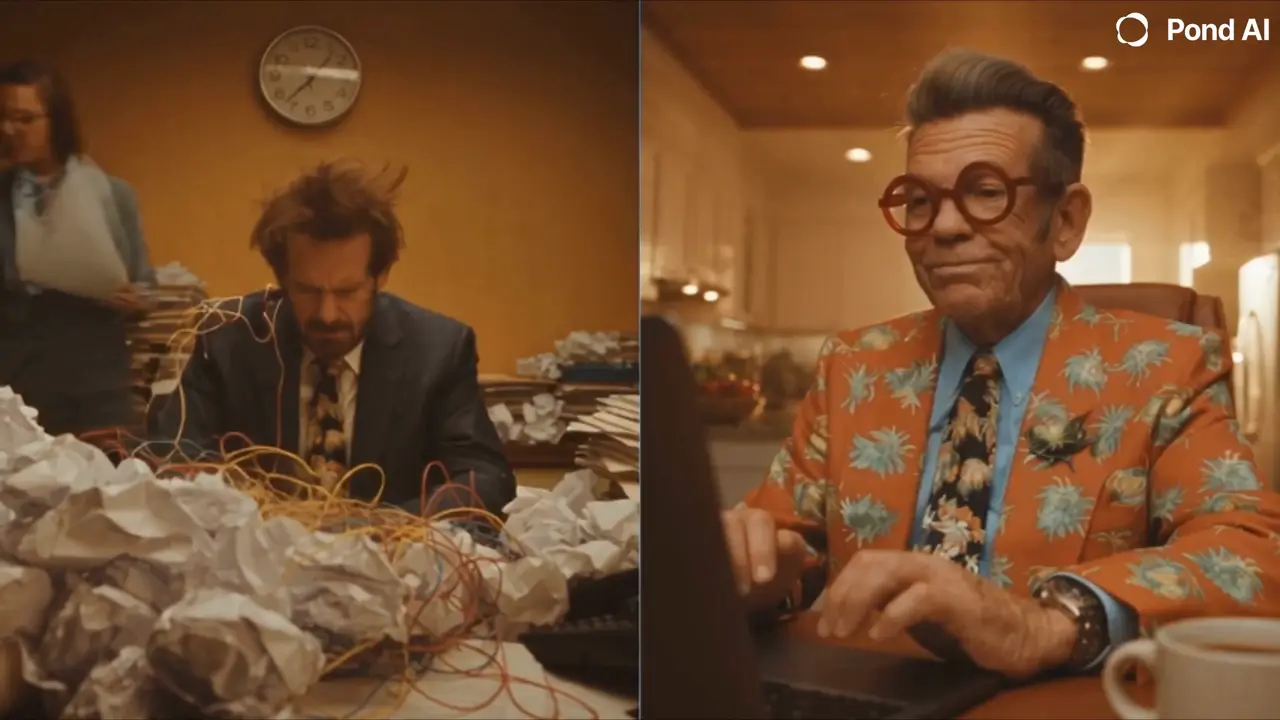
Left: exhausted, surrounded by chaos.
Zoey Z., director of Pond Marketing video3. Keep text out of the footage
Ask the model for no readable text and add every word in the editor, because generated lettering warps and you will want to change the copy later.
No readable text appears on screen.
Zoey Z., director of Pond Marketing video
AI ad examples from films made in Flick
Both ads were made in Flick for the same client, Pond, and each runs 30 seconds.
Example 1: The Ghosted Boss, one continuous pullback
 00:30
What the brief fixed: the lines and when each one lands, and one camera move: a close-up that pulls back to reveal an empty room.
How it was made: a character sheet with the sweater swapped in, a first frame from the sheet and the room, 10 draft takes, one final take, and message bubbles added in the editor. The prompt is in step 1.
Use it when: your product replaces people or work the viewer would expect to see, and one surprise can carry the ad.
Open The Ghosted Boss workflow
Example 2: Pond Marketing video, a split screen contrast
 00:30
What the brief fixed: two parallel stories, the same client request on both sides, timed shot by shot so the contrast grows across 30 seconds.
How it was made: a turnaround sheet for each founder, then the whole brief as one prompt to Seedance 2.5, with the sheets attached as references.
Use it when: the product changes how a day goes, and showing both days side by side makes the difference obvious.
Model: Seedance 2.5 · Note: the full brief, sent as one prompt
SHOT 1 — OPEN / 0–3s

Split screen.

Two founders receive the same urgent client request on their devices.

They both look at the screen, then react differently.

Left founder looks concerned.
Right founder stays calm.

No readable text appears on screen.

SHOT 2 — LEFT SIDE: HIRING CHAOS / 3–10s

The left side becomes increasingly chaotic.

He’s on phone calls.
Reviewing resumes.
Taking notes.
Jumping between meetings.
People keep entering and leaving the room.
His desk becomes more cluttered.

He keeps checking the time and looks more and more stressed.

No readable text or interface details.

SHOT 3 — RIGHT SIDE: POND / 10–14s

The right side remains calm.

He sits at his desk, opens his laptop, quickly enters a task into a platform, and submits it.

Keep the interface abstract and clean, with no readable text.

He closes the laptop, leans back, and relaxes.

SHOT 4 — CONTRAST MONTAGE / 14–22s

The contrast becomes more exaggerated.

Left side:
Still interviewing.
Still on calls.
Still taking meetings.
Papers pile up.
He looks exhausted and overwhelmed.

Right side:
He casually grabs a coffee.
Cuts to him doing a quick workout at the gym.
Cuts to him cooking at home.
Cuts back to him casually dancing for a moment.

Meanwhile, use abstract visual cutaways to suggest work is progressing in the background: multiple people working, submissions arriving, workflow nodes connecting, and tasks moving toward completion.

No readable text.

SHOT 5 — RESULT / 22–27s

The right founder returns to his desk.

He reviews several completed options visually and confidently selects one.

A clear visual cue shows that the task is finished, but without any readable text.

He smiles, satisfied.

Cut to the left founder:

Still stuck in another meeting.

SHOT 6 — END / 27–30s

Split screen holds for one final beat.

Left: exhausted, surrounded by chaos.

Right: relaxed, smiling, everything under control.

Hold on the contrast.

No text in the generated footage.

Model: Nano Banana Pro · Note: the right side founder's turnaround sheet
Image 1 is elderly man in orange floral suit, main look (likeness, clothing, and identity).

Create a professional character reference turnaround sheet showing this exact character (same face, same round red glasses, same swept-back gray hair, same orange floral print suit with dark patterned tie) in three full-body views: front view, side profile view, and back view, arranged side by side. Neutral A-pose, standing. Plain seamless light-gray background, even studio lighting, orthographic framing, full body in frame for each view. No props, no scene, no other people. Identical facial features, proportions, and clothing across all views.
What do people ask about making AI ads?
How long should an AI ad be?
One small story with a reveal fits in 30 seconds: The Ghosted Boss and Pond Marketing video both run 30 seconds, and each was planned second by second in a brief before anything was generated.
Which AI model is best for video ads?
For live action ads with dialogue, Seedance 2.5 takes your character sheets as references and makes up to 30 seconds with sound in one take, and it needs the Standard plan in Flick. Character sheets and frames can be made with Nano Banana Pro or GPT Image 2.5, which run on the free plan.
Can I make an AI commercial for free?
You can start free: you get 100 credits when you sign up and 100 credits every week, enough for character sheets and frames. The video models used for these ads need the Standard plan.
How do I keep the same character in every shot of an ad?
Make a turnaround sheet and an expression sheet first, then attach them to every frame and video prompt, naming what each one gives, such as face, outfit or set.
How do I put a real product in an AI ad?
Attach a photo of the product as a reference and say exactly what to replace, as The Ghosted Boss did with a sweater, then add the logo and any interface text in the editor rather than in the prompt.
Can I use an AI ad for a real client?
Yes, Pond uses ads made this way. Check the terms of each model you use and keep other brands' logos and real people's likenesses out of your prompts.
Keep going


Films on this page
- Zoey Z. · The Ghosted Boss
- Zoey Z. · Pond Marketing video
Make your AI ad in Flick
Brief, characters, sets, shots and the edit, all on one canvas.
Try for free, no credit card required.
Ask AI about this page:ChatGPTPerplexityClaude