
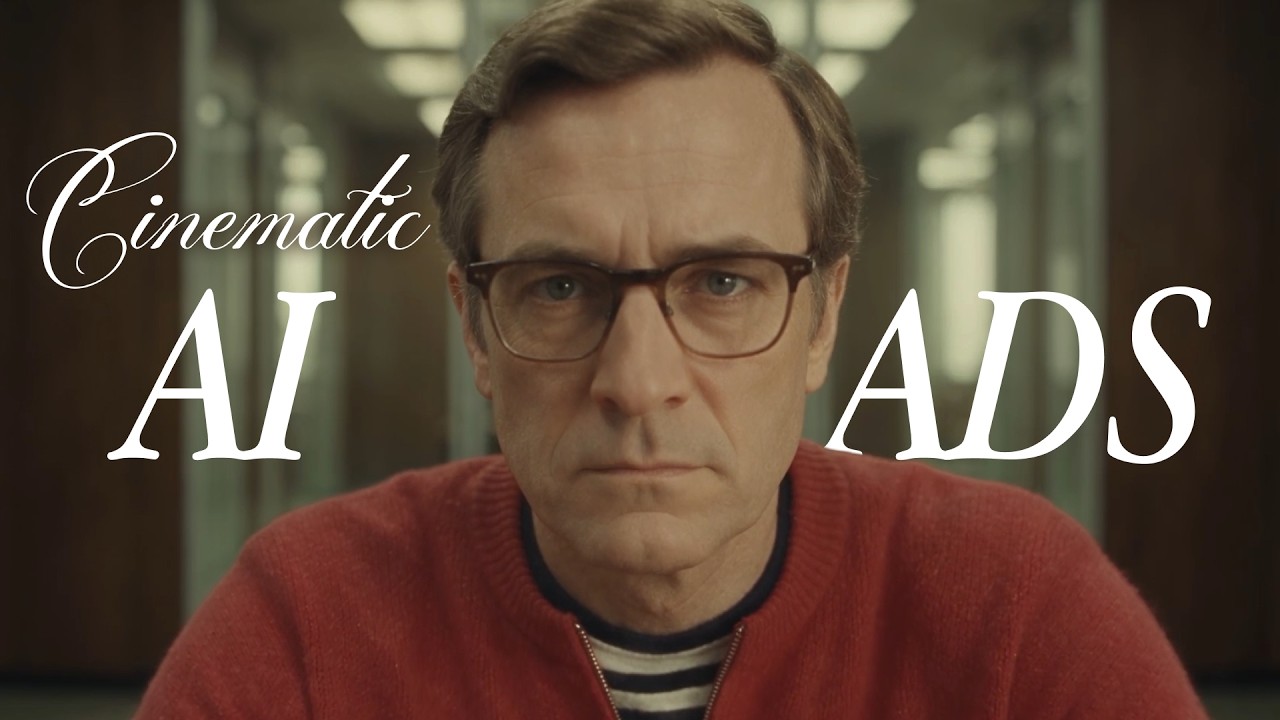
人們會快速滑過任何看起來像廣告的內容,但會為短片停留。Zoey Z. 在 Flick 中為 Pond 製作了三支廣告,Pond 是一個連結企業與 AI 代理和人類專家的平台,其中兩支作品 The Ghosted Boss 和 Pond Marketing video 都有公開的工作流程可以開啟。本指南將逐步說明如何以這些廣告的製作方式,透過六個步驟和確切的提示詞來製作 AI 商業廣告。
描述你的廣告
什麼讓 AI 廣告具有電影感?
| 一般廣告 | 電影式廣告 | |
|---|---|---|
| 開場 | 產品及其名稱 | 一個人、一個地方和一個問題 |
| 產品 | 從頭就在畫面上 | 答案在結尾揭曉 |
| 觀眾 | 知道這是廣告並滑過 | 想看接下來會發生什麼 |
| 看起來像 | 產品鏡頭 | 一部影片中的場景,全片保持一致的視覺風格 |
如何用 6 個步驟製作 AI 廣告
每個步驟都適用於任何廣告。「透過 AI」展示如何在 Flick 中完成,並使用來自 The Ghosted Boss 和 Pond Marketing 影片的真實提示詞。
1. 在生成任何內容之前,先撰寫一份有時間規劃的簡報
這是什麼:一個頁面,說明廣告每一秒發生的事情:動作、鏡頭和每一句對白,按順序排列。
為何重要:故事必須在 30 秒內完成,每個鏡頭都需要有目的。腳本大綱也告訴模型每句台詞出現的時機。
如何執行
- 用一句話寫下你的基本想法:誰的日常發生了改變,以及如何改變。
- 將時長分割成有時間標記的節拍,每個一行。
- 對於對白,寫下誰在說話、他們說什麼以及鏡頭何時移動。
透過 AI
The Ghosted Boss 是一鏡到底的拍攝,因此其腳本大綱就是對話內容:老闆說什麼、畫面外的 AI 團隊回答什麼,以及鏡頭何時拉遠。最終的影片提示詞逐行保留了這些內容。
模型:Seedance 2.5 Final · 註記:最終鏡頭的完整提示詞
First, CEO wearing red sweater twirls a pen in his hand. Then, the camera cuts to a close-up of him speaking directly to the camera.He confidently asks:
 "how's the automation going?"
** WOMAN Voiceover:** "Done, sir."

The camera slowly begins to pull back.

**7–15s — The Team**

The CEO continues:
"Operations?"

**MAN Voiceover:** "All workflows running."

**CEO:** "Customer support?"

**WOMAN Voiceover:** "Handled."
CAMERA CONTINUE pull back

THERE ARE dozens of empty chairs.

He nods confidently.

**CEO:** "Great work, everyone."

He feel relaxed.

NO BACKGROUND MUSIC
2. 從你喜愛的影片中挑選一個風格來借鑑

這是什麼:一組靜態圖片,你希望廣告共享其色調、鏡頭和美術設計。
為何重要:視覺效果可以看起來像實拍,同時仍保有廣告的質感。影片的視覺風格決定了它們是否能被視為電影作品。
如何執行
- 收集幾張你喜歡的電影或影集的靜態畫面,或從 YouTube 截圖。
- 維持統一風格,讓每個鏡頭共享同一色調。
透過 AI
《The Ghosted Boss》在角色設定表和場景設計中使用了 Flickpedia 的電影復古風格。Pond Marketing 影片的主角起源於上方的 Flickpedia 靜態圖像。Flickpedia 是 Flick 的視覺風格和電影參考資源庫,你也可以上傳自己的靜態圖像到畫布。
3. 製作角色設定表,然後為其穿上產品

定義:主角的旋轉參考表,在純色背景上展示正面、側面和背面,加上一張臉部表情表。
重要性:後續每個鏡頭都從中複製相同的臉部和服裝,讓角色在整支廣告中保持一致。
如何執行
- 生成幾個臉部,保留最令你印象深刻的那個。
- 將其轉換為旋轉參考表,然後製作一張包含六種表情的特寫用表情表。
- 若要為角色穿上真實產品,附上產品照片並明確說明要替換什麼、保留什麼。
透過 AI
《The Ghosted Boss》一開始是三件式西裝。Zoey 從商店照片中換上紅色毛衣,為每個參考圖像標註其用途,讓模型從一張圖像取得服裝,從另一張取得人物。
模型:GPT Image 2.5 · 註:使用兩個參考圖像的編輯,包括旋轉參考表和毛衣照片
Man Character Reference Turnaround is Man turnaround (Identity, face, glasses, hair, body proportions, four views and sheet layout). Untitled Image is Outfit reference (Red knit zip neck sweater, striped undershirt and dark trousers). Edit the man's four view character turnaround sheet by replacing his suit outfit in every view with the outfit in the clothing reference. Match the vivid red relaxed fit fine knit sweater with dropped shoulders, ribbed rounded neckline, ribbed cuffs and hem, and short silver front zipper partially open to reveal the black and cream horizontal striped crewneck shirt underneath. Replace suit trousers with dark navy trousers matching the clothing reference. Retain his existing black leather shoes. Remove the suit jacket, waistcoat, white shirt and tie entirely. Preserve exactly the man's face, age, glasses, hairstyle, proportions, neutral standing poses, full body front, left profile, back and right profile arrangement, plain gray background and realistic even studio lighting. Same outfit consistently across every view, with plausible plain red sweater back. Do not copy the clothing model's identity or hands in pockets pose. Preserve original sheet framing and photographic look. No text.
4. 用你的角色和場景建構第一幀畫面

定義:鏡頭的開場畫面,由角色設定表和場景組成。
重要性:影片模型從這一幀開始,所以這裡有任何問題,每個版本都會有相同問題。
如何執行
- 為腳本中的每個場景製作環境設定表。
- 附加角色和場景,並說明哪個參考提供什麼。
- 列出每個參考不要採用的部分,這樣就不會從一個洩漏到另一個。
透過 AI
一個參考提供男人、房間和色調。第二個參考設定他坐的位置以及桌子延伸的方式,而提示詞排除了其西裝、地圖、書櫃和金色色調。
模型:GPT Image 2.5 · 註記:使用兩個參考的編輯
Man in Red Sweater, Meeting Room is Red sweater man and meeting room (Man identity and outfit, meeting room design and vintage visual treatment). Man at Conference Table is Table placement reference (Centered far end subject position and lengthwise table framing only). Let the man wearing the red sweater sit in a chair at the far end of the conference table, in the same centered location as image 2's man, but keep image 1 visual. Use the red sweater man and meeting room image as the source of character identity, wardrobe, architecture, furnishings, lighting, color and photographic style. Reframe its meeting room looking straight down the length of its long wooden table, with table edges converging toward the man centered at the far short end, as in the table placement reference. He must be SITTING in an office chair facing the camera, not standing or leaning over the table. His seated torso and head are visible above the far edge, forearms resting naturally on the tabletop, lower body concealed by the table. Preserve his exact face, glasses, combed hair, red short zip neck sweater and striped undershirt. Remove his old foreground right position so there is only one man. Retain image 1's dark wood paneled walls, aluminum framed glass office partitions, brown upholstered office chairs, muted olive and yellow green palette, creamy highlights, matte shadows, diffuse interior illumination, fine analog grain and subtle vintage softness. Do not import image 2's suit, world map, bookcase, curtains, traditional executive office or golden high contrast grade. Image 2 supplies only centered subject placement and lengthwise perspective, not its standing pose. Wide cinematic 16:9 composition, realistic seated anatomy and scale, no additional people, no text.
5. 生成快速試拍,然後將最佳的一個製作成完整版
 00:30
這是什麼:快速的草稿版本,然後是您選擇的那一次拍攝的完成版本。
為什麼重要:相同的提示詞每次都會給出不同的表現。草稿讓您在支付完整拍攝費用之前,找到時機恰到好處的那一個。
如何執行
- 附加第一幀和設定稿,貼上鏡頭提示詞,然後生成。
- 觀察每句台詞的時機和鏡頭的穩定性。
- 在不同拍攝之間改變一件事,這樣您就知道是什麼解決了問題。
透過 AI
Zoey 用 Seedance 2.5 Draft 生成了《The Ghosted Boss》的 10 次拍攝,然後用 Seedance 2.5 Final 完整製作了選定的那一個。
6. 在編輯器中最後才揭露產品
 00:08
這是什麼:品牌名稱、介面和螢幕上的每個文字,在最後幾秒的編輯中加入。
為什麼重要:觀眾在得知廣告是為了什麼之前就已經在觀看,而且生成的文字會扭曲變形。
如何執行
- 要求模型在影片中不要出現可讀的文字。
- 在編輯器中在上層加入標誌、產品和任何文案。
- 把揭曉留到最後一刻。
透過 AI
在《The Ghosted Boss》中,AI 團隊以訊息泡泡的形式在 Flick 編輯器中呈現動畫效果,而 Pond 的名稱則在最後才出現。Pond Marketing 影片的提示詞讓每個鏡頭都不出現可讀文字,所有文字都在剪輯中加入。
為什麼 AI 廣告仍然給人廣告的感覺?
1. 設定錯誤預期
讓開頭暗示一件事,結尾展示另一件事,因為驚喜才是讓人們看到最後並分享的關鍵。
2. 展示改變,而非產品
講述一個關於某人的一天如何改變的小故事,讓產品成為觀眾心中已經產生的問題的解答。
3. 讓影片素材不含文字
要求模型不生成可讀文字,並在編輯器中加入每個文字,因為生成的字體會變形,而且你之後會想要修改文案。
在 Flick 中製作的影片 AI 廣告範例
這兩支廣告都是在 Flick 中為同一個客戶 Pond 製作的,每支都是 30 秒。
範例 1:The Ghosted Boss,一鏡到底的拉遠鏡頭
 00:30
簡報中固定的內容:對白台詞及每句台詞出現的時機,以及一個鏡頭運動:從特寫拉遠揭示空蕩蕩的房間。
製作方式:一張角色設定圖並替換成毛衣,從角色設定圖和房間生成第一幀,10 次草稿嘗試,一次最終生成,並在編輯器中加入訊息泡泡。提示詞在步驟 1 中。
適用時機:當你的產品取代了觀眾預期會看到的人或工作,而一個驚喜就能撐起整支廣告時。
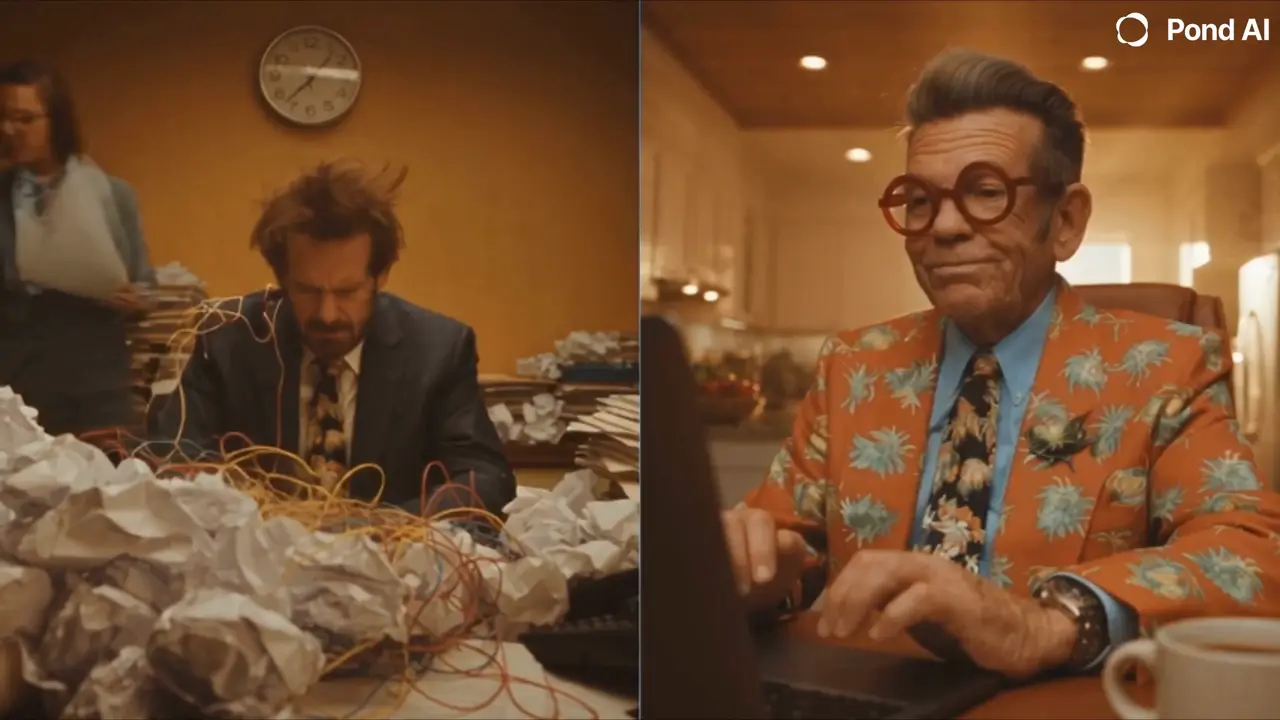
範例 2:Pond Marketing video,分割畫面對比
 00:30
簡報修正了什麼:兩個平行故事,兩邊都是相同的客戶需求,逐個鏡頭計時,讓對比在 30 秒內逐漸呈現。
製作方式:為每位創辦人製作一張角色轉向圖,然後將整份簡報作為一個提示詞發送給 Seedance 2.5,並附上轉向圖作為參考。
適用時機:當產品改變了一天的進行方式,並排展示兩天的差異就能清楚呈現效果。
模型:Seedance 2.5 · 備註:完整簡報,以單一提示詞發送
SHOT 1 — OPEN / 0–3s

Split screen.

Two founders receive the same urgent client request on their devices.

They both look at the screen, then react differently.

Left founder looks concerned.
Right founder stays calm.

No readable text appears on screen.

SHOT 2 — LEFT SIDE: HIRING CHAOS / 3–10s

The left side becomes increasingly chaotic.

He’s on phone calls.
Reviewing resumes.
Taking notes.
Jumping between meetings.
People keep entering and leaving the room.
His desk becomes more cluttered.

He keeps checking the time and looks more and more stressed.

No readable text or interface details.

SHOT 3 — RIGHT SIDE: POND / 10–14s

The right side remains calm.

He sits at his desk, opens his laptop, quickly enters a task into a platform, and submits it.

Keep the interface abstract and clean, with no readable text.

He closes the laptop, leans back, and relaxes.

SHOT 4 — CONTRAST MONTAGE / 14–22s

The contrast becomes more exaggerated.

Left side:
Still interviewing.
Still on calls.
Still taking meetings.
Papers pile up.
He looks exhausted and overwhelmed.

Right side:
He casually grabs a coffee.
Cuts to him doing a quick workout at the gym.
Cuts to him cooking at home.
Cuts back to him casually dancing for a moment.

Meanwhile, use abstract visual cutaways to suggest work is progressing in the background: multiple people working, submissions arriving, workflow nodes connecting, and tasks moving toward completion.

No readable text.

SHOT 5 — RESULT / 22–27s

The right founder returns to his desk.

He reviews several completed options visually and confidently selects one.

A clear visual cue shows that the task is finished, but without any readable text.

He smiles, satisfied.

Cut to the left founder:

Still stuck in another meeting.

SHOT 6 — END / 27–30s

Split screen holds for one final beat.

Left: exhausted, surrounded by chaos.

Right: relaxed, smiling, everything under control.

Hold on the contrast.

No text in the generated footage.

模型:Nano Banana Pro · 備註:右側創辦人的角色轉向圖
Image 1 is elderly man in orange floral suit, main look (likeness, clothing, and identity).

Create a professional character reference turnaround sheet showing this exact character (same face, same round red glasses, same swept-back gray hair, same orange floral print suit with dark patterned tie) in three full-body views: front view, side profile view, and back view, arranged side by side. Neutral A-pose, standing. Plain seamless light-gray background, even studio lighting, orthographic framing, full body in frame for each view. No props, no scene, no other people. Identical facial features, proportions, and clothing across all views.
關於製作 AI 廣告,大家都在問什麼?
AI 廣告應該多長?
一個帶有揭示的小故事適合放在 30 秒內:The Ghosted Boss 和 Pond Marketing video 都是 30 秒,每個都在生成任何內容之前,在簡報中逐秒規劃。
哪個 AI 模型最適合製作影片廣告?
對於帶有對白的實拍廣告,Seedance 2.5 可以使用你的角色圖作為參考,一次生成長達 30 秒且帶有聲音的影片,需要 Flick 的 Standard 方案。角色圖和影格可以使用 Nano Banana Pro 或 GPT Image 2.5 製作,這些都能在免費方案上運行。
我可以免費製作 AI 廣告嗎?
您可以免費開始:註冊時獲得 100 點數,之後每週獲得 100 點數,足以製作角色設定表和影格。這些廣告使用的影片模型需要 Standard 方案。
如何在廣告的每個鏡頭中保持相同角色?
先製作角色旋轉表和表情設定表,然後將它們附加到每個影格和影片提示詞中,並命名每個提供的內容,例如臉部、服裝或場景。
如何在 AI 廣告中放入真實產品?
附加產品照片作為參考,並準確說明要替換的內容,就像 The Ghosted Boss 對毛衣所做的那樣,然後在編輯器中添加標誌和任何介面文字,而不是在提示詞中。
我可以將 AI 廣告用於真實客戶嗎?
可以,Pond 使用這種方式製作的廣告。請檢查您使用的每個模型的條款,並避免在提示詞中使用其他品牌的標誌和真實人物的肖像。
繼續


本頁中的影片
- Zoey Z. · The Ghosted Boss
- Zoey Z. · Pond Marketing video
在 Flick 中製作您的 AI 廣告
簡報、角色、場景、鏡頭和剪輯,全部在一個畫布上。
免費試用,無需信用卡。
讓 AI 解讀本頁:ChatGPTPerplexityClaude